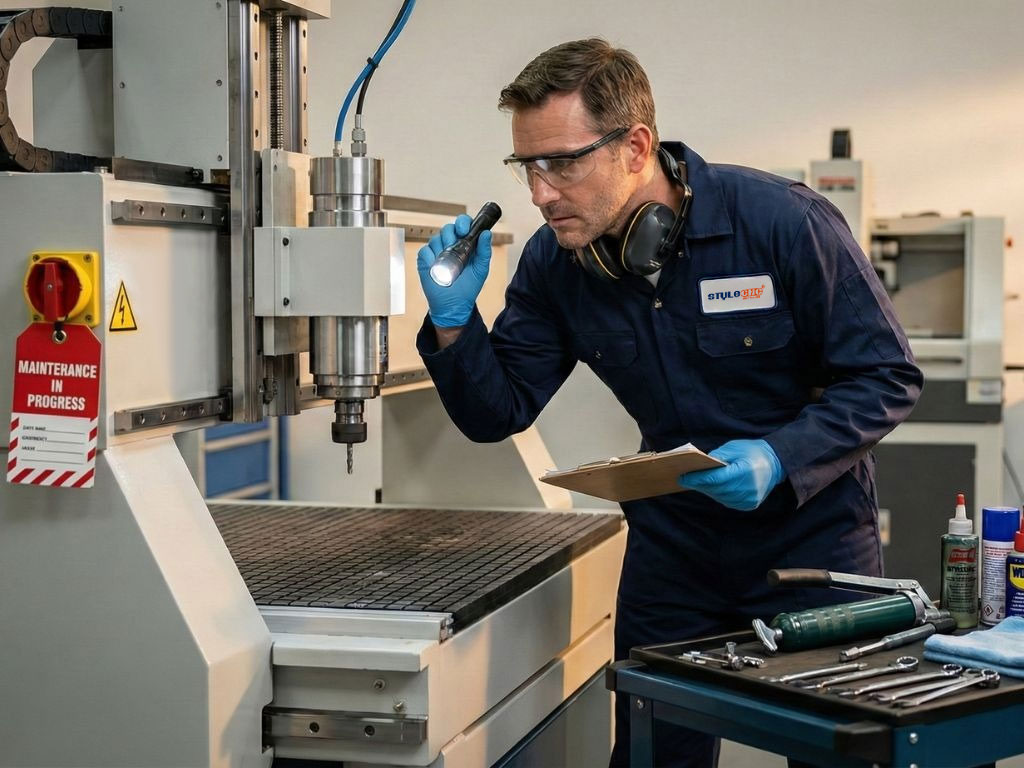
CNC Machine Maintenance is the regular care of a CNC machine to keep it clean, safe, accurate, and ready for work. It includes daily checks, cleaning, lubrication, coolant care, filter checks, and planned service. Follow the machine maker’s manual for exact tasks and service times.
Across machine shops in the United States, CNC mills, lathes, routers, and machining centers help make parts for cars, aircraft, farm tools, medical devices, and many other goods. These machines work under heat, load, vibration, and constant chip flow. Without proper care, small faults can grow into costly stops or poor parts.
A good care plan starts with simple checks. An operator can spot low oil, dirty coolant, loose hoses, damaged covers, and odd sounds before they lead to a larger fault. A trained service worker must handle tasks that involve live power, stored pressure, moving parts, or machine alignment.
There is no single schedule for every CNC machine. A small router in a wood shop has needs that differ from a heavy metal-cutting lathe. Run time, material, coolant type, shop dust, load, and the machine design all affect the right plan. Use the maker’s manual as the main guide, then adjust the work based on real machine use.
Source: 3erp.com
What Is CNC Machine Maintenance?
CNC Machine Maintenance is the planned work used to keep a computer-controlled machine in good working order. CNC means computer numerical control. The control reads a program and guides the machine’s axes, spindle, and other parts through set moves.
A CNC machine has many parts that must work as one system. These include the frame, spindle, axis drives, ball screws, linear guides, tool changer, coolant unit, air system, control cabinet, and safety guards. A fault in one area can affect the whole machine.
Maintenance aims to prevent avoidable wear, keep parts within their required limits, and find faults early. It does not mean that every part must be changed on a fixed date. The right action depends on the machine design, maker’s rules, use, and measured condition.
Source: in-housecnc.com
Preventive maintenance
Planned checks and service done before a fault stops the machine. Examples include filter changes, oil checks, and coolant care.
Corrective maintenance
Work done after a fault appears. It may involve replacing a damaged hose, fixing a leak, or repairing a drive.
Predictive maintenance
Work guided by signs of wear, such as vibration, heat, noise, current, or changes in machine accuracy.
Condition-based maintenance
Service triggered when a measured value or inspection shows that a part needs care.
Why Maintenance Matters
A CNC machine can lose accuracy long before it stops working. A worn guide, poor lubrication, dirty spindle taper, or loose fixture can affect part size and finish. Regular checks help the shop find these issues before they cause a batch of bad parts.
Good care also helps protect costly parts. A spindle, ball screw, servo drive, or tool changer can cost far more to repair than a basic filter or seal. Early action can reduce the risk of damage, but it cannot prevent every failure.
Better part quality
Clean surfaces, stable motion, and sound tool holding help the machine meet its required part limits.
Less unplanned downtime
Routine checks can reveal leaks, clogged filters, and worn parts before they stop a job.
Safer work
Working guards, doors, stops, and other safety devices help reduce exposure to machine hazards.
Build a CNC Machine Maintenance Schedule
A written schedule turns maintenance into a repeatable shop task. It should list each check, its interval, the person in charge, the result, and the action needed if a check fails.
Start with the service manual for the exact make and model. Some machines use oil-fed guides, while others use grease. Some have sealed spindle units. Others use a separate chiller or hydraulic system. A general checklist cannot replace these model-specific rules.
The schedule below is a starting point, not a universal service standard. The maker may call for more frequent checks. Heavy cutting, long shifts, abrasive dust, and harsh shop conditions may also call for shorter intervals.
Source: stylecnc.com
Daily or each shift
Check oil and coolant levels, air pressure, visible leaks, machine covers, chip build-up, alarms, and unusual noise.
Weekly
Review coolant condition, clean approved filters, inspect hoses and cables, check wipers, and inspect tool holders.
Monthly
Review filter condition, lubrication delivery, hydraulic levels, cabinet cooling, and recurring alarm history.
Quarterly or at the maker’s interval
Review machine accuracy, axis motion, spindle condition, coolant system health, and wear trends.
Annual or planned service
Arrange qualified service for tasks such as geometry checks, major fluid service, spindle assessment, and system calibration when required.
Set Intervals by Run Hours and Shop Conditions
Calendar time alone may not show how hard a machine works. A machine that runs two shifts each day may need more frequent care than one used for a few hours each week. Track both run hours and calendar dates where the maker calls for them.
Also look at the material being cut. Cast iron and wood can create dust or fine chips that place extra demand on seals and filters. Aluminum and other metals may affect coolant care in different ways. Use the fluid maker’s guidance and the machine manual to set the right checks.
High-use machines
Review fluid levels, filters, chip flow, and wear signs more often when machines run for long shifts.
Dust-heavy work
Check approved air filters, covers, seals, and extraction systems for build-up.
Low-use machines
Follow storage and idle-time rules. Long periods without use can still affect batteries, fluids, seals, and corrosion.
Daily CNC Machine Maintenance Checklist
Daily care should focus on visible conditions and basic checks that the operator is trained to perform. Complete them before the first job or at the shift change, as the machine maker directs. Record any issue rather than hiding it with a quick reset.
Keep the work area clear. Use the approved chip tools and cleaning method. Never reach into a machine that could move or start without first following the site’s safe work procedure.
Source: cnc.works
Check way lubrication
Read the reservoir level and look for a low-oil warning. Confirm the system shows normal operation. Use only the specified oil grade.
Check coolant
Review the tank level and visible condition. Look for excess foam, tramp oil, unusual color, or a bad smell. Measure concentration when the coolant maker calls for it.
Inspect air supply
Check the pressure shown at the machine inlet against the required value. Look for water in the approved separator and report leaks.
Clear chips
Remove loose chips from approved areas, the table, and the chip collection zone. Keep chips away from seals and moving covers.
Check machine guards
Look at doors, windows, covers, and interlocks. Do not run a machine with damaged guards or a failed safety device.
Review alarms
Read and record new or repeated alarms. Do not keep resetting an alarm without finding the cause.
Listen during warm-up
Follow the approved warm-up routine. Watch for new vibration, grinding, knocking, or unusual changes in spindle sound.
How to Record a Daily Check
A useful check sheet should identify the machine, date, shift, operator, and run hours. Give each item a clear result, such as OK, needs attention, or not applicable. Add a note when a reading falls outside the maker’s range.
If an item fails, stop and report it under the shop’s work rules. The operator should not adjust a pressure switch, safety circuit, or control parameter without the right training and approval.
Record the reading
Write down values such as coolant concentration or air pressure when the procedure asks for a measured check.
Describe the symptom
Use clear details such as a leak near the rear hose or a new alarm after tool change.
Track the response
Add the work order, repair action, technician, and return-to-service approval.
Clean the CNC Machine the Right Way
Cleaning protects moving parts from chips, grit, and dried coolant. It also helps operators see leaks and damage. Use the cleaning tools and fluids approved for the machine and the material being cut.
Start with the areas the maker lists for routine cleaning. Remove loose chips from the enclosure, table, chip tray, and approved chip conveyor areas. Do not push chips into guide covers, drain holes, electrical parts, or seals.
Avoid using compressed air to scatter chips around the shop. Air can drive sharp chips into skin or eyes and can push dirt into machine seals. Use a chip hook, brush, vacuum, or other approved tool instead.
Source: oxmaint.ai
Machine table and work area
Remove loose chips and wipe approved surfaces. Keep fixture seats and contact points clean before setting up a new job.
Way covers and bellows
Look for tears, dents, trapped chips, or poor movement. Do not force a cover that has jammed.
Spindle taper
Keep the taper clean with the approved method and lint-free material. Do not use abrasive tools that can damage the contact surface.
Chip conveyor
Check for a build-up or jam. Follow the isolation procedure before clearing a blockage that exposes a worker to moving parts.
Machine windows
Use an approved cleaner and soft cloth. Replace a damaged or badly scratched window as the maker directs.
Cleaning Mistakes to Avoid
A machine can look clean while hidden chips remain under covers or near seals. Do not use a sharp metal tool to scrape delicate surfaces. A small scratch on a guide or spindle taper can cause a much larger problem.
Never spray water or cleaner into the control cabinet, motor vents, connectors, or other electrical areas. Use the maker’s approved method for cabinet cleaning, and isolate power when the task requires access to hazardous electrical parts.
Do not flood the machine
Use only the amount of approved cleaner needed for the task.
Do not bypass guards
Never defeat an interlock to make cleaning easier.
Do not use unknown chemicals
Some solvents can harm paint, seals, plastics, or machine windows.
Lubrication and Fluid Care
Correct lubrication helps reduce friction and wear in parts that slide, turn, or carry a load. CNC machines may use separate fluids for guideways, ball screws, spindle systems, gearboxes, and hydraulic parts. These fluids are not all interchangeable.
Use the exact type and grade stated by the machine maker. A fluid that looks similar may have a different viscosity or additive package. Mixing products can affect performance and may harm seals or other parts.
Do not assume that adding more oil is better. Too much fluid can cause leaks, heat, foam, or other problems. Fill to the marked level and use the approved fill point.
Source: oxmaint.com
Way oil
Check the central lubrication tank and system status. Report a low level, leak, blocked line, or lubrication alarm.
Hydraulic oil
Check the level and visible condition where the machine design permits. Follow the service interval for filter and oil changes.
Spindle lubrication
Follow the exact spindle design and maker’s procedure. Some units use grease, some use oil, and others use sealed systems.
Gearbox oil
Check the specified level and service interval. Report metal particles, leaks, or unusual color.
Grease points
Apply grease only to listed points and at the stated amount. Extra grease can be harmful in some assemblies.
How to Spot a Lubrication Problem
Look for dry guide surfaces, low reservoir levels, leaks, repeated lubrication alarms, or a pump that does not cycle as expected. A machine may also show rough axis motion or new noise. These signs do not prove a single cause, so a trained worker should inspect the system.
Never remove a lubrication line or open a pressurized part while the system is live. A technician should check delivery, pressure, flow, and the condition of the lines with the right tools.
Low reservoir level
Check for a leak or a service issue. Refill only with the listed fluid and method.
Repeated lube alarm
Record the alarm and machine state. Arrange a check of the pump, sensor, lines, and delivery points.
New axis noise
Stop the job if the sound is abnormal and report the location, axis, and conditions.
Coolant System Maintenance
The coolant system helps control heat, carry chips away, and support cutting performance. Poor fluid care can lead to odor, foam, corrosion, skin exposure, poor finish, or blocked flow. The right care depends on the coolant type and the material being cut.
Check the tank level and fluid condition at the interval in the machine and coolant instructions. For water-mix fluids, use a suitable refractometer or the tool listed by the coolant maker to check concentration. Use the maker’s correction method when the value is outside the required range.
Tramp oil is unwanted oil that enters the coolant from machine ways or other sources. Too much can affect fluid condition. Remove it with a suitable skimmer or service method, where fitted and approved.
Source: ifactoryapp.com
Check fluid level
Keep the tank within its marked operating range. Do not let the pump run dry.
Check concentration
Measure water-mix coolant as directed. Do not guess the mix by color or smell.
Check flow
Look for blocked nozzles, weak flow, or leaks during a safe operating check.
Clean filters
Service screens and filters at the stated interval. Isolate the system before work that exposes a worker to moving parts.
Review fluid condition
Watch for foam, odor, rust, excess oil, or unusual changes. Follow the coolant supplier’s test and disposal rules.
Coolant Health and Worker Safety
Metalworking fluids can cause skin and breathing problems if workers handle or breathe them without proper controls. Keep the fluid within the supplier’s recommended range and use the safety data sheet for handling, storage, and spill response.
Wear the protective gear required by the shop risk review. Do not put bare hands into a coolant tank. Use a suitable tool and follow the site’s procedure for draining, cleaning, and refilling the system.
Avoid direct skin contact
Use suitable gloves and wash exposed skin after work, as the fluid supplier and site rules direct.
Control mist
Keep the enclosure and mist control system in working order.
Dispose of waste correctly
Follow local, state, and federal rules that apply to the fluid and waste stream.
Inspect the Spindle, Tool Changer, and Tool Holders
The spindle and tool system affect cutting quality, tool life, and machine safety. Keep the spindle taper and tool holders clean. Dirt, chips, burrs, and damage can prevent a holder from seating as designed.
Watch for a change in spindle sound, heat, vibration, or tool change behavior. A new noise can point to a problem, but it does not identify the failed part by itself. Record when it occurs and stop the machine if the sound or motion suggests an unsafe condition.
Do not take apart a spindle or adjust drawbar parts without the required training and tools. Spindle repair and drawbar force checks often need a qualified service worker.
Inspect the taper
Look for chips, rust, scoring, or marks. Clean it with the approved tool and method.
Check tool holders
Look for damage, dirt, worn pull studs, and poor fit. Remove damaged holders from use.
Watch the tool changer
Check for smooth operation, correct tool seating, and new impact sounds.
Review spindle warm-up
Use the maker’s warm-up cycle after the stated idle period or under the listed conditions.
Signs That Need Spindle Service
Repeated vibration, excess heat, poor surface finish, taper damage, and a change in runout can point to a spindle or tool-holding issue. Check the tool, holder, workholding, and cutting setup before assuming the spindle has failed.
If the symptom remains, arrange a qualified inspection. A technician may use a test bar, dial indicator, vibration tool, or other method suited to the machine and its stated limits.
Grinding or rumbling
Stop and report the noise. Do not keep cutting to see whether it goes away.
Record the alarm and tool position. Do not force the tool changer by hand.
Maintain Axis Drives, Ball Screws, and Guideways
Axis systems move the cutting tool or workpiece along programmed paths. Many CNC machines use servo motors, ball screws, and linear guides to make these moves. Wear, poor lubrication, loose parts, or chip damage can affect motion and accuracy.
Keep way covers and wipers in good condition. They help stop chips and coolant from reaching sensitive motion parts. Check for tears, trapped debris, unusual marks, and movement that looks or sounds different.
Do not adjust backlash, servo settings, or axis compensation based on guesswork. These settings can affect machine behavior and part accuracy. Use the machine maker’s procedure and qualified service support.
Inspect covers and wipers
Look for damage, gaps, loose fasteners, and trapped chips.
Watch axis movement
Notice sticking, jerking, drift, or unusual noise during an approved motion check.
Review lubrication
Check reservoir status, pump operation, and visible signs of oil delivery.
Track accuracy
Record measured results from approved checks and compare them with the machine’s stated limits.
When to Check Backlash and Machine Geometry
Backlash is lost motion when an axis changes direction. A change may affect size or shape, but it can also come from other sources, such as a loose fixture, worn tool, thermal change, or measurement error.
Geometry checks can help assess straightness, squareness, and other machine relationships. The right test depends on the machine type and the part tolerance. Use a trained technician and suitable test tools when a result falls outside the maker’s limits.
Record the baseline
Keep a dated record of approved axis and geometry checks.
Compare like with like
Use the same test method, machine state, and measurement setup where possible.
Investigate a trend
Arrange service when measured movement or error grows over time or exceeds the stated limit.
Check the Electrical Cabinet and Cooling System
The control cabinet houses sensitive electrical and electronic parts. Dust, blocked filters, poor airflow, heat, and loose connections can affect system life and reliability. Only trained and authorized workers should open the cabinet or work near live electrical parts.
Operators can check external cabinet filters and cooling indicators only when the machine maker permits it. A cabinet fan alarm, high-temperature warning, or repeated drive fault needs a proper review. Do not remove covers or touch wiring as a routine operator task.
Some machines also use a separate spindle chiller or heat exchanger. Keep its air paths clear and check fluid level or alarms as the manual directs. The right coolant and service method depend on the unit.
Check external airflow
Keep approved vents clear of boxes, dust, and other items that block air.
Review fan and filter status
Follow the listed check and cleaning interval for cabinet filters and fans.
Watch temperature alarms
Record the alarm and machine conditions. Do not keep running through a repeated overheat warning.
Inspect visible cables
Look for damage or rubbing where visible and safe. Leave repair and internal inspection to qualified staff.
Electrical Work Requires Qualified Staff
Electrical cabinets may contain dangerous voltage even after the main power is switched off. Stored energy can remain in drives and other parts. A qualified worker must follow the machine’s electrical isolation and discharge procedure before service.
Never bypass a door switch, interlock, overload device, or other safety control to keep production running. Report a failed safety feature and keep the machine out of service until the approved repair and test are complete.
Do not touch live parts
Electrical diagnosis and repair belong to workers with the required training and authorization.
Do not defeat safety controls
A bypass can expose workers to unexpected motion or electrical hazards.
CNC Maintenance Safety and Lockout/Tagout
Safety comes before cleaning, repair, or production. A CNC machine may hold electrical, pneumatic, hydraulic, mechanical, and thermal energy. Switching off the control screen does not prove that all hazards have been removed.
In the United States, OSHA’s control of hazardous energy rule, 29 CFR 1910.147, covers many servicing and maintenance tasks when workers may face unexpected startup or the release of stored energy. The employer must provide an energy-control program and procedures that fit the equipment and work.
Before a task, identify every energy source and follow the site’s machine-specific procedure. Authorized workers must isolate the sources, apply locks and tags as required, release or restrain stored energy, and verify the isolation before work begins. Follow the rules for group work and shift changes when they apply.
Some routine tasks may be done during normal production only when effective safeguards protect the worker and the task meets the rule’s conditions. Do not assume that cleaning or a quick adjustment is exempt. If a guard must be removed or a worker enters a danger zone, stop and use the required energy-control process.
Use the machine-specific procedure
Follow the written energy-control steps for the exact machine and task.
Control stored energy
Account for pressure, gravity, moving parts, and electrical energy that may remain after shutdown.
Verify isolation
Use the approved test method to confirm the machine cannot start or release hazardous energy.
Keep guards in place
Do not run the machine with missing guards, failed interlocks, or an unsafe enclosure.
Use suitable protective gear
Follow the task risk review and safety data sheets for chips, coolant, cleaners, and other materials.
When to Stop Work
Stop the job when a safety device fails, a guard is damaged, a machine starts unexpectedly, or a worker finds an uncontrolled leak or exposed electrical hazard. Do not restart until the fault has been assessed and the machine is cleared for use.
A supervisor or qualified technician should decide whether the machine can return to service. Record the repair and any required safety test.
Failed emergency stop
Keep the machine out of service until the control is repaired and tested.
Unexpected movement
Stop, secure the area, and report the event for technical review.
Uncontrolled leak
Follow the spill and energy-control procedure before cleanup or repair.
Common CNC Machine Problems and Maintenance Checks
A fault should be checked in a safe order. Start with the alarm and visible signs. Then compare the machine state with its manual and recent maintenance log. Avoid changing several settings at once because that can hide the true cause.
The table below links common symptoms to possible causes and sensible next steps. These are possible causes, not a diagnosis. The same symptom can come from more than one machine part or from the cutting setup.
Source: azadtechhub.com
Poor surface finish
Possible causes include a worn tool, dirty taper, loose workholding, vibration, or a spindle issue. Check the setup and tool first, then arrange spindle checks if the fault remains.
Axis motion feels rough
Possible causes include poor lubrication, chip ingress, a damaged cover, or a drive fault. Stop if motion is abnormal and request a technical inspection.
Coolant flow is weak
Possible causes include a low tank, blocked filter, blocked nozzle, or pump fault. Check approved external items before arranging service.
Repeated overheat alarm
Possible causes include blocked airflow, a cooling unit fault, overload, or a sensor issue. Record the alarm and stop if the manual requires it.
Tool changer fails
Possible causes include a tool seating issue, dirty holder, sensor fault, or mechanical damage. Do not force the arm or magazine.
Part size changes
Possible causes include thermal growth, tool wear, fixture movement, measurement error, or machine wear. Compare controlled measurements and seek a qualified check.
Use a Fault Log to Find Repeat Problems
A useful fault log records the date, time, machine, program, tool, material, alarm code, and conditions when the issue began. Add what changed just before the fault, such as a tool change, coolant refill, or new material batch.
Review repeat faults as a group. A pattern may point to a filter, hose, tool, or process issue that one isolated repair would not reveal. Use the log to plan a lasting fix rather than repeating resets.
Keep the exact alarm code
Do not record only a general note such as machine stopped.
Record the repair
List the part, action, technician, and test used to confirm the repair.
Check if the fault returns
Compare later events with the original record and update the maintenance plan.
Tools and Records That Support Good Maintenance
A small set of suitable tools can make routine checks more consistent. The exact tools depend on the machine and task. Use calibrated measuring tools when a result will be compared with a tolerance.
Operators should use simple tools only for tasks they are trained and approved to do. Internal electrical tests, spindle repairs, alignment work, and pressure-system repairs may require specialist tools and qualified workers.
Maintenance checklist
Use a paper or digital form with clear tasks, intervals, readings, initials, and follow-up actions.
Lint-free cloths and approved brushes
Use them for routine cleaning of surfaces that the maker permits.
Coolant test tools
Use a suitable refractometer or other tool specified by the coolant supplier.
Inspection light
Use a safe light to inspect visible areas without reaching into a hazard zone.
Measuring tools
Use suitable indicators, test bars, or other calibrated tools for checks performed by trained staff.
Service records
Keep manuals, alarm logs, work orders, fluid records, repair notes, and calibration results together.
What a Useful Maintenance Log Should Include
A maintenance log should help the next person understand what was checked and what happened. A tick mark alone may not be enough when a value changes or a fault returns.
Keep records for each machine, not just for the shop as a whole. This helps link machine use, faults, parts, and service work over time.
Machine details
Record the machine ID, maker, model, serial number, and control type.
Task details
Record the task, date, run hours, worker, and result.
Parts and fluids
Record the part number, fluid type, grade, batch where useful, and quantity.
Follow-up
Record open faults, work orders, service dates, and return-to-use approval.
How to Improve a CNC Maintenance Program
A useful maintenance program grows from real machine history. Start with the maker’s schedule, then review missed tasks, repeat alarms, downtime, repair cost, and measured accuracy. Use these records to find weak points in the plan.
Do not judge the program only by how many checks workers complete. A checklist can be full while the same fault keeps returning. Look at whether the work finds problems, closes work orders, and helps the machine meet its required limits.
Assign clear ownership
Name the operator, maintenance worker, and service lead for each task.
Use clear pass limits
Write the correct value or condition from the maker’s manual beside each measured check.
Track repeat failures
Review common alarms, leaks, filter issues, and quality problems at set intervals.
Keep spare parts sensible
Stock items based on lead time, failure history, and the cost of a machine stop.
Train operators
Teach staff how to inspect, clean, record, and report issues without crossing their safety limits.
Review the plan
Update tasks when the machine, process, material, or operating hours change.
Useful Maintenance Measures
A few simple measures can show whether the program is working. Use the same method over time so that results can be compared. A change in one measure should lead to a review, not an automatic claim that the machine has improved or declined.
Track planned maintenance completion, unplanned downtime, repeat faults, repair time, and scrap linked to machine issues. Set targets that fit the shop’s work and machine type.
Planned task completion
Shows how much scheduled work was completed on time.
Unplanned downtime
Tracks time lost to faults that were not planned.
Repeat fault rate
Shows whether the same issue returns after repair.
Maintenance cost
Helps compare planned care with repair and replacement costs.
Research Notes and Next-Question Gap Map
This guide is an informational synthesis, not a hands-on machine test or a review of one specific CNC model. The practical schedule is based on common maintenance tasks and the limits stated in machine service documentation. Exact oil grades, pressures, tolerances, and service intervals must come from the machine maker and fluid supplier.
The reviewed material included CNC maintenance guides and checklists published by Master CNC, CNC Bangla, In-House CNC, and Akriti Precision Systems, along with an Okuma maintenance guide and a Haas lathe service schedule. OSHA guidance was reviewed for hazardous-energy control. The search and review date was November 4, 2026, and the market focus is the United States.
The reviewed guides commonly cover daily cleaning, coolant, lubrication, filters, and periodic service. The machine-specific service manual provides a stronger basis for exact intervals than a general checklist. This article adds a clearer separation between operator checks and specialist work, plus a safety-first fault response and record-keeping method.
Observed question: What should I check each day?
Reader stage: before operation. Daily checklists in the reviewed guides answer this. The useful added detail is how to record a failed check and when to stop.
Inferred next need: How often should I service my exact CNC model?
Reader stage: planning. General pages give broad intervals, but the exact answer depends on the model manual, run hours, and working conditions.
Inferred next need: Which maintenance tasks require lockout/tagout?
Reader stage: before cleaning or repair. General checklists often give limited detail. OSHA hazardous-energy guidance helps explain when energy isolation is required.
Inferred next need: When should I call a CNC service technician?
Reader stage: troubleshooting. The useful trigger points include repeat alarms, abnormal spindle noise, accuracy drift, damaged guards, and electrical or pressure faults.
Inferred next need: What records help prevent repeat failures?
Reader stage: after service. A machine-level log links run hours, alarms, repairs, fluids, and test results.
Evidence Limits
The reviewed sources do not establish one maintenance interval that applies to all CNC machines. A checklist from one maker or shop should not be copied as a universal rule.
No machine was inspected or tested for this article. No repair result, downtime saving, accuracy improvement, or service-life gain is claimed as a measured outcome. Numerical limits should be taken from the exact machine documentation.
Documented
The reviewed manuals and OSHA materials describe maintenance tasks and safety requirements within their stated scope.
Analysis
The suggested workflow groups common checks by frequency and separates operator tasks from specialist service.
Not established
A universal percentage reduction in downtime or a fixed extension of spindle life cannot be supported from the reviewed material.
Frequently Asked Questions
Q
How often should a CNC machine be maintained?
Check basic machine conditions each shift. Clean chips, inspect fluid levels, review alarms, and look for leaks or damage. Set weekly, monthly, and longer service tasks using the exact machine manual. Run hours and shop conditions may require more frequent care.
Q
What are the most important daily CNC maintenance tasks?
Check way oil, coolant, air pressure, visible leaks, covers, and machine alarms. Remove chips from approved areas and watch for new sounds during the maker’s warm-up cycle. Record any fault and report it before it causes further damage.
Q
Can I use the same oil in every CNC machine?
No. Way oil, hydraulic oil, spindle oil, gearbox oil, and grease can have different properties. Use the exact product grade listed in the machine manual. Do not mix fluids unless the machine or fluid maker confirms that the combination is suitable.
Q
What causes poor accuracy in a CNC machine?
Possible causes include tool wear, poor workholding, thermal change, dirty tapers, lubrication problems, worn motion parts, and measurement errors. Check the setup and record the measured result. Arrange qualified machine checks when the error remains or exceeds the stated tolerance.
Q
When should I call a CNC maintenance technician?
Call a qualified technician for repeated alarms, new spindle grinding, unusual vibration, axis drift, persistent leaks, failed safety devices, electrical faults, or machine accuracy outside its limits. Stop operation when the machine may be unsafe. Do not attempt repairs beyond your training or authorization.
✦ Wrapping Up
Conclusion
CNC Machine Maintenance works best when it is planned, recorded, and tied to the needs of the exact machine. Daily checks help operators spot early signs of trouble. Weekly and monthly tasks help keep fluids, filters, covers, and motion systems in good shape.
The best checklist is not the longest one. It is the one that workers can follow safely, that uses the right limits, and that leads to action when a check fails. Use the maker’s manual as the main source for service details, and bring in qualified help for work that needs special tools or training.
A clean machine, sound lubrication, healthy coolant, working guards, and clear records give a shop a stronger base for reliable work. They cannot prevent every fault, but they help make problems easier to spot and manage.
💡 Key Takeaway
Start with the machine maker’s service manual. Create a shift checklist for coolant, lubrication, air, chips, guards, leaks, and alarms. Assign each task, record the result, and arrange qualified service for any fault that affects safety, motion, or accuracy.