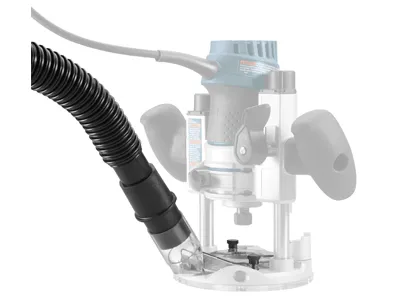
The most effective router dust collection setup captures dust as close to the router bit as possible, uses a properly matched hose and vacuum or dust collector, and provides enough airflow without interfering with the cut.
For woodworkers in the United States, router dust collection is more than a cleanup convenience. Handheld routers and router tables can throw chips and fine wood dust well beyond the cutting area, so collecting material at the source is generally more effective than trying to remove it after it spreads through a garage, basement, or dedicated shop. OSHA identifies local exhaust ventilation as the primary engineering approach for controlling wood dust and specifically recommends source capture for woodworking machinery.
A practical setup depends on the type of routing you do. A handheld router may use a factory dust hood, sub-base, or extraction attachment connected to a shop vacuum. A router table commonly benefits from collection at the fence, below the table, or at both locations. The best arrangement is not simply the one with the largest hose or most powerful collector; the pickup point, sealing, hose routing, airflow, and the type of cut all affect how much dust actually reaches the collector.
Source: powertecproducts.com
What Is Router Dust Collection?
Router dust collection is a system that captures chips and airborne wood dust produced while a router cuts, trims, grooves, profiles, or shapes material. Instead of allowing the router’s airflow and the rotating bit to scatter debris around the work area, a hood, shroud, fence port, enclosure, or dust shoe directs the debris into a hose connected to a vacuum or dust collector.
The basic principle is source capture. OSHA describes local exhaust ventilation as a primary method of controlling wood dust because it removes dust at or near its emission point. This principle applies particularly well to routing because the bit generates dust and chips at high speed.
Router dust collection does not mean that every particle will be captured. Router geometry, bit design, feed direction, material, cutting depth, opening size, and the position of the collection hood all affect performance. Some operations are naturally easier to collect than others.
Source: finewoodworking.com
Source capture
The collection opening is positioned close to the cutting area so dust enters the airflow before it spreads.
Airflow path
The hood, hose, fittings, and collector work together to move contaminated air away from the cutting area.
Filtration
The vacuum or dust collector separates collected material from the air before the air is discharged.
Containment
Enclosures, fences, shrouds, and close-fitting hoods reduce the amount of material that escapes into the surrounding shop.
Why Routers Can Be Difficult to Collect
A router bit rotates at high speed and can throw chips in several directions. A handheld router also moves around the workpiece, so the collection hood must remain close to the cutting area without blocking visibility or movement. Router tables introduce another challenge because dust can escape both above and below the tabletop.
A fence port may work well when routing along an edge because the workpiece and fence help direct chips toward the opening. A dado or groove located away from the fence can be harder to capture because the cut may block the normal airflow path.
Edge routing
Often easier to collect because the fence or workpiece edge can help guide chips toward the pickup.
Grooves and dados
May require additional collection below the table or closer to the bit.
Curved work
A fence-mounted port may not be available, so a dedicated hood or movable vacuum nozzle can be useful.
Router Dust Collection for Handheld Routers
For handheld routing, start with the dust extraction attachment supplied or approved for your router model when one is available. A properly fitted hood or shroud places the hose connection near the bit and can substantially reduce the amount of material escaping into the shop.
Manufacturers use different attachment systems, so compatibility matters. Bosch, for example, documents dust extraction hoods for specific router bases and hose sizes. DEWALT manuals likewise describe attaching extraction accessories to compatible fixed and plunge bases and emphasize positioning the vacuum so the hose does not interfere with the work.
When choosing between a factory attachment and an aftermarket hood, check the router model, base type, mounting-hole pattern, hose diameter, bit clearance, and whether the accessory preserves visibility of the cutting area.
Source: boschtools.com
Use the correct attachment
Verify that the hood or sub-base is designed for the router and base configuration you are using.
Keep the pickup close
The collection opening should surround or closely approach the cutting area without touching the rotating bit.
Protect visibility
A clear or appropriately positioned shroud can help maintain sight of the cut while directing debris toward the hose.
Secure the hose
Route the hose so it cannot catch on the workpiece, pull the router off course, or become entangled with the tool.
How to Set Up a Handheld Router for Dust Extraction
Unplug the router before installing or adjusting the dust attachment. Fit the approved hood or extraction base according to the manufacturer’s instructions. Connect a compatible hose adapter and make sure the connection is tight enough that it will not separate during routing.
Position the vacuum or extractor where it cannot tip or pull on the hose. Before starting the cut, move the router through its intended path with the motor off. This dry check helps identify hose interference, limited travel, or contact between the collection attachment and the workpiece.
Start the extraction before routing when practical. After the cut, allow the collector to continue briefly if your equipment supports that arrangement so loose material can be removed from the collection area.
Sign of a good setup
Most chips enter the hood and the work area accumulates noticeably less dust without restricting router movement.
If dust escapes
Check hood position, hose connection, airflow restrictions, and whether the cutting operation places the dust outside the hood’s capture area.
Router Table Dust Collection: Above, Below, or Both?
A router table usually benefits from collection at the fence, beneath the table, or at both points. The correct arrangement depends on the cut. A fence-mounted port can collect chips thrown toward the rear of the bit, while an enclosure or lower port can capture material that falls through the insert opening and accumulates beneath the tabletop.
For edge routing, the fence port may capture much of the debris because the workpiece helps contain the cutting area. For dados, grooves, and other cuts away from the fence, debris can fall through the opening instead. Fine Woodworking has described a below-table collection approach for trapped cuts, while other router-table designs combine upper and lower pickup points.
A combined system can provide broader coverage, but it also introduces additional hose, fittings, and airflow requirements. Adding another hose does not automatically improve collection if the system becomes overly restrictive or the collector cannot maintain useful airflow through both branches.
Source: popularwoodworking.com
Fence collection
Captures material near the rear of the bit and is particularly useful for edge-forming operations.
Under-table collection
Captures debris that drops through the insert opening and helps control dust around the router motor.
Enclosed router cabinet
Can help contain and direct debris toward an extraction port while limiting dust accumulation around the router.
Dual collection
Uses both upper and lower pickup points when the routing operation produces debris in both areas.
Improve Collection Around the Router Table
Seal unnecessary openings without restricting the router’s required cooling airflow or safe operation. Keep the fence opening reasonably close to the workpiece and position the collection port where chips naturally travel. If a cabinet is used, avoid designing it as a completely sealed box around a motor that requires airflow for cooling.
For a custom enclosure, a sloped or angled interior can help guide settled material toward the collection opening. The goal is to create a predictable airflow path rather than simply enclosing the router and hoping suction will remove everything.
Reduce dead zones
Use enclosure geometry that directs material toward the collection opening instead of leaving large stagnant areas.
Allow necessary airflow
Do not block cooling airflow around the router or create an arrangement that causes the motor to overheat.
Choosing a Shop Vacuum or Dust Collector
The collector should match the scale and configuration of the routing work. A shop vacuum is convenient for many handheld routers because the hose is relatively small and the equipment is easy to move. A larger dust collector can be more appropriate for a permanent router table system with larger ductwork and longer runs.
Do not judge a collection system by motor horsepower alone. Actual performance depends on airflow, static pressure, hose diameter, hose length, fittings, filters, separators, and how much the pickup opening restricts the system. A powerful collector connected through an unsuitable adapter can still produce disappointing collection.
The connection between the router and collector should be as direct as practical. Avoid unnecessary reducers, sharp bends, long flexible hoses, and partially blocked filters. These restrictions increase resistance and can reduce the airflow available at the router.
Source: woodworkingnetwork.com
Shop vacuum
Convenient for handheld routers and compact setups where a smaller hose and portable equipment are useful.
Portable dust collector
Useful when the shop uses multiple woodworking machines and the collection system needs more airflow capacity.
Central dust collection
Makes sense for a permanent shop with fixed ductwork and several machines, provided the system is designed for the required airflow.
Cyclone separator
Can remove a substantial portion of collected material before it reaches the vacuum or collector filter, depending on the separator design and operating conditions.
What Hose Size Should You Use?
Use the hose size specified by the router attachment and collection equipment whenever possible. Smaller hoses are convenient for handheld tools but can impose more airflow resistance than larger ductwork. Larger hoses can move more air in suitable systems but may be cumbersome for a handheld router and may not connect directly to the router’s dust port.
The practical objective is a compatible, unobstructed airflow path. If an adapter is necessary, use a properly sized adapter rather than forcing a hose onto an incompatible port.
Check both ends
Confirm the router port and collector inlet dimensions before purchasing an adapter or hose.
Keep the route short
Shorter hose runs generally create fewer opportunities for restriction, kinks, and accidental disconnection.
How to Improve Router Dust Collection Performance
If your router still leaves a large amount of dust behind, improve the collection path before simply buying a larger collector. Start at the cutting point and work backward through the hood, hose, fittings, filter, and collector. This approach helps identify whether the problem is poor capture or insufficient airflow.
First, inspect the collection hood. The opening should be close enough to the bit to capture material but not so close that the workpiece, bit, or router movement is restricted. Next, inspect the hose for kinks, packed dust, crushed sections, and loose joints. Finally, check the vacuum or collector filter and collection container because a loaded filter can restrict airflow.
Source: commons.wikimedia.org
Move the pickup closer
If dust is escaping before it reaches the hood, improve the hood position or use a more suitable shroud.
Remove hose restrictions
Straighten kinks and reduce unnecessary bends, reducers, and restrictive fittings.
Clean the filter
Follow the vacuum or collector manufacturer’s maintenance instructions and clean or replace filters when required.
Check for leaks
Loose hose connections can allow suction losses and release collected dust back into the work area.
Match the system to the operation
A collection method that works for edge routing may not capture a deep dado or an open curved cut equally well.
A Simple Troubleshooting Sequence
If collection is poor, turn off and unplug the router before inspecting the setup. Confirm that the hood is installed correctly, then inspect the hose and fittings. Check whether the vacuum is operating normally and whether its filter or collection container needs maintenance. If the equipment is functioning correctly, examine the cutting operation itself and determine where the chips are escaping.
When the problem occurs only during a particular cut, the collection system may not be positioned for that operation. For example, a fence-mounted pickup may work well along an edge but provide poor capture when the cutting path moves away from the fence.
Dust escapes at the bit
Look first at hood position, bit enclosure, and whether the cutting operation is outside the capture zone.
Weak suction
Inspect hose restrictions, fittings, filter loading, container capacity, and the collector itself.
Dust leaks at connections
Inspect adapters, clamps, seals, and hose joints for gaps or accidental disconnections.
Dust remains below the router table
Consider adding or improving under-table collection rather than relying only on the fence port.
Router Dust Collection Safety and Maintenance
Wood dust should be controlled at the source whenever practical. OSHA notes that routers can generate substantial amounts of dust and recommends local exhaust ventilation and suitable collection systems for woodworking equipment. Wood dust exposure can also present health concerns, particularly when exposure is frequent or substantial.
Fire and housekeeping considerations matter as well. OSHA identifies fine wood dust as a combustible material and recommends preventing dust accumulation. Do not use compressed air to blow accumulated wood dust around a workshop because this can create an airborne dust cloud and increase the fire or explosion hazard.
Keep the router, hose, hood, collector, and surrounding area maintained. Follow the equipment manufacturer’s cleaning and filter-maintenance instructions. Inspect hoses and fittings regularly and remove accumulated dust from areas where it can interfere with moving parts or cooling.
Source: maklta.com.ua
Do not blow dust with compressed air
Use an appropriate vacuum or approved cleaning method rather than creating a suspended dust cloud.
Keep collection equipment maintained
Inspect hoses, filters, seals, collection containers, and ducting according to the equipment manufacturer’s maintenance requirements.
Wear appropriate protection
Use suitable eye protection and respiratory protection when required by the work environment and applicable safety guidance, while still prioritizing source capture.
Keep hoses away from the cut
Position hoses and power cords so they cannot interfere with router movement, the workpiece, or the rotating bit.
Address combustible dust accumulation
Do not allow substantial deposits of fine wood dust to build up on floors, ledges, equipment, or other surfaces.
When a Workshop Needs More Than a Shop Vacuum
A small shop vacuum can be practical for occasional handheld routing, but a workshop with several machines or frequent production routing may require a properly engineered dust collection system. Larger systems should be designed around the machines, ductwork, airflow requirements, filtration, and applicable fire and electrical safety requirements.
For commercial woodworking operations, consult qualified industrial ventilation or dust-control professionals when the system design involves significant combustible dust quantities, permanent ductwork, or regulatory requirements. The appropriate design depends on the facility, equipment, materials, and applicable standards.
Small hobby shop
A suitable shop vacuum and router-specific hood may be adequate for many handheld operations.
Dedicated router table
A fixed dust collector with appropriately sized ducting can provide a more permanent solution.
Commercial woodworking
Use a professionally designed collection and ventilation system when the scale or hazard profile exceeds a simple portable setup.
Common Router Dust Collection Mistakes
Many dust collection problems come from the connection between the router and collector rather than from the collector itself. A system can have strong suction at the vacuum and still collect poorly if the pickup is too far from the bit, the hose is restricted, or the dust is thrown outside the hood’s capture area.
Another common mistake is treating all routing operations as though they produce dust in the same direction. The best collection arrangement for edge routing may not work for a dado, groove, template operation, or curved cut. Adjust the pickup strategy to the actual path of the bit.
Source: woodworkingnetwork.com
Using only a room air filter
An overhead air cleaner can help with airborne particles that escape source collection, but it should not replace capture at the router.
Ignoring the underside of a router table
A fence port alone may leave chips and dust beneath the table, especially during cuts away from the fence.
Using too many adapters
Every additional transition can introduce resistance or a leak, especially when adapters are poorly matched.
Leaving the filter overloaded
A heavily loaded filter can reduce the airflow available for collection.
Placing the vacuum where the hose pulls on the router
The hose should be supported and positioned so its weight or movement does not affect control of the tool.
How to Tell Whether Your System Is Working Well
A practical sign of effective collection is that most visible chips and dust move toward the pickup during the cut instead of forming a cloud around the router. The work surface should require less cleanup, and dust should not accumulate rapidly around the motor, table cabinet, or nearby floor.
Do not interpret a clean-looking work surface as proof that all airborne dust has been eliminated. Source collection reduces exposure and cleanup, but no ordinary workshop system should be assumed to capture every particle.
Good capture
Most chips are visibly directed into the hood or collection path.
Poor capture
Dust forms a visible cloud, accumulates rapidly around the bit, or escapes from the same location during repeated cuts.
Frequently Asked Questions
Q
Can I use a shop vacuum for router dust collection?
Yes. A shop vacuum is commonly suitable for handheld routers when the router has a compatible dust hood or extraction attachment. Check the router manufacturer’s recommended hose or adapter size and make sure the vacuum filter and collection container are maintained.
Q
Do I need dust collection on a router table?
Dust collection is strongly useful on a router table because routing can scatter chips and fine dust above and below the tabletop. A fence port may capture much of the material during edge routing, while under-table collection can address debris that falls through the insert opening.
Q
Is a larger dust hose always better for a router?
No. Hose diameter needs to match the router attachment, collector, and intended airflow. A larger hose can be useful in a properly designed collection system, but a large hose that does not fit the router or is poorly connected does not automatically provide better collection.
Q
Why does my router still make dust when the vacuum is running?
Common causes include poor hood positioning, an unsuitable collection attachment, restricted airflow, a clogged filter, loose connections, or a cutting operation that throws material outside the hood’s capture area. Inspect the collection path from the bit outward before replacing the vacuum.
Q
Can I blow router dust away with compressed air?
Avoid using compressed air to disperse accumulated wood dust in the workshop. OSHA warns that blowing accumulated dust with compressed air can create the type of airborne dust cloud associated with increased explosion hazard. Vacuum collection and appropriate housekeeping are safer approaches.
✦ Wrapping Up
Conclusion
Effective router dust collection starts at the bit. For handheld routing, use a compatible extraction hood or shroud and connect it to a properly matched vacuum or dust extractor. For router tables, consider how the specific operation sends chips and dust, then provide collection at the fence, beneath the table, or at both locations when necessary.
If collection performance is poor, inspect the capture point before buying more powerful equipment. A badly positioned hood, restrictive hose, overloaded filter, or leaking connection can undermine an otherwise capable collector. Good source capture also works alongside sensible housekeeping, equipment maintenance, and appropriate personal protection.
💡 Key Takeaway
Before your next routing job, unplug the router and inspect the entire collection path from the bit to the collector. Confirm the hood is close to the cutting area, the hose is unrestricted, connections are secure, and the collector is maintained. Then perform a short test cut and adjust the pickup position if dust escapes.