Router collet maintenance means regularly cleaning the collet, collet nut, spindle taper, and bit shank, then inspecting them for wear, rust, burrs, cracks, or deformation. A clean, undamaged collet should grip the correct router bit securely without excessive tightening.
For woodworkers in the United States, router collet maintenance is a small shop task that can prevent larger problems during cabinetmaking, trim work, sign making, furniture projects, and router-table operations. Wood dust, resin, pitch, and corrosion can accumulate around the collet and spindle, affecting how evenly the collet grips a bit.
The basic procedure is straightforward: unplug the router, remove the bit and collet assembly according to the owner’s manual, clean the mating surfaces, inspect the parts, remove only light surface contamination or rust, and replace damaged components. There is no single maintenance interval that fits every router, so use the manufacturer’s instructions and increase inspection frequency when the tool is used heavily or in dusty conditions.
Source: media.popularwoodworking.com
What Is a Router Collet and Why Does It Need Maintenance?
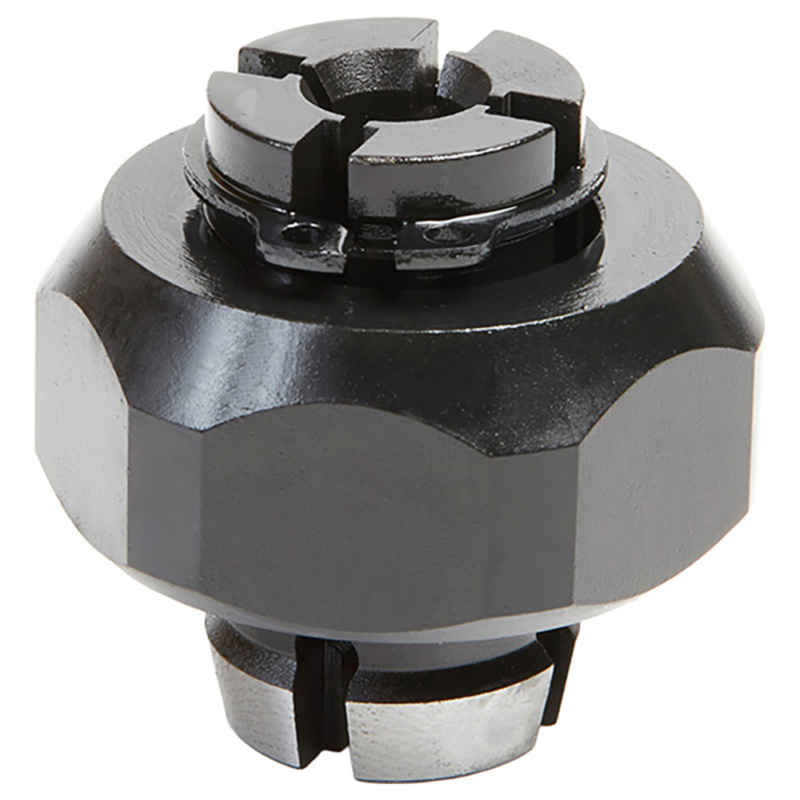
A router collet is the precision sleeve that grips the shank of a router bit. In a conventional router, the collet sits inside a tapered socket at the end of the motor spindle. Tightening the collet nut draws the collet into that taper, causing the slotted collet to contract around the bit shank.
Because the collet is part of the tool-holding system, contamination or damage can affect more than bit changes. Dust and resin can interfere with seating, while corrosion, scratches, burrs, or deformation can reduce the consistency of the grip. A bit that does not remain securely positioned can change cutting depth, increase vibration, or create an unsafe operating condition.
The collet system normally includes several mating surfaces: the inside of the collet that contacts the bit shank, the outside taper of the collet, the tapered spindle socket, the collet nut, and the relevant threads. Maintenance should address the entire assembly.
Source: rutlands.com
Collet
The slotted metal sleeve that contracts around the router bit shank.
Collet nut
The threaded nut that forces the collet into the spindle taper and creates the clamping action.
Spindle taper
The tapered socket inside the router spindle that receives and supports the outside of the collet.
Bit shank
The cylindrical portion of the router bit held by the collet.
Why Cleanliness Affects Bit Holding
A thin layer of dust or resin may seem insignificant, but the collet depends on clean, accurately mating surfaces. Debris can prevent the collet from seating correctly in the spindle or interfere with consistent contact around the bit shank. That can contribute to runout, vibration, or bit movement.
Maintenance therefore is not simply cosmetic. The goal is to preserve the geometry and contact surfaces that allow the collet system to hold the bit correctly.
When Should You Perform Router Collet Maintenance?
There is no universal cleaning schedule for every router. A better approach is condition-based maintenance combined with the interval specified by the router manufacturer. Inspect the collet whenever you change bits if you see contamination, and perform a more complete cleaning when resin, dust, rust, or unusual operating behavior appears.
Heavy router-table use, frequent bit changes, abrasive materials, resinous wood, and humid shop conditions can increase the need for inspection. A router used occasionally in a clean indoor workshop may require less frequent deep cleaning than a production tool that runs for hours every week.
A quick visual check before use is worthwhile. Look at the bit shank and the accessible part of the collet and nut. If you see buildup, corrosion, scoring, or anything unusual, stop and clean or inspect the assembly before routing.
Source: cdn.shopify.com
Before important work
Inspect the collet and bit before a long routing operation or precision cut where bit movement would ruin the workpiece.
After heavy use
Clean the assembly when substantial dust, pitch, or resin has accumulated.
After exposure to moisture
Inspect for surface rust or corrosion and address it before storing or using the router.
When symptoms appear
Investigate the collet when a bit slips, vibration increases, runout becomes noticeable, or cut quality changes unexpectedly.
During scheduled tool service
Include the collet system in the router’s broader maintenance inspection according to the manufacturer’s instructions.
How to Clean a Router Collet Step by Step
The safest general procedure is to remove power first, remove the router bit, disassemble only the collet components your owner’s manual permits, clean the mating surfaces, inspect them, and reinstall everything correctly. Router designs differ, so the exact removal method should come from the manual for your model.
Do not open the motor housing just to perform routine collet maintenance. Internal electrical or mechanical repairs may require manufacturer-authorized service.
Source: wonkeedonkeetrend.co.uk
Step 1: Disconnect power
Unplug the router or disconnect its battery before working around the spindle, collet, or bit. For a router table, disconnect the router table from power as well.
Step 2: Remove the router bit
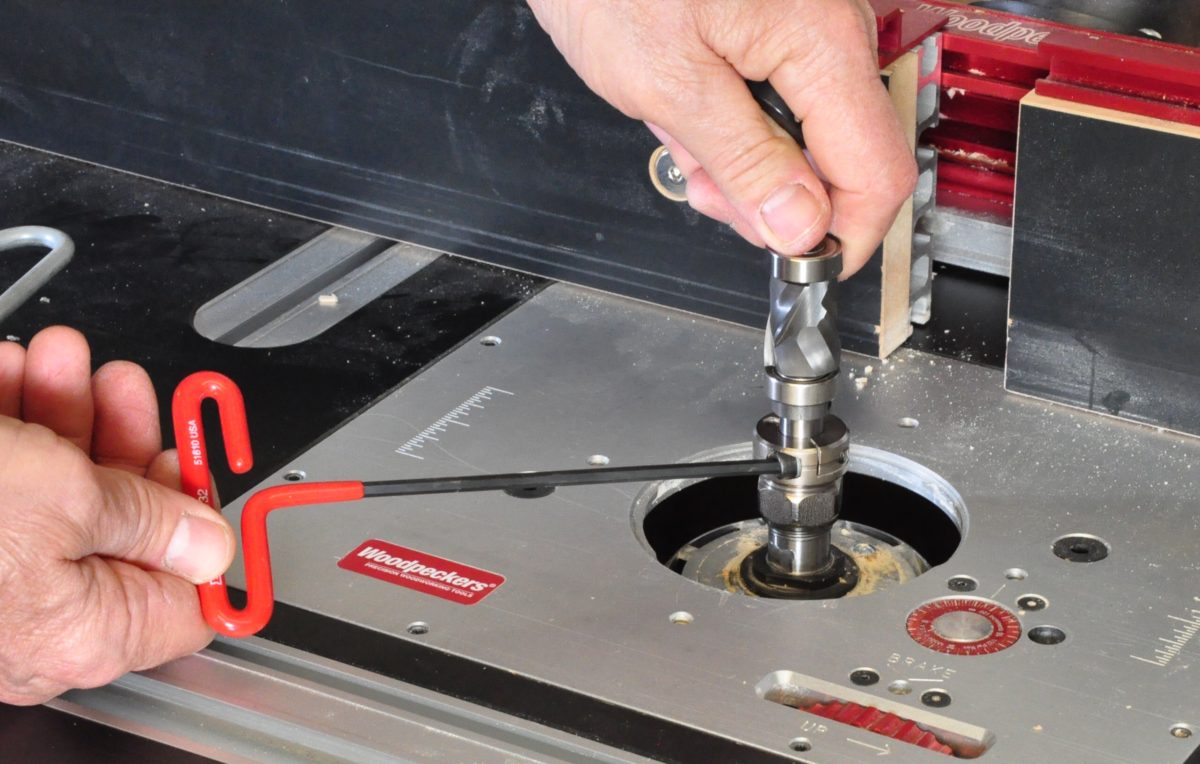
Use the correct spindle lock and wrench procedure specified for the router. Keep hands away from the cutting edges and support the bit as it is released.
Step 3: Remove the collet assembly
Remove the collet and nut only as described in the owner’s manual. Some designs allow the collet to snap out of the nut; others use different retention arrangements.
Step 4: Clean the collet
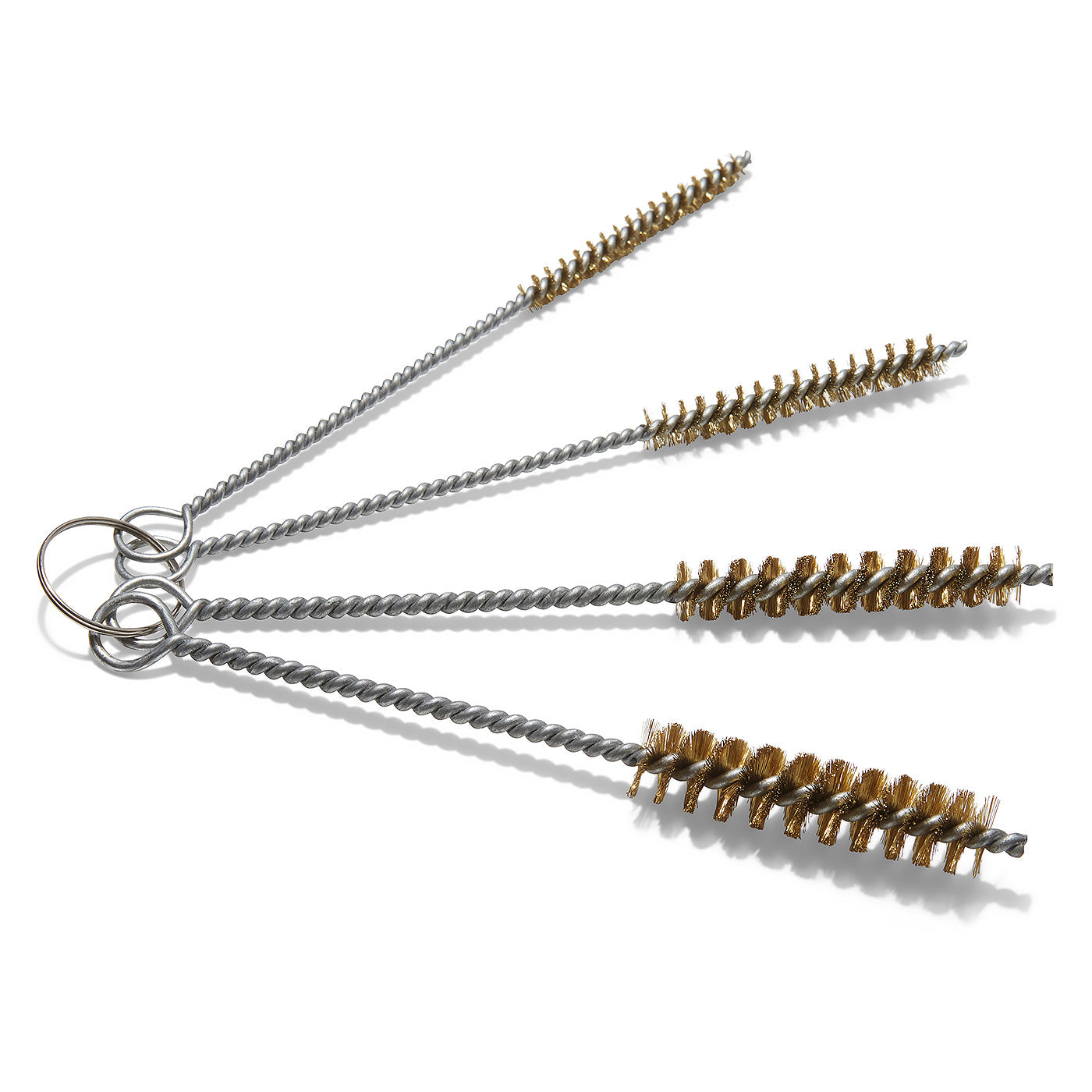
Use a clean cloth and a suitable small brass or nylon brush to remove dust and residue from the collet. Pay particular attention to the bore, slots, and tapered outer surface.
Step 5: Clean the spindle taper
Clean the tapered socket inside the router spindle with an appropriate nonaggressive cleaning method. Remove all loose fibers and debris before reassembly.
Step 6: Clean the collet nut and threads
Remove resin and dust from the nut, its internal seating area, and accessible spindle threads. Dirty threads can affect how the nut seats and tightens.
Step 7: Clean the bit shank
Wipe the shank with a clean cloth and remove resin or residue before reinstalling the bit. The shank should be smooth and free of material that could interfere with gripping.
Step 8: Inspect everything
Look for cracks, deep scratches, deformation, pitting, burrs, heavy corrosion, or evidence that the bit has spun inside the collet.
Step 9: Reassemble correctly
Reinstall the collet and nut exactly as specified by the manufacturer. Do not force parts together or substitute components that are not designed for the router.
Step 10: Install the bit correctly
Insert the correct shank size to the manufacturer’s specified clamping depth and tighten the collet nut using the recommended procedure rather than excessive force.
What You Need for Routine Cleaning
A practical maintenance kit can be simple: a clean lint-free cloth, a small brass or nylon brush, a suitable approved cleaning agent when the manufacturer permits it, a flashlight for inspection, and the router’s supplied wrench. A narrow collet brush can help reach the bore and slots.
Avoid treating the collet like a general metal part that can be aggressively sanded. The inside bore and mating taper are functional precision surfaces. The objective is to remove contamination, not reshape the metal.
Brass or nylon brush
Useful for reaching dust and resin without the aggressive action of a hard steel brush.
Clean cloth
Removes residue from the bit shank, nut, and accessible metal surfaces.
Flashlight
Helps reveal rust, scoring, cracks, and contamination inside the spindle area.
Manufacturer-approved cleaner
Use only a cleaning product compatible with the router’s materials and instructions.
Should You Use Compressed Air?
Compressed air can be useful for clearing loose debris from appropriate external components, but it should not automatically be blasted into every opening of a router. Some manufacturers specifically warn against using compressed air inside the motor housing because it can drive contamination deeper into the tool.
If you use compressed air for maintenance, follow the router manufacturer’s instructions, use appropriate eye protection, and avoid directing debris toward yourself or other people.
How to Remove Rust Without Damaging the Collet
Light surface rust can sometimes be removed without replacing the collet, but aggressive abrasion is risky. The gripping surfaces need to retain their original shape and finish. Removing measurable metal from the bore can increase clearance and potentially affect how the bit is held.
For light surface corrosion, a synthetic abrasive pad or another maintenance method approved for the specific router can be used carefully. A small dowel wrapped with a fine synthetic pad is one documented approach for cleaning rust from the inside of a collet. Work gently and remove residue completely afterward.
Do not assume that every rusty collet can be restored. Deep pitting, heavy corrosion, damaged slots, distortion, or other structural damage are reasons to replace the component rather than trying to polish it back into service.
Source: images.finewoodworking.com
Light surface film
May be removable with a mild, controlled cleaning or synthetic abrasive method.
Deep pitting
Can compromise the contact surface and is a strong reason to replace the collet.
Raised burrs
Should not be aggressively ground away because changing the bore geometry can affect bit holding.
Heavy corrosion
Replacement is generally more appropriate than attempting to restore a precision clamping component.
Why Sandpaper Can Be a Bad Choice
Abrasive paper can remove material while creating scratches. On a precision collet, that can be counterproductive. Several woodworking maintenance references recommend less aggressive cleaning methods and warn against removing metal from the gripping surfaces.
If a collet has damage that cannot be removed without changing its shape, stop trying to repair it and replace it with the correct part.
How to Inspect a Router Collet for Wear or Damage
Cleaning is only half of router collet maintenance. After removing contamination, inspect the collet, nut, spindle taper, and bit shank under good lighting. The goal is to distinguish harmless residue from damage that can affect clamping.
A healthy collet should not have obvious cracks, severe corrosion, distorted slots, deep scoring, or evidence of overheating or bit spinning. The bore should remain smooth enough to grip the bit consistently, and the collet should seat properly in its matching taper.
Source: media.witglobal.net
Cracks
A cracked collet should not be used. Replace it with the correct component.
Deep scoring
Deep grooves or damage on the gripping surfaces can indicate wear or bit movement.
Deformation
A distorted collet may not close evenly around the bit shank.
Corrosion and pitting
Minor surface discoloration is different from deep pitting that changes the functional surface.
Spun-bit marks
Galling or scoring on the bit shank can indicate that the bit moved inside the collet and should trigger a closer inspection.
Damaged threads
Cross-threaded or damaged nut or spindle threads can prevent proper tightening and require replacement or professional service.
Signs That the Collet May Be Causing a Routing Problem
A dirty or damaged collet is one possible cause of router problems, but it is not the only one. A dull bit, damaged bearings, incorrect bit installation, incorrect bit size, or a problem elsewhere in the router can create similar symptoms.
Use a process of elimination. Start with the safest and easiest checks: power disconnected, bit clean, correct shank size, clean collet system, proper installation, and visible condition. If the problem remains, consult the router’s service information rather than repeatedly tightening the nut.
Bit slips during cutting
Check for contamination, damaged surfaces, incorrect installation, and a worn collet before continuing to use the router.
New vibration appears
Inspect the bit, collet, spindle, and bearings. A damaged or contaminated tool-holding system can contribute to vibration.
Cut depth changes
Unexpected bit movement can change the cutting depth and should be treated as a maintenance and safety issue.
Bit is difficult to remove
Follow the manufacturer’s release procedure. Do not strike the collet or force the bit with improvised tools unless the manufacturer specifically permits that procedure.
Lubrication and Reassembly: What Should You Put on a Router Collet?
Lubrication requirements vary by router design, so the owner’s manual should control. Some maintenance guidance recommends a small amount of appropriate lubricant on certain spindle surfaces, while other instructions emphasize keeping the gripping bore clean and free from residue.
The most important distinction is between surfaces that need the manufacturer’s specified lubrication and the surface that grips the bit shank. Do not leave an oily film on the bit-gripping bore unless the manufacturer specifically instructs you to do so. Excess lubricant can attract dust and may interfere with clean clamping.
If a manual specifies a particular lubricant, use that product or an explicitly compatible substitute. Do not assume that a general-purpose oil, grease, penetrating spray, or anti-corrosion product is suitable for every collet system.
Source: images.contentstack.io
Follow the manual
Router designs differ, so the manufacturer’s lubrication instructions take priority.
Keep the gripping surface clean
The inside bore must be free of dirt, excess oil, and residue that could affect contact with the bit shank.
Avoid excess lubricant
More lubricant is not necessarily better because excess material can collect dust.
Use matching components
The collet, nut, and router must be designed to work together. Do not mix incompatible components.
How to Reinstall the Bit Correctly
Before inserting the bit, make sure the bit shank, collet, and spindle seating surfaces are clean. Insert the correct shank size to the clamping depth specified by the router manufacturer. Many router manuals provide a minimum insertion depth or a reference mark; follow that requirement rather than relying on a universal measurement.
Do not force the bit against the bottom of the collet unless the manufacturer specifically designs the system for that method. Conventional collet systems can require a small amount of clearance so the collet can seat and clamp properly. Tighten the nut using the supplied wrench and manufacturer’s procedure instead of using excessive force.
Common Router Collet Maintenance Mistakes
Most collet problems do not require complicated repairs. They often begin with simple maintenance mistakes such as leaving resin on the bit shank, using the wrong collet size, overtightening the nut, or continuing to use a damaged collet.
Avoiding these mistakes helps preserve the tool-holding system and makes troubleshooting much easier.
Source: rutlands.com
Cleaning only the outside
The inside bore, outer taper, nut, and spindle socket also need attention because they participate in the clamping system.
Using an aggressive wire brush
Hard abrasive tools can scratch or alter precision surfaces. A brass or nylon brush is generally a more controlled option.
Sanding away metal
Removing material from the bore or taper can alter the fit. Use replacement instead of aggressive repair when damage is significant.
Overtightening the collet nut
Excessive force can deform the collet and does not fix contamination, wear, or an incorrect setup.
Using the wrong shank size
A 1/4-inch collet is not interchangeable with a 6 mm collet simply because the dimensions appear close. Use the exact size specified for the router.
Tightening an empty collet
Do not clamp the collet without a bit when the router design does not permit it because this can deform the component.
Ignoring bit-shank damage
A scored or galled shank can indicate previous slipping and should be inspected before the bit is returned to service.
Using unapproved chemicals
Some solvents can damage plastics, finishes, seals, or other router components. Check the manual before applying a cleaner.
When Cleaning Is Not Enough
Cleaning cannot restore a collet that has lost its correct geometry or suffered significant physical damage. If the router continues to show bit slippage, excessive vibration, or poor clamping after proper cleaning and installation, stop using it until the cause is identified.
Replacement is generally the appropriate response to a cracked, severely corroded, deformed, or otherwise damaged collet. If the spindle taper, bearings, or other internal components appear damaged, professional service may be appropriate.
Router Collet Maintenance Troubleshooting Guide
When a router develops a collet-related problem, start with the simplest checks before assuming that the motor or spindle needs repair. Disconnect power, remove the bit, and inspect the entire tool-holding system.
The table below separates common symptoms from possible causes and practical next checks. These are troubleshooting possibilities rather than proof that the collet is responsible.
Source: images.finewoodworking.com
Bit slips during a cut
Possible causes include contamination, damaged collet surfaces, incorrect bit installation, incorrect shank size, insufficient tightening, or a worn collet. Clean and inspect the system first.
Router vibrates more than usual
Check the bit for damage or imbalance, then inspect the collet and spindle for contamination or damage. Persistent runout may require professional inspection.
Bit is hard to remove
Use the manufacturer’s release procedure and loosen the nut as instructed. Do not strike precision components unless the manual specifically permits it.
Collet looks rusty
Determine whether the corrosion is superficial or has produced pitting. Light surface rust may be cleaned carefully; significant corrosion generally calls for replacement.
Nut will not tighten normally
Inspect the threads, collet, nut, and spindle seating surfaces for debris or damage. Do not force a damaged or cross-threaded assembly.
Problem remains after cleaning
Inspect the bit, collet, spindle taper, and bearings. If the source cannot be identified safely, stop using the router and seek manufacturer or qualified service assistance.
Frequently Asked Questions
Q
How often should I clean a router collet?
There is no single interval that applies to every router. Inspect the collet regularly and clean it whenever dust, resin, pitch, rust, or other contamination is present. Follow the maintenance schedule in your router’s owner’s manual, especially if the tool receives heavy use.
Q
Can I clean a router collet with a wire brush?
A small brass or nylon brush is commonly used for removing residue from router collets because it provides controlled cleaning. Avoid aggressive brushing that could scratch or remove material from precision surfaces. Always follow the manufacturer’s cleaning instructions.
Q
Can I use WD-40 or oil on a router collet?
Do not assume that a general-purpose spray or oil is suitable for the entire collet system. Some router maintenance instructions permit lubrication on specific spindle surfaces, while the bit-gripping bore should remain clean. Use only the lubricant and locations specified by the router manufacturer.
Q
What causes a router bit to slip in the collet?
Possible causes include dust or resin contamination, a dirty bit shank, an incorrect collet or bit size, improper installation, excessive wear, collet damage, or inadequate tightening. Over-tightening is not a reliable solution and can damage the collet.
Q
How do I know when a router collet needs to be replaced?
Replace a collet when it is cracked, badly corroded, deformed, deeply scored, or otherwise damaged, or when it no longer securely holds the correct bit after proper cleaning and installation. Evidence that a bit has spun inside the collet is also a reason to inspect the component closely and consider replacement.
Q
Can I use sandpaper to clean a rusty router collet?
Aggressive sanding is not recommended as a general repair method because it can remove metal and change the collet’s geometry. For light surface rust, use a controlled synthetic abrasive method approved for the tool. If corrosion has produced pitting or significant surface damage, replace the collet.
Q
Should the router bit touch the bottom of the collet?
The correct bit seating method depends on the collet and router design. Many conventional systems require the bit to be inserted to the manufacturer’s specified depth without being forced against the bottom of the collet. Follow the owner’s manual rather than applying a universal insertion rule.
✦ Wrapping Up
Conclusion
Router collet maintenance is mainly about keeping the bit-holding system clean, correctly assembled, and free from damage. Cleaning the collet alone is not enough; the collet nut, spindle taper, threads, and router bit shank also need attention because all of these parts contribute to reliable clamping.
For routine care, disconnect the router from power, remove the bit, clean contamination with suitable tools, inspect for corrosion and physical damage, and reinstall the components according to the manufacturer’s instructions. If the collet remains damaged or the router continues to experience bit slippage, vibration, or abnormal runout, replace the appropriate component or obtain qualified service instead of compensating with excessive tightening.
💡 Key Takeaway
Before your next routing job, remove the bit and spend a few minutes inspecting the shank, collet, nut, and spindle taper. Clean any contamination, replace visibly damaged parts, and reinstall the bit using the router manufacturer’s specified procedure.