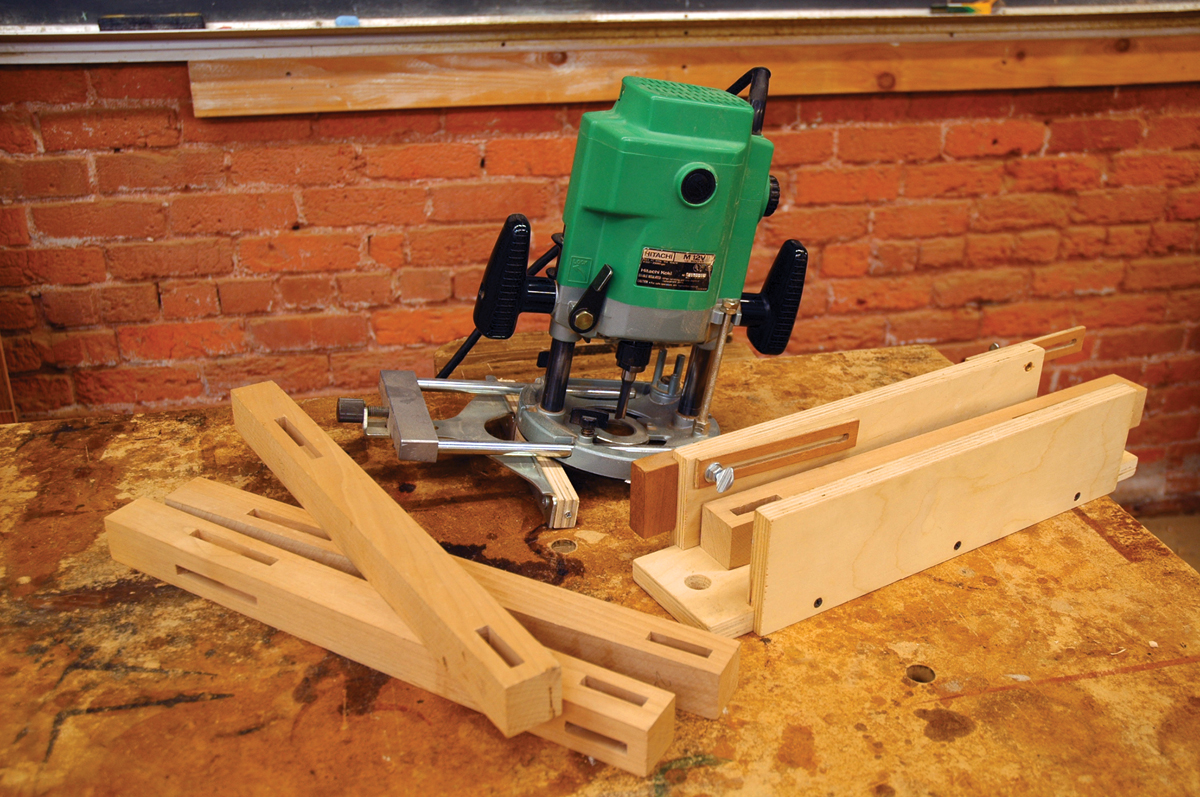
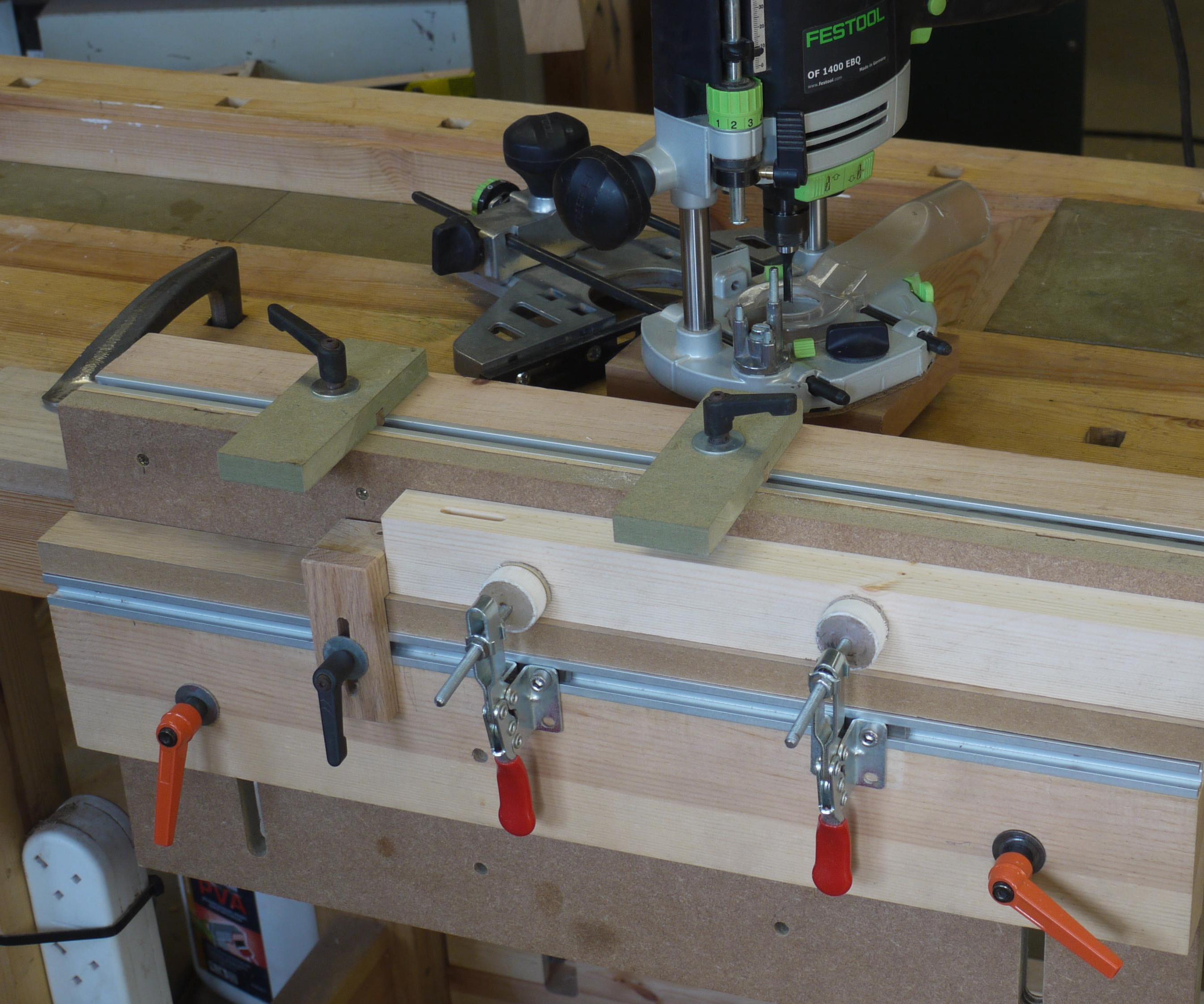
The most controlled way to cut a wood mortise with a handheld router is to use a plunge router, a suitable straight or spiral upcut bit, and a stable guide or mortising jig. Mark the mortise, secure the workpiece, set the depth in several stages, make shallow passes, and test the joint before cutting the final pieces.
For U.S. woodworkers building furniture, cabinets, doors, tables, and other projects, a plunge router can produce accurate mortises without requiring a dedicated mortising machine. The key is not simply the router itself. Accuracy comes from controlling the router’s position, plunge depth, travel distance, and relationship to the workpiece.
A router mortise is the recessed portion of a mortise-and-tenon joint. The router removes the waste inside the marked area while a jig, edge guide, template guide, or fence keeps the bit on the intended path. For repeated work, a jig with adjustable stops can make positioning much more consistent. For deeper mortises, removing material in several shallow passes reduces the amount of material the bit has to remove at one time and gives the operator better control.
This guide focuses on common woodworking applications in the United States and uses U.S. customary measurements where practical. The method applies to hardwoods and softwoods, but the correct bit, cutting depth, feed rate, and number of passes depend on the router, bit, wood species, and dimensions of the joint.
Source: woodsmith.com
What Is Router Mortising?
Router mortising is the process of using a router to remove a controlled area of wood and create a mortise for a tenon, loose tenon, hinge, or similar component. A mortise can be blind, meaning it stops inside the material, or through, meaning it passes completely through the workpiece.
For traditional mortise-and-tenon joinery, the mortise receives the tenon. The quality of the joint depends on more than simply making a hole of the correct size. The mortise needs to be positioned correctly, its sides should be reasonably straight and parallel, and its depth must leave enough material for the joint to assemble without bottoming out.
A plunge router is particularly useful because the bit can be lowered into the material after the router is running. This allows the operator to start a cut in the middle of a board instead of needing an existing edge or opening. A fixed-base router can be useful for many routing operations, but it is not the preferred tool for plunging directly into solid material for a blind mortise.
The router does not automatically make a square-ended mortise. A round cutting bit produces rounded internal corners. That is normal. If the mating tenon has square corners, the mortise can be squared afterward with a sharp chisel. Alternatively, the tenon corners can be rounded to match the routed mortise.
Source: popularwoodworking.com
Mortise
The recessed opening that receives a tenon or loose tenon.
Tenon
The projecting portion of a traditional mortise-and-tenon joint that fits inside the mortise.
Loose tenon
A separate piece of wood inserted into matching mortises cut into two mating workpieces.
Mortising jig
A fixture that supports the router or workpiece and controls the bit’s position and travel.
When Is a Router a Good Choice for Mortising?
A router is well suited to furniture joinery, frame construction, loose-tenon work, hinge recesses, and other applications where the mortise dimensions can be controlled with a guide. It is especially useful when several matching mortises must be made because a properly adjusted jig can establish a repeatable reference.
A dedicated mortising machine may make more sense for high-volume production or specialized shop work. A router-based setup is more flexible because the same router can also cut dados, rabbets, grooves, profiles, and other features.
Occasional furniture work
A plunge router and simple jig can provide accurate mortises without dedicating a machine to one operation.
Repeated joinery
Adjustable stops and fixed references make it easier to reproduce the same mortise across multiple parts.
Narrow workpieces
A jig can give the router a larger, more stable support surface than the workpiece alone.
Tools and Materials You Need
Before cutting the first mortise, assemble the router, bit, guide system, clamps, measuring tools, and safety equipment. The exact setup depends on whether you are using a commercial guide, a shop-built jig, or an edge guide.
A plunge router is generally the most convenient option for blind mortises because its plunge mechanism lets you control how deeply the bit enters the wood. Use a router with a collet and bit combination approved by the manufacturer, and verify that the bit is fully seated and tightened correctly before routing.
For many mortising jobs, a straight bit or spiral upcut bit is appropriate. A spiral upcut bit can be particularly useful in deeper pockets because its cutting geometry helps lift chips out of the mortise. However, chip evacuation is only part of the setup. A sharp bit, stable workpiece, controlled feed rate, and suitable depth of cut remain essential.
The guide system can be as simple as a straight fence or as elaborate as an adjustable mortising jig. A template guide and slot-based jig can control the router’s movement while a fence references the workpiece. When using a guide bushing, remember that the bushing diameter and cutter diameter affect the dimensions of the jig opening.
Source: woodcraft.com
Plunge router
Provides controlled vertical entry and adjustable routing depth for blind mortises.
Router bit
A straight or spiral bit establishes the width and cutting profile of the mortise.
Mortising jig or guide
Keeps the router aligned and can limit side-to-side movement and mortise length.
Clamps
Hold the workpiece and jig securely so neither can shift during routing.
Layout tools
A square, marking knife or pencil, ruler, and measuring tools help establish the mortise location.
Dust collection
A shop vacuum or suitable extraction system helps remove chips and improves visibility.
Safety equipment
Use eye protection, hearing protection, and any other protective equipment required by the router and bit manufacturer.
Choosing the Router Bit Diameter
The bit diameter normally determines the initial mortise width. For example, a 1/4-inch bit produces a mortise approximately 1/4 inch wide when the router follows one centered path. If a wider mortise is required, the router can be shifted laterally for additional passes, provided the jig or guide allows controlled movement.
Do not assume that a larger bit is always better. The bit must be appropriate for the router’s collet, operating speed, cutting depth, and material. Follow the bit manufacturer’s operating limits rather than choosing a speed or feed rate solely from a general rule.
Narrow mortise
A smaller diameter bit can make narrow joinery cuts but may require more care to avoid excessive lateral pressure.
Wider mortise
A larger bit or controlled overlapping passes can create a wider opening.
The most reliable process is to establish the mortise location first, secure the workpiece, set the guide, verify the router depth, and then remove the material through several controlled passes. Do not rush the first cut. A few minutes spent checking the setup can prevent a misplaced mortise or damaged workpiece.
The following method assumes a blind mortise cut into a wood component using a plunge router and a stable guide or jig. If your router, guide, or bit manufacturer provides different operating instructions, follow those instructions.
Source: instructables.com
1. Lay out the mortise
Mark the mortise centerline, length, width, and required depth on the workpiece. Extend useful reference lines onto adjacent faces if they will help position the jig.
2. Secure the workpiece
Clamp the material firmly to a stable bench or inside the mortising fixture. The workpiece should not rock, slide, or lift when moderate hand pressure is applied.
3. Install and inspect the bit
Insert the correct bit into the router collet according to the router and bit manufacturer’s instructions. Confirm that the bit is secure and free from damage.
4. Set the guide
Position the fence, guide bushing, template, or jig so the cutter will follow the intended mortise location.
5. Check the mortise length
Use stop blocks or the jig’s travel limits when available. Confirm both ends of the cut before starting the router.
6. Set the initial depth
Zero the plunge mechanism against the workpiece and set a shallow first cutting depth. The exact depth increment depends on the bit, router, material, and manufacturer’s guidance.
7. Start the router safely
Keep the bit clear of the workpiece when starting unless the manufacturer’s instructions specifically allow another procedure. Hold the router securely with both hands and allow the bit to reach operating speed before plunging.
8. Make the first pass
Plunge smoothly to the selected depth and move the router through the controlled travel path. Avoid forcing the router or making abrupt changes in direction.
9. Clear chips
Pause as needed to remove accumulated chips with dust extraction or another safe method. Do not place fingers near a spinning cutter.
10. Increase depth gradually
Raise the cutting depth in stages and repeat the routing path until the final mortise depth is reached.
11. Inspect the mortise
Turn off and unplug the router before making adjustments or removing debris by hand. Check the mortise dimensions, walls, bottom, and corners.
12. Test the mating tenon
Use a test piece made from matching material when possible. Adjust the mortise or tenon gradually rather than removing a large amount of material at once.
How Deep Should Each Pass Be?
There is no universal depth-per-pass number that is safe for every router, bit, wood species, and mortise size. Published woodworking methods commonly use shallow increments such as 1/8 inch or 1/4 inch, but the appropriate value should be based on the tool manufacturer’s limits and the resistance you observe during cutting.
Hardwoods, deep mortises, small-diameter bits, and less powerful routers may require lighter passes. If the router slows noticeably, chatters, burns the wood, struggles to evacuate chips, or requires excessive force, reduce the cutting depth and reassess the setup.
Signs of a reasonable pass
The router maintains controlled movement, the bit cuts without excessive vibration, chips are evacuated, and the wood does not show abnormal burning.
Signs to reduce the load
The motor bogs down, the router becomes difficult to control, the bit overheats, or the cut produces heavy burning and chatter.
How to Build and Use a Simple Router Mortising Jig
A mortising jig does two jobs: it stabilizes the router and limits its movement. A simple jig can be made from plywood, hardwood, or other stable sheet material, provided the construction is rigid and the router has adequate support throughout the cut.
One common design gives the router a broad, flat platform while the workpiece is clamped vertically or horizontally below it. Adjustable stops can restrict the router’s travel and establish the mortise length. A guide bushing can ride inside a slot, or an edge guide can run against a fence.
The exact jig dimensions are not universal because they depend on the router base, guide bushing, cutter diameter, workpiece thickness, and desired mortise dimensions. The important principle is that the jig opening must provide the required clearance and compensate correctly for the difference between the guide and cutter.
Source: imgur.com
Build a rigid platform
Use stable material and construct the platform so it does not flex under the router.
Provide a positive workpiece reference
A fence or vertical support gives the workpiece a consistent registration surface.
Add adjustable stops
Stops can establish the beginning and end of the mortise without relying entirely on visual judgment.
Make clamping independent of the cut
Position clamps where they hold the workpiece firmly without interfering with the router’s travel.
Test the jig
Run a test cut in scrap before using the jig on finished project parts.
Understanding Guide Bushing Offset
When a guide bushing follows a jig slot, the router bit is not necessarily centered on the slot’s edge. The distance between the outside diameter of the guide bushing and the cutter diameter determines the offset between the guide and the actual cut.
For example, if a guide bushing has a 5/8-inch outside diameter and the cutter is 1/4 inch in diameter, the total diameter difference is 3/8 inch. Half of that difference is 3/16 inch on each side. This relationship must be accounted for when laying out a template or jig opening.
The same principle applies when calculating the required slot length. If the guide rides inside the slot, the slot generally needs additional length beyond the finished mortise to account for the guide-to-bit relationship.
Guide diameter
The outside diameter of the guide bushing determines how far the router can travel from the guide edge.
Bit diameter
The cutter diameter determines the actual width of the routed opening.
Offset
The difference between guide and bit dimensions must be included when designing a template or jig.
Router Mortising Problems and How to Fix Them
Most router mortising problems come from movement, incorrect setup, excessive cutting load, poor chip evacuation, or an inaccurate jig. Diagnose the symptom before changing the tool settings. Making several adjustments at once can make it difficult to identify the actual cause.
A test piece is especially useful when the mortise must fit a specific tenon. Make the same cut in scrap of the same species and thickness before committing to the project parts.
Source: commons.wikimedia.org
The mortise is too wide
Check the bit diameter, guide setup, jig clearance, and whether the router was shifted sideways during the cut. If the mortise is made from multiple passes, verify the lateral reference before making another pass.
The mortise is too narrow
Verify the cutter diameter and whether the router completed the intended travel. For a wider mortise, make a controlled additional pass rather than forcing the router sideways.
The mortise is in the wrong location
Check the workpiece reference surface, jig alignment, fence position, and layout marks. Confirm the first setup with scrap before repeating it.
The mortise is too deep
Check the router’s depth stop and zero reference. If the workpiece or jig changed position during setup, correct the mechanical reference before continuing.
The router chatters
Reduce the cutting load, inspect the bit, improve support, verify clamping, and check that the router base or guide is not loose.
The wood burns
A dull bit, excessive depth, slow feed, inappropriate speed, or packed chips can contribute to burning. Inspect the bit and reduce the cutting load.
The mortise has poor chip evacuation
Clear the pocket between passes and consider a suitable spiral upcut bit where appropriate. Deep cuts require particular attention to chip removal.
The workpiece moves
Stop routing and improve the clamping arrangement. Never continue a mortising operation when the material can shift unexpectedly.
Why Does a Router Mortise Have Rounded Corners?
The corners of a routed mortise normally reflect the shape of the router bit. A round cutting edge cannot create a perfectly square inside corner in a single pass. This is not necessarily a defect.
If the project requires square internal corners, mark the corners and remove the remaining material with a sharp chisel after routing. If the joint permits it, rounding the corners of the mating tenon can be faster and may provide an equally practical fit.
Square mortise
Route the bulk of the material, then square the corners with a sharp chisel.
Rounded tenon
Round the tenon corners to match the router-cut mortise when the joint design allows it.
Safety Practices for Router Mortising
Router mortising involves a high-speed rotating cutter, so setup and control matter as much as the joinery dimensions. Read the router and bit manuals before use and follow the manufacturer’s requirements for compatible accessories, bit installation, operating speed, and protective equipment.
Secure the workpiece before routing. An upcut spiral bit can exert an upward force on poorly secured material, and a moving workpiece can cause loss of control. The jig itself must also be firmly clamped or otherwise secured to a stable work surface.
Keep hands away from the bit and never reach into a mortise to clear chips while the router is running. Turn the router off and wait for the bit to stop completely before changing depth, adjusting the jig, moving clamps, inspecting the cut closely, or clearing material by hand.
Use appropriate eye and hearing protection and manage dust with suitable extraction. Wood dust can be hazardous, so the dust-control method should match the material and workspace. Additional respiratory protection may be appropriate depending on the dust, ventilation, and workplace conditions.
Do not attempt a plunge cut with a router configuration that is not designed for controlled plunging. A stable plunge mechanism, secure bit installation, and adequate router support are fundamental to the operation.
Source: commons.wikimedia.org
Secure the material
Clamp the workpiece so it cannot shift, lift, or rotate during routing.
Secure the jig
A jig that moves can change the mortise location and create a dangerous loss of control.
Keep hands clear
Never place fingers near the cutter while it is spinning or use your hand to remove chips from the mortise.
Disconnect power for adjustments
Unplug or otherwise isolate the router according to the manufacturer’s instructions before changing the bit or making adjustments that require access near the cutter.
Inspect the bit
Do not use a bit that is cracked, damaged, improperly seated, or otherwise unsuitable for the operation.
Control dust
Use appropriate dust extraction and protective equipment for the material and working environment.
When Should You Stop and Recheck the Setup?
Stop if the router begins vibrating unusually, the workpiece shifts, the bit produces unexpected noise, the motor struggles significantly, the jig loosens, or the cut no longer follows the intended path. Turn off the router and wait for the cutter to stop before investigating.
If a bit breaks or becomes damaged, do not simply install another bit and continue. Inspect the setup for the reason the failure occurred, including cutting depth, material, bit condition, router speed, clamping, and accidental contact with hardware.
Unexpected vibration
Stop and inspect the bit, collet, router base, jig, and workpiece.
Sudden movement
Stop routing and improve the clamping or support before making another cut.
Burning or smoke
Stop and determine whether the bit is dull, overloaded, moving too slowly, or unable to clear chips.
Frequently Asked Questions
Q
Can you cut a mortise with a regular router?
A plunge router is generally the more convenient choice for cutting a blind mortise because it is designed to lower the bit into the workpiece. A fixed-base router can be useful for other guided routing operations, but it should not be tipped into the workpiece as a substitute for a proper plunge mechanism.
Q
What router bit is best for mortising?
A straight bit or spiral upcut bit can be used for many woodworking mortises. A spiral upcut bit can help lift chips from a deeper pocket, while straight bits are widely available and can work well with controlled passes. The correct bit depends on the mortise dimensions, material, router, collet, cutting depth, and manufacturer specifications.
Q
How deep can a router cut a mortise?
The practical depth depends on the router’s plunge capacity, bit length and cutting length, workpiece dimensions, material, and the manufacturer’s limits. Do not determine safe depth solely from the visible length of the bit. Deep mortises may require multiple stages and careful chip evacuation.
Q
Do I need a mortising jig for a router?
Not for every mortising operation. An edge guide, fence, template, or other stable reference may be sufficient for some cuts. A dedicated jig becomes more useful when the workpiece is narrow, the mortise must be centered or repeated, or the router needs additional support.
Q
How do you make square corners in a routed mortise?
Route the majority of the mortise with the router, then square the rounded corners with a sharp chisel. Another option is to round the corners of the mating tenon so they match the routed mortise when the joint design allows it.
Q
Why is my router mortise burning the wood?
Burning can result from a dull or unsuitable bit, excessive cutting depth, inappropriate router speed, slow feed, or poor chip evacuation. Stop and inspect the bit and setup. Reduce the cutting load and improve chip removal rather than continuing to force the cut.
Q
Should a mortise be the same depth as the tenon?
For a blind mortise, the mortise is commonly made deeper than the portion of the tenon that enters it so the tenon does not bottom out. The exact allowance depends on the joint design and adhesive requirements. Always verify the dimensions with a test joint before final assembly.
✦ Wrapping Up
Conclusion
A router mortising setup does not need to be complicated to produce accurate joinery. The essential ingredients are a suitable plunge router, a sharp and compatible bit, accurate layout, solid workpiece support, and a guide or jig that controls the router’s movement.
For the most reliable results, establish the mortise dimensions before routing, test the setup on scrap, make several shallow passes, and inspect the joint as you work. A jig with adjustable stops is particularly valuable when several parts need identical mortises.
Remember that a router creates rounded internal corners and that the cutter’s diameter, guide system, and depth settings all affect the final dimensions. Treat the first test cut as part of the setup process rather than assuming the first pass will be perfect.
💡 Key Takeaway
For your next router mortise, start with a marked scrap piece, secure it firmly, set up the plunge router and guide, make a shallow test pass, verify the mortise position and fit, and only then move to the finished workpiece.