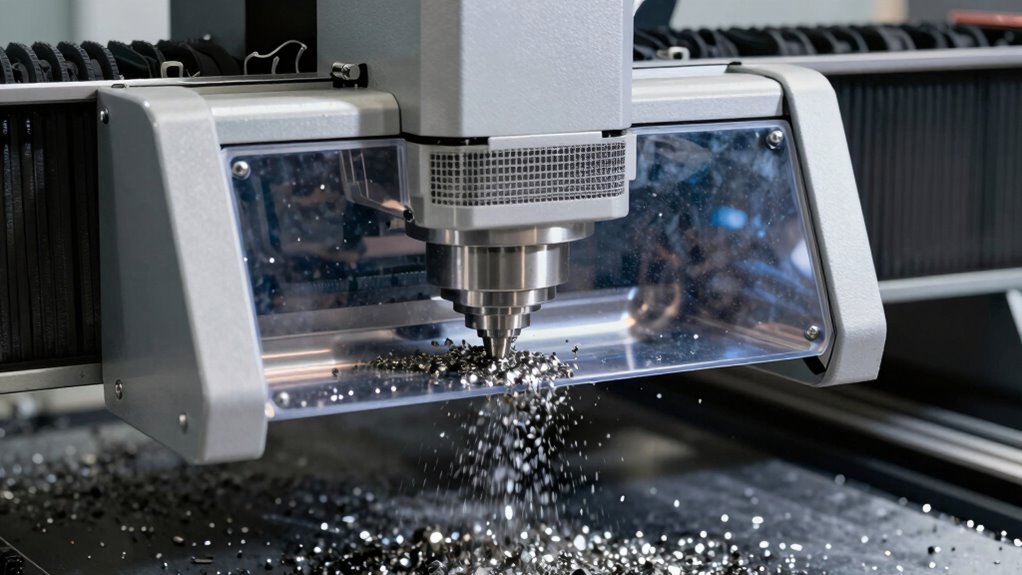
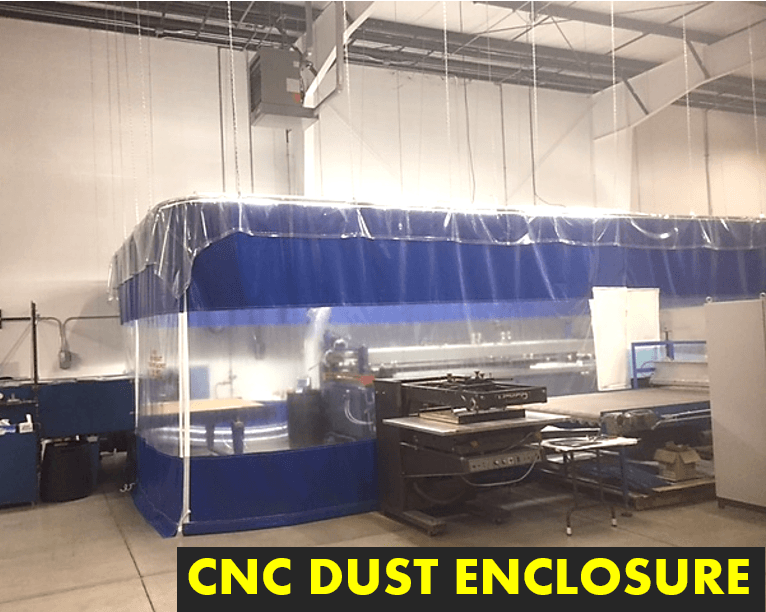
CNC dust control uses a dust shoe, a suitable collector, well-planned airflow, and proper filtration to capture dust near the cutting tool. Regular cleaning and safe work habits help keep dust out of the air, away from machine parts, and off nearby surfaces.
In American woodworking shops, CNC routers cut wood, plywood, MDF, plastic, and other sheet goods every day. These jobs create chips and fine dust. Some dust lands on the machine, while smaller particles can stay in the air. A clean work area helps protect the machine and the people who use it. It also makes cleanup easier after each job.
CNC dust control starts at the cutting point. A dust shoe surrounds the router bit and guides loose material toward a collection hose. The hose carries dust to a collector or suitable vacuum. A filter then traps particles before the air returns to the room or leaves through an approved exhaust system. Each part has a clear job, so a weak part can reduce the whole system’s value.
A large dust collector does not always solve the problem. Poor hose routing, a loose brush skirt, a clogged filter, or a small duct can limit airflow. Dust may still escape even when the collector sounds strong. The best setup matches the machine, tool, material, and cutting work. It also needs regular checks.
The U.S. Occupational Safety and Health Administration (OSHA) identifies wood dust as a workplace health concern. Exposure can affect the eyes, skin, and breathing system. The National Institute for Occupational Safety and Health (NIOSH) has also studied dust from automated routers. Its work shows why source capture and good ventilation matter. This guide explains how to build, check, and maintain a practical dust control system.
Source: curtain-and-divider.com
What Is CNC Dust Control?
CNC dust control is the process of capturing and removing loose material made during CNC cutting. It covers more than the dust collector. It includes the dust shoe, hose, ductwork, airflow, filters, machine enclosure, and cleaning routine. These parts work together to limit the spread of dust.
A CNC router spins a cutting bit at high speed. The bit removes material from a workpiece and throws chips away from the cutting edge. Some pieces are large and easy to collect. Others are tiny and can float in the air. These fine particles need more careful control.
A dust system should collect material before it spreads across the shop. This is called source capture. OSHA describes local exhaust ventilation as a main method for controlling wood dust. The exhaust hood should sit as close as possible to the point where dust forms.
The goal is not just a clean machine bed. The system should also reduce airborne dust and keep it from building up on nearby equipment, floors, shelves, and electrical parts.
Source: inventorartist.com
Source capture
Collects dust close to the cutting bit before it spreads through the work area.
Dust transport
Moves chips and fine particles through a hose or duct to the collection unit.
Dust separation
Removes larger chips and particles before they reach the main filter.
Air filtration
Traps fine particles so they do not return to the shop air.
Why CNC Machines Create So Much Dust
The cutting bit spins fast and removes material from a small area. Its flutes push chips away from the workpiece. The direction and speed of this flow can send particles beyond the cutting zone. A moving gantry can also spread loose dust across the table.
Some CNC jobs create more dust than others. MDF, for example, creates fine wood particles during cutting. Hardwood can produce both chips and fine dust. Plastic may create small chips or curls, based on the tool and cutting method.
A worn bit can make the problem worse. It may rub instead of cutting cleanly. This can create more heat and fine waste. Sharp tools and suitable cutting settings help the machine produce cleaner chips.
MDF cutting
Often creates large amounts of fine dust that can spread beyond the work area.
Hardwood cutting
Can produce chips and fine particles that need source capture.
Plastic cutting
May create curls, chips, or small particles based on the material and tool.
Why Proper CNC Dust Control Matters
Good dust control protects both people and equipment. Fine wood dust can enter the breathing system. It can also irritate the eyes and skin. Repeated exposure may lead to more serious health effects.
OSHA lists respiratory effects linked to wood dust exposure. These include asthma, chronic bronchitis, and other breathing problems. Some hardwood dusts have also been linked to cancer in woodworkers. The exact risk depends on the wood, exposure, and work conditions.
Dust can also affect a CNC machine. It may settle on linear rails, bearings, lead screws, and other moving parts. When dust mixes with grease, it can form a dirty layer. This layer may affect smooth movement and increase cleaning needs.
Fine dust can settle on electrical parts and cooling openings. Heavy buildup may block airflow around machine parts. A clean machine is easier to inspect and maintain. It can also reduce the chance of dust spreading into nearby work areas.
Wood dust can burn. A cloud of fine combustible dust can create a serious fire or explosion hazard under the right conditions. A dust collector must suit the material and workplace. Large shops may need a qualified dust system designer and a fire protection review.
Source: youtube.com
Worker health
Source capture helps reduce the amount of dust that reaches the breathing zone.
Machine care
Less dust buildup helps protect rails, bearings, motors, and other machine parts.
Better visibility
A cleaner cutting area makes it easier to watch the tool and spot problems.
Fire risk control
Regular dust removal helps prevent large piles of combustible material from building up.
Wood Dust Is a Health Hazard
Fine wood dust is not harmless just because it comes from natural material. Small particles can travel deep into the lungs. Repeated exposure may cause irritation or long-term health problems.
NIOSH lists a recommended exposure limit for wood dust of 1 milligram per cubic meter as an eight-hour time-weighted average. OSHA lists limits for particulate matter under its applicable rules. These values have different purposes and should not be treated as proof that a particular workshop is safe.
A workplace should assess actual exposure when needed. A visible dust cloud is a warning sign, but clear air does not prove that fine dust is under control. Qualified exposure testing can help determine whether the system works.
Use source extraction
Collect dust at the router rather than relying only on room ventilation.
Use suitable protection
Select respiratory protection based on the exposure and follow the required respiratory protection program.
Dust Can Create Fire and Explosion Hazards
Wood dust is combustible. A large dust pile can feed a fire, while airborne fine dust can create a more serious explosion hazard. An ignition source, fuel, and the right conditions can combine to create a dangerous event.
Do not blow settled dust into the air with compressed air. This can create a dust cloud. OSHA’s woodworking guidance warns against this practice. Use suitable industrial vacuum equipment and safe cleaning methods instead.
Do not assume that a normal shop vacuum or dust collector is suitable for every combustible dust risk. Industrial systems may need special design, electrical controls, explosion protection, or outdoor placement. Ask a qualified professional to review the hazards before changing a large system.
Remove dust often
Do not allow thick layers of fine dust to collect on floors, beams, lights, or machine surfaces.
Control ignition sources
Keep hot work, sparks, and unsuitable electrical equipment away from dust collection areas.
Get a system review
Use a qualified designer for industrial dust collection and explosion protection needs.
Main Parts of a CNC Dust Collection System
A useful CNC dust collection system has several parts. Each part must work with the others. Buying a strong collector will not fix a poor dust shoe or a blocked hose.
The best design depends on the machine size, spindle, cutting material, dust volume, hose length, and work schedule. A small desktop router may use a suitable shop vacuum and dust shoe. A large production router may need a dedicated industrial collector and fixed ductwork.
Start by checking the dust port size on the machine and the airflow needs stated by the machine or dust shoe maker. Then plan the hose route and filter system. Avoid choosing equipment by motor horsepower alone.
Source: inventorartist.com
Dust shoe
Surrounds the cutting area and guides dust toward the collection hose.
Flexible hose
Connects the moving router head to the main duct or collector.
Ductwork
Carries dust over longer distances with less resistance than a long run of flexible hose.
Cyclone separator
Separates much of the larger waste before it reaches the filter.
Dust collector
Creates the airflow needed to move material through the system.
Filter
Traps fine particles before air is returned or discharged.
Choose the Right Dust Shoe
The dust shoe is the first part to check. It sits around the router bit and forms a small collection area. A brush or flexible skirt helps keep dust inside while the tool cuts.
The shoe should fit the spindle or router body. It must also allow the tool to move through its full cutting depth. A shoe that sits too high may leave a large gap. A skirt that presses too hard can drag on the workpiece.
Check the brush length and condition. Replace worn bristles when they no longer touch the work surface. If the shoe has removable parts, make sure they lock in place before starting a job.
The brush must also clear clamps, tabs, and workpiece edges. These items can lift the skirt and let dust escape. Plan the workholding layout with the dust shoe in mind.
Correct fit
Choose a shoe that fits the spindle, router, and machine design.
Good brush contact
Set the skirt so it reaches the work surface without dragging or blocking tool movement.
Easy tool access
Make sure the shoe can be removed or opened for bit changes and checks.
Choose a Suitable Dust Collector
A dust collector moves air through the hose and removes waste from the machine. The collector must provide enough airflow at the dust shoe, not just at its open inlet. Hose length, bends, filters, and fittings all affect the airflow that reaches the tool.
A shop vacuum may work well with a small dust shoe on a hobby CNC machine. A larger router may need a dedicated dust collector. The machine maker’s guidance is a useful starting point. Avid CNC, for example, describes a dedicated collector with a 4-inch hose for its recommended setup. That guidance is not a universal rule for every CNC machine.
Check the collector’s airflow data under realistic conditions. A free-air rating may not show the flow available through a hose, separator, and loaded filter. Static pressure also matters because it shows how well the system can overcome resistance.
A canister filter can help capture fine particles. The correct filter rating depends on the material, dust load, and required air quality. Do not assume that a collector bag or basic vacuum filter captures all fine dust.
Small CNC router
A suitable shop vacuum or compact extractor may meet the needs of a small dust shoe.
Large CNC router
A dedicated dust collector may be needed for larger ports and heavier cutting loads.
Industrial machine
A designed local exhaust system may be needed for multiple machines or continuous production.
Use a Cyclone Separator When It Helps
A cyclone separator removes much of the larger waste before it reaches the main filter. Air enters the separator and moves in a circular path. Heavier chips fall into a collection bin, while the remaining air moves toward the filter.
This can reduce the amount of large waste that reaches the filter. It may also make bin emptying easier. However, a separator adds resistance to the airflow. The collector must still provide enough flow for the dust shoe.
Check the separator size and port design before buying one. A small unit may restrict a larger system. Empty the bin before it becomes too full, and inspect the seals for leaks.
Main benefit
Keeps many large chips out of the main filter.
Main limit
Adds another part that can reduce airflow if poorly matched.
How to Set Up CNC Dust Control Step by Step
A good setup begins with the machine and its dust port. Do not start by buying the largest collector you can afford. First, check the machine’s needs and the space available in your shop.
Use the following steps for a small or medium CNC router. Industrial systems may need a professional design and exposure review. Always follow the machine and dust collector manuals.
Source: woodnbits.com
Before starting
Gather the machine manual, dust shoe details, collector data, hose measurements, and a plan for the hose route.
Step 1: Check the CNC Machine
Find the dust port size and location. Check whether the machine maker lists a required airflow or collector type. Look at the spindle, router mount, and available space around the gantry.
Measure the full movement area. The hose must reach every corner without pulling on the spindle or catching on the frame. Also check the distance from the machine to the collector.
Measure the port
Record the inside and outside diameter where the hose will connect.
Check full travel
Move the gantry through its permitted range with the machine off.
Step 2: Fit the Dust Shoe
Install the shoe according to its maker’s instructions. Check that it sits securely and does not block the spindle or tool holder. Set the brush skirt so it reaches the work surface.
Use a safe setup check with the machine off. Move the Z axis through the planned range and confirm that the shoe does not hit clamps, fixtures, or the workpiece. Check tool changes and access to the collet.
Secure the mount
Make sure the shoe cannot loosen during normal movement.
Check tool clearance
Confirm that the longest planned tool can cut without hitting the shoe.
Step 3: Route the Hose
Keep the hose as short and direct as practical. Long flexible hose runs and sharp bends add resistance. Smooth-wall duct can help on longer fixed runs, while a short flexible section allows the spindle to move.
Use an overhead support or hose boom when needed. This can take the hose weight off the gantry. Leave enough slack for full travel, but not so much that the hose can drag on the table.
Keep the hose away from spindle cables and moving parts. Secure loose sections with suitable supports. Do not let the hose pull the machine head to one side.
Reduce bends
Use broad turns rather than tight elbows where the system allows.
Support the hose
Prevent its weight from placing extra load on the moving gantry.
Protect moving parts
Keep the hose clear of rails, belts, cables, and workholding.
Step 4: Connect the Collector and Filter
Connect the hose to the collector using fittings that match the measured port sizes. Avoid loose joints and sudden size changes. Seal connections with suitable materials that can handle the system’s operating conditions.
Install the separator if the collector design uses one. Check the filter type and its condition. Make sure the bin and filter housing close properly.
Follow the maker’s grounding and bonding instructions. Long plastic hoses can build up static during dry dust collection. Use the correct conductive hose or grounding arrangement when the system requires it. Do not create an improvised electrical connection.
Check connections
Look for gaps, loose fittings, and damaged seals.
Check the filter
Use the filter type specified for the dust and collector.
Follow grounding instructions
Use the approved arrangement for the hose and collector.
Step 5: Test the System Before Cutting
Turn on the collector and inspect the dust shoe. Check for loose parts, unusual noise, and poor hose movement. Use a small test cut with a suitable material and safe machine settings.
Watch the cutting area from a safe position. Look for dust escaping around the skirt or collecting behind the tool. Check whether the hose remains clear through the full motion range.
A good test shows steady collection, no hose snagging, and little loose waste around the cutting zone. This does not prove that airborne exposure is below a safe limit. Workplace air testing may still be needed.
Good result
Most visible chips move into the shoe and hose without large clouds escaping.
Poor result
Dust spreads beyond the shoe, the hose blocks, or airflow drops during the job.
How to Improve CNC Dust Collection Airflow
Airflow is one of the main factors in dust collection. The collector must move enough air through the full system to pick up waste at the cutting point. A powerful motor alone does not prove that it can do this.
Air resistance comes from hose length, bends, narrow fittings, rough duct walls, filters, separators, and leaks. Each part can reduce the flow that reaches the dust shoe. A clean, well-planned path often works better than a large collector connected through poor ductwork.
OSHA’s woodworking guidance discusses duct velocity for moving different types of wood waste. Its listed range of 2,500 to 4,000 feet per minute applies to the stated woodworking extraction context. It is not a universal airflow target for every small CNC hose or dust shoe. Follow the system designer’s specifications for your equipment.
Source: inventorartist.com
Keep the route short
Reduce unnecessary hose length and extra fittings.
Use suitable duct sizes
Match duct size to the collector, machine port, and required airflow.
Clean filters
Remove dust buildup according to the collector maker’s instructions.
Seal leaks
Repair loose joints that allow air to enter the system before the dust shoe.
Understand Hose Diameter and Length
A narrow hose can create more resistance than a wider hose. But a wider hose is not always better. The collector must be able to move the needed air through the full system.
A small CNC dust shoe may use a smaller hose than a large industrial router. Check the port size before choosing an adapter. Do not reduce the duct too early unless the system design calls for it.
For longer runs, smooth-wall duct can reduce resistance compared with a long length of corrugated flexible hose. Use flexible hose near the moving spindle where it is needed. Support it so it does not pull on the gantry.
Small hose
May suit a compact machine but can restrict a larger dust collection system.
Large hose
Can support greater airflow when the collector and system are designed for it.
Smooth duct
Can help reduce friction on longer fixed runs.
Check Static Pressure and Airflow
Airflow describes the amount of air moving through the system. Static pressure describes the system’s ability to overcome resistance. Both matter when selecting a collector.
A collector may have a high advertised airflow rating under open conditions. That number may fall when the collector connects to a hose, filter, separator, and dust shoe. Look for performance data at a stated static pressure when comparing equipment.
If the system keeps losing capture, check for blockages and dirty filters first. Then inspect hose size, bends, and leaks. A qualified dust system designer can help when the required flow is unclear.
Airflow
Shows how much air the system can move under stated test conditions.
Static pressure
Shows how well the collector can overcome resistance in the duct and filter system.
Keep the Dust Shoe Close to the Work
A dust shoe works best when its skirt stays close to the work surface. A large gap lets dust escape before the airflow can collect it.
Check the skirt when changing tools or cutting thicker material. The Z height may change the way the brush touches the work. A shoe with an independent floating skirt can help follow the work surface, if it is compatible with the machine.
Clamps can lift the brush and create an opening. Place workholding outside the shoe path when possible. Check the toolpath and clamp positions before starting.
Correct brush height
Set the brush to touch the surface without excessive pressure.
Clear workholding
Avoid placing clamps where they lift the skirt during cutting.
Choose the Right CNC Dust Control Setup for Your Workshop
The right setup depends on machine size, dust volume, material, and daily use. A small hobby router has different needs from a large production machine. The table below gives general starting points, not guaranteed equipment specifications.
Check the maker’s airflow and filter requirements before choosing a system. A professional review may be needed when the shop has several machines or handles large amounts of combustible dust.
Source: curtain-and-divider.com
Small desktop CNC
Focus on a well-fitted dust shoe, a suitable vacuum or extractor, and a short hose run.
Mid-size CNC router
Consider a dedicated collector, separator, suitable filter, and supported hose route.
Large production CNC
Use a designed extraction system with suitable ductwork, monitoring, and safety controls.
Small Hobby CNC Machines
Small machines often use compact routers and small dust shoes. A suitable shop vacuum or dust extractor may work if it provides the needed flow through the shoe and hose.
Keep the hose light. A heavy hose can pull on a small gantry and affect movement. Use an overhead support if the machine design allows it.
If the machine cuts MDF often, pay close attention to fine dust filtration. Empty the collection bin and clean the filter as directed. Do not rely on a room air cleaner as the only control.
Main priority
Good source capture with a light hose and suitable filter.
Common limit
A small collector may struggle with a large dust shoe or long hose run.
Mid-Size CNC Routers
A mid-size router may cut larger panels and run for longer periods. A dedicated collector can provide a better match for its dust port and cutting load.
A cyclone separator can help reduce the amount of large waste that reaches the filter. A canister filter may improve fine particle capture when it is rated for the task.
Plan the hose support before fixing the collector in place. The hose must follow the gantry without dragging, twisting, or catching on the frame.
Main priority
Match collector performance and duct size to the dust shoe.
Useful addition
A separator and supported hose route can improve daily operation.
Large Industrial CNC Machines
Large production routers may create high dust loads over long shifts. They may need fixed ductwork, a central collector, and a carefully designed local exhaust system.
A system for several machines must account for which machines run at the same time. It must also consider duct layout, filter loading, fire risk, and the type of material being cut.
Do not size an industrial system by copying a hobby CNC setup. Have a qualified ventilation professional review airflow, exposure, and fire protection needs. Follow applicable OSHA requirements and relevant fire and building codes.
Main priority
Use a system designed for the real number of machines and their operating loads.
Professional support
Get qualified help with ventilation, combustible dust, and system safety.
Common CNC Dust Control Problems and How to Fix Them
Dust escaping from a CNC machine does not always mean the collector is too small. The cause may be a worn brush, blocked hose, poor duct layout, or incorrect shoe height. Check the simple and safe items first.
Stop the machine before inspecting the dust shoe or hose. Disconnect power when the machine or collector manual requires it. Never put your hands near a moving bit or open a collector while it is running.
Source: inventorartist.com
Dust escapes around the shoe
Check the brush height, damaged bristles, clamps, and gaps around the workpiece.
Weak suction
Check the filter, bin, hose, duct, fittings, and collector performance.
Hose keeps catching
Adjust the hose support and service loop to clear the full machine travel.
Fine dust remains in the room
Review source capture, filter performance, room ventilation, and exposure controls.
Problem: Dust Escapes From the Dust Shoe
A poor seal is a common reason for visible dust around the cutting area. The brush may be worn, too short, or set too high. A clamp may also lift one side of the skirt.
Inspect the shoe with the machine off. Replace damaged bristles and set the skirt to reach the work surface. Move clamps when possible. If the tool is too long for the shoe, check whether the shoe can be adjusted safely.
Check the skirt
Look for gaps, broken bristles, and uneven contact.
Check the tool
Make sure the tool length and cutting depth suit the shoe.
Check clamps
Move workholding away from the brush path when possible.
Problem: The Collector Has Weak Suction
Weak suction may come from a full bin or dirty filter. A blocked hose can cause the same issue. A loose connection may also let air enter before it reaches the dust shoe.
Check the bin first. Empty it if needed. Then inspect the hose and duct for blockages. Clean the filter according to the maker’s instructions. If the problem remains, compare the system’s performance with the collector’s specifications.
Do not remove a filter to gain more airflow. This may release fine dust into the room and expose the user to harmful particles.
Empty the bin
Remove collected waste before it blocks the inlet or reduces useful capacity.
Clean the filter
Use the approved cleaning method for the filter material.
Inspect the hose
Look for crushed areas, blocked sections, and loose joints.
Problem: Dust Sticks to the Hose
Static charge can build up as dry particles move through plastic hose. This may cause dust to cling to the inside wall. It can also cause small shocks when a person touches the hose.
Check whether the collector maker requires conductive hose or a grounding wire. Follow its approved instructions. Do not assume that any metal wire added to a plastic hose will provide safe grounding.
Use approved parts
Choose hose and grounding components suited to the collector.
Inspect the connection
Make sure the grounding arrangement follows the equipment instructions.
Problem: The Machine Loses Movement or Accuracy
A hose that pulls on the gantry can affect movement. It may drag across the table or place extra force on the moving head. This is more likely with a heavy hose or poor overhead support.
Check the full travel range with the machine off. Move the hose support and adjust the service loop. Keep the hose clear of belts, rails, and cables. If the machine still shows lost steps, inspect the motion system and other possible causes.
Support the hose
Take excess hose weight off the moving head.
Check the service loop
Leave enough slack for travel without allowing the hose to drag.
CNC Dust Control Maintenance and Cleaning
A dust collection system needs regular care. Filters load with fine particles, bins fill, and hoses can become blocked. A system that worked well last week may perform poorly today if no one checks it.
Set a maintenance schedule based on machine use, dust volume, and the collector manual. A busy production shop may need checks every shift. A small workshop may use a less frequent schedule, but it should still inspect the system before dusty jobs.
Do not wait until dust escapes from the machine. Check the system before each job and clean it at planned intervals. Record recurring problems so you can find patterns.
Source: youtube.com
Before each job
Check the dust shoe, hose, bin level, and collector operation.
After dusty jobs
Remove loose waste and inspect the work area.
On a set schedule
Clean filters, inspect ducts, and check seals and supports.
When performance changes
Stop and inspect the system before continuing work.
Clean the Dust Shoe
Dust can build up around the brush, port, and mounting plate. This buildup may reduce the opening or change the skirt position. Remove the shoe according to its instructions and clean it safely.
Check the brush for wear and loose sections. Look for cracks in the housing and damaged fasteners. Replace worn parts rather than using a shoe that no longer captures dust well.
Remove buildup
Use a suitable vacuum and cleaning method.
Inspect the brush
Replace bristles that no longer make proper contact.
Maintain the Collector and Filter
Empty the collection bin before it becomes too full. A full bin can reduce useful capacity and may affect airflow. Check the separator and seals when emptying it.
Clean or replace the filter according to the maker’s instructions. Some filters can be cleaned with a built-in system. Others need careful removal or replacement. Never use a cleaning method that can damage the filter media.
Check the filter housing for gaps and damaged seals. Fine dust can escape through a poor seal even when the filter itself is in good condition.
Check the bin
Empty it before waste reaches the level set by the maker.
Check the filter
Look for damage, heavy buildup, and signs of poor airflow.
Check seals
Replace worn gaskets and secure loose filter covers.
Clean the CNC Machine Safely
Stop the machine before cleaning. Follow the manual for shutdown and electrical isolation. Use a suitable industrial vacuum to remove dust from the bed, rails, and nearby surfaces.
Do not use compressed air to blow dust off the machine or floor. It can send fine particles into the air and spread them across the room. A vacuum with suitable filtration is a better choice.
Pay attention to areas around motors, cooling openings, and electrical enclosures. Do not open electrical panels unless you are qualified and the equipment is safely isolated. Ask a trained technician to inspect areas that need internal cleaning.
Stop the machine
Never clean near a moving spindle or exposed cutting tool.
Use a suitable vacuum
Choose equipment with filtration suited to the dust.
Avoid compressed air
Do not create airborne dust clouds during cleanup.
CNC Dust Control Safety Practices
A dust collector is an engineering control. It should be the main part of the dust safety plan, not the only part. Good work habits and suitable personal protection also matter.
OSHA favors engineering controls for reducing exposure. A suitable exhaust system can capture dust before workers breathe it. Respirators may also be needed, based on the hazard and exposure assessment.
In workplaces covered by OSHA rules, employers must follow the applicable respiratory protection requirements when respirators are required. This can include medical evaluation, fit testing, training, and a written program. A simple face mask is not a substitute for a proper workplace program.
Source: curtain-and-divider.com
Wear suitable eye protection
Use safety glasses or other protection suited to the machine and material.
Use proper respiratory protection
Choose protection based on the exposure assessment and applicable requirements.
Keep the area clean
Remove settled dust with suitable vacuum equipment.
Control ignition sources
Keep dust away from sparks, hot surfaces, and unsuitable electrical equipment.
Use a Suitable Respirator When Needed
A respirator can help reduce inhalation exposure when selected and used correctly. The right type depends on the dust, exposure level, work conditions, and required protection.
For a U.S. workplace, OSHA’s respiratory protection standard may apply when respirators are required. Employers must use a compliant program rather than simply handing workers a mask.
A respirator does not replace source capture. Use it as part of a wider control plan when the risk assessment calls for it.
Choose the correct type
Use a respirator approved for the hazard and exposure conditions.
Check the fit
Follow required fit testing and user seal checks.
Maintain the equipment
Replace filters and parts according to the respirator instructions.
Never Spread Dust During Cleanup
Dry sweeping and compressed air can send settled dust back into the air. This creates another chance to breathe the particles. Use a suitable industrial vacuum instead.
If wet cleaning is allowed for the material and equipment, follow a safe method that does not create other hazards. Keep water away from electrical parts and use only approved cleaning procedures.
Avoid dry sweeping
Use a suitable vacuum rather than a broom for fine dust.
Avoid blow-down
Do not use compressed air to clean dust from floors or machinery.
Know When to Get Professional Help
Some dust control problems need more than a new hose or filter. If dust remains airborne, workers report breathing problems, or the collector cannot meet the machine’s needs, stop and review the system.
A qualified industrial hygienist can assess exposure. A ventilation engineer can review airflow and duct design. A fire protection professional can assess combustible dust risks.
Do not modify an industrial collector, explosion vent, electrical system, or fire protection device without qualified guidance. These changes can create new hazards.
Exposure concerns
Arrange an exposure assessment when dust remains in the breathing zone.
Poor system performance
Ask a ventilation professional to assess airflow and capture.
Combustible dust concerns
Get a qualified fire and dust hazard review.
Common CNC Dust Control Mistakes to Avoid
A dust system can look complete and still perform poorly. The most common problems come from poor sizing, weak source capture, bad hose routing, and poor maintenance. Avoid these mistakes before spending money on a larger collector.
Source: inventorartist.com
Buying by horsepower alone
Motor power does not show the airflow available at the dust shoe.
Using a poor dust shoe fit
Large gaps allow chips and fine dust to escape.
Using long flexible hose runs
Extra length and bends can increase airflow resistance.
Ignoring filter maintenance
A loaded or damaged filter can reduce collection performance.
Relying only on room air filtration
A room cleaner cannot replace source capture at the cutting tool.
Blowing dust with compressed air
This can spread fine dust and create a dangerous airborne cloud.
Do Not Assume a Clean Table Means Safe Air
A clean machine bed is a useful sign, but it does not prove that fine dust is under control. Some particles are too small to see. They may remain in the breathing zone after visible chips have been collected.
Use the correct filtration and ventilation design. Where worker exposure is a concern, use qualified exposure testing. Do not judge workplace safety by appearance alone.
Check the whole area
Look beyond the machine table to nearby surfaces and the room air.
Use exposure assessment
Measure workplace conditions when needed rather than relying on visual checks.
Do Not Oversize the Hose Without Checking the System
A larger hose can reduce resistance in some systems. But the collector, duct, and dust shoe must support the change. A poorly matched hose can reduce capture rather than improve it.
Measure the port and check the collector’s performance data. Use the machine maker’s guidance or ask a dust collection professional when the correct size is unclear.
Measure first
Use actual port measurements rather than relying only on nominal hose labels.
Check performance
Make sure the collector can move the required air through the complete system.
How to Know Whether Your CNC Dust Control System Works
A working system should capture most visible waste at the source, keep the hose clear, and operate without leaks or movement problems. It should also maintain its performance during the full job, not just during the first few minutes.
Check the dust shoe during a test cut. Look for escaping particles around the skirt and at the edges of the workpiece. Inspect the collector and filter after the test. A sudden increase in dust may point to a blockage or loss of airflow.
A visual check is only a basic performance check. It cannot confirm that airborne exposure meets a workplace limit. Use suitable measurement methods when health and compliance decisions depend on exposure levels.
Source: curtain-and-divider.com
Good source capture
Most visible chips and dust move into the dust shoe during cutting.
Stable airflow
Collection remains steady through the full job.
Clear machine movement
The hose does not pull, snag, or block the gantry.
Clean connections
There are no obvious leaks, loose fittings, or damaged seals.
Controlled cleanup
The shop can be cleaned without blowing fine dust into the air.
Use a Simple Inspection Checklist
A short inspection can catch many problems before a long cutting job. Keep a written checklist near the CNC machine. Record any drop in suction, damaged brush, or unusual collector noise.
Dust shoe
Check mounting, brush condition, and contact with the work surface.
Hose
Check for cracks, blockages, crushed sections, and loose joints.
Collector
Check the bin, filter, seals, and operating condition.
Machine travel
Check that the hose clears all permitted movement.
Work area
Look for dust escaping beyond the cutting zone.
Know When to Stop the Job
Stop cutting if the hose becomes blocked, the collector stops, the shoe comes loose, or dust begins spreading in a way that suggests failed capture. Do not continue a long job while the system is not working.
Follow the machine shutdown procedure. Allow moving parts to stop. Correct the problem before restarting. If a fault involves electrical parts, fire risk, or exposure beyond your control, seek qualified help.
Stop for blocked airflow
Clear the cause before continuing the cut.
Stop for loose parts
Secure the dust shoe and hose before restarting.
Stop for safety concerns
Do not resume work until the hazard has been assessed and controlled.
Research Notes and Reader Question Gaps
This guide uses U.S. workplace guidance and CNC equipment documentation to explain dust capture, airflow, and maintenance. The research review included OSHA woodworking dust guidance, NIOSH research on automated routers, and practical setup documentation from CNC equipment providers. It also reviewed current dust shoe and hose guidance from specialist CNC support pages.
The main improvement is to connect the full system. Many setup guides focus on a dust shoe or collector. A useful workshop plan must also address filter performance, hose movement, exposure, fire risk, and maintenance. These issues affect whether a system works throughout a real cutting job.
The research was documentary. No CNC machine, collector, or dust shoe was physically tested for this article. Equipment performance must be checked against the exact machine and collector specifications.
Source: woodnbits.com
OSHA woodworking guidance
Supports the use of local exhaust ventilation, proper system maintenance, and controls for wood dust exposure.
NIOSH automated router research
Shows that conventional router-head extraction may leave some dust in the workroom and describes a tested engineering control.
Avid CNC documentation
Provides practical guidance on dust shoes, collector selection, hose grounding, and machine setup.
The following map separates common practical needs from questions that were directly covered in the reviewed sources. It does not claim to measure search volume or prove demand. Observed questions are based on the subjects covered in the inspected guidance. Inferred needs are useful follow-up questions based on the setup process.
What size dust collector does a CNC router need?
Reader stage: Before setup. Basis: Inferred next need. Coverage: Answered in part by equipment guidance. Benefit: Helps readers match airflow and static pressure to the machine. Priority: High. Placement: Collector selection section.
Why does dust escape from a CNC dust shoe?
Reader stage: During use. Basis: Covered by CNC dust shoe support guidance. Coverage: Answered, with practical limits. Benefit: Helps users check brush contact, clamps, and tool clearance. Priority: High. Placement: Troubleshooting section.
Can a shop vacuum work with a CNC router?
Reader stage: Before buying. Basis: Inferred next need. Coverage: Partly answered by specialist setup guidance. Benefit: Helps small-shop users choose equipment based on port size and system resistance. Priority: Medium. Placement: Collector selection section.
How should a CNC dust hose move with the gantry?
Reader stage: During setup. Basis: Covered by specialist hose management guidance. Coverage: Answered in part. Benefit: Helps prevent snagging and unwanted load on the machine. Priority: High. Placement: Hose routing section.
Does a clean CNC table prove that the air is safe?
Reader stage: After setup. Basis: Inferred next need. Coverage: Shallow in many equipment setup guides. Benefit: Explains the difference between visible cleanup and measured exposure. Priority: High. Placement: Safety and performance sections.
How often should CNC dust filters be cleaned?
Reader stage: Ongoing maintenance. Basis: Covered by equipment support guidance. Coverage: Answered in general terms, but exact intervals depend on the collector. Benefit: Helps readers avoid airflow loss. Priority: Medium. Placement: Maintenance section.
Evidence Limits and Editorial Boundaries
OSHA and NIOSH provide the main U.S. safety evidence used here. Their guidance supports the need for source capture and proper dust control. Equipment makers provide model-specific setup instructions, not proof that one collector will work for every machine.
NIOSH documents a Jet Stripper control for automated routers and reports a 90 percent reduction in wood dust emissions in its testing. That result applies to the documented system and test conditions. It should not be treated as the expected result for an ordinary dust shoe.
Airflow needs, filter ratings, and fire protection depend on the complete system. They cannot be set safely by a general article alone. Use the exact equipment manuals and qualified professional advice when the design or exposure risk requires it.
Documented
OSHA and NIOSH identify wood dust hazards and support local exhaust ventilation as a key control.
Manufacturer guidance
Collector and dust shoe recommendations apply to the equipment and setup described by the maker.
Not tested for this article
No product performance, exposure reduction, or machine accuracy result was measured firsthand.
Not established universally
One collector size, hose diameter, or filter type cannot be recommended for every CNC machine.
Frequently Asked Questions
Q
Do I need a dust collector for my CNC router?
Yes, CNC routers that cut wood and similar materials need suitable dust collection. A dust shoe and collector help capture waste near the cutting point. A small machine may use a suitable vacuum or extractor. A large router may need a dedicated dust collection system.
Choose the system based on the dust shoe, airflow needs, hose route, and material. A collector that is too small may leave dust around the machine.
Q
Can I use a shop vacuum for CNC dust collection?
A suitable shop vacuum can work with some small CNC routers and compact dust shoes. It must provide enough airflow through the hose and shoe. Check its filter rating and dust capacity as well.
A larger router or long production job may need a dedicated collector. A vacuum that fills quickly or loses suction during a job may not be suitable for the work.
Q
What is the best dust shoe for a CNC router?
The best dust shoe is one that fits the machine, surrounds the cutting area, and maintains good brush contact with the work surface. It should allow full tool travel and provide a hose port that matches the collection system.
Check spindle compatibility, brush replacement, tool clearance, and clamp access before choosing one. No single shoe fits every CNC machine.
Q
Why does fine dust escape from my CNC dust collection system?
Fine dust may escape because of a worn brush, poor shoe fit, weak airflow, a clogged filter, or a hose leak. Dust may also remain airborne after visible chips have been collected.
Inspect the shoe, hose, filter, and collector. Check the full cutting area during a safe test. If workers may be exposed, arrange a suitable workplace exposure assessment.
Q
Is MDF dust dangerous when using a CNC router?
MDF cutting can release fine wood and resin-related particles. Breathing wood dust can irritate the eyes, skin, and respiratory system. Repeated exposure may lead to serious health effects.
Use source capture, suitable filtration, safe cleaning, and appropriate respiratory protection when required. Follow the material safety information and applicable workplace rules.
Q
How often should I clean my CNC dust collector?
Check the collector before each job. Empty the bin and clean or replace the filter according to the maker’s instructions. The exact interval depends on the dust load, filter design, and machine use.
If suction drops or dust starts escaping, stop and inspect the system. Do not wait for the next planned cleaning date.
Q
Can I use compressed air to clean my CNC machine?
Do not use compressed air to blow wood dust from the CNC machine or workshop. It can send fine particles into the air and create a combustible dust cloud.
Use a suitable industrial vacuum with proper filtration. Follow the machine manual for cleaning near sensitive electrical and mechanical parts.
✦ Wrapping Up
Conclusion
CNC dust control is a key part of a clean and safe workshop. It protects the machine from dust buildup and helps reduce worker exposure. The best system captures dust close to the cutting bit and moves it through a well-planned collection path.
Start with a suitable dust shoe. Match it with the right hose, collector, separator, and filter. Keep the hose clear of moving parts and check the brush skirt often. Clean the bin and filter on a set schedule.
Do not judge the system by motor power or a clean machine bed alone. Check how well it captures dust during real cutting work. Fine particles can remain in the air even when visible chips disappear. Use qualified exposure testing when workplace safety decisions depend on actual dust levels.
For a small CNC router, a compact extractor may be enough when it matches the dust shoe and cutting load. Larger machines need more careful planning. Industrial shops should seek professional help with ventilation, exposure, and combustible dust risks.
💡 Key Takeaway
Before your next CNC job, inspect the dust shoe, measure the hose connections, check the collector and filter, and test the full gantry movement with the machine off. Then run a short test cut and check for escaping dust. Fix any collection problem before starting a long production run.