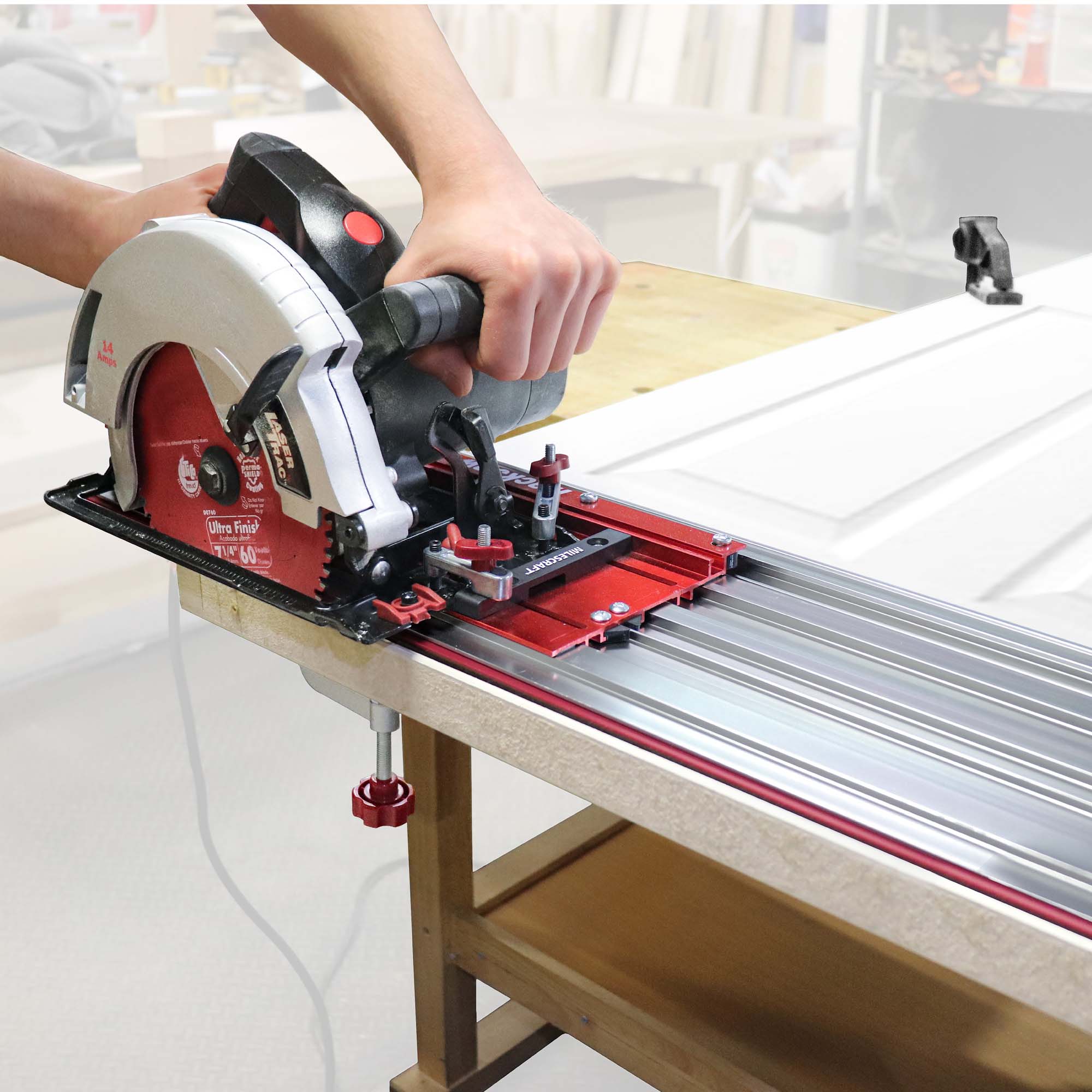
A track saw rail guide is a straight, rigid guide rail that keeps a compatible track saw moving along a controlled path, making long rip cuts, crosscuts, bevel cuts, and sheet-good breakdowns more consistent than freehand cutting.
For U.S. woodworkers, remodelers, cabinet installers, and DIYers, a track saw rail guide is especially useful when breaking down 4-by-8-foot plywood, MDF, doors, countertops, and other large panels. Instead of balancing a circular saw against a temporary straightedge, the saw rides in or against a dedicated rail while the rail establishes the cutting path.
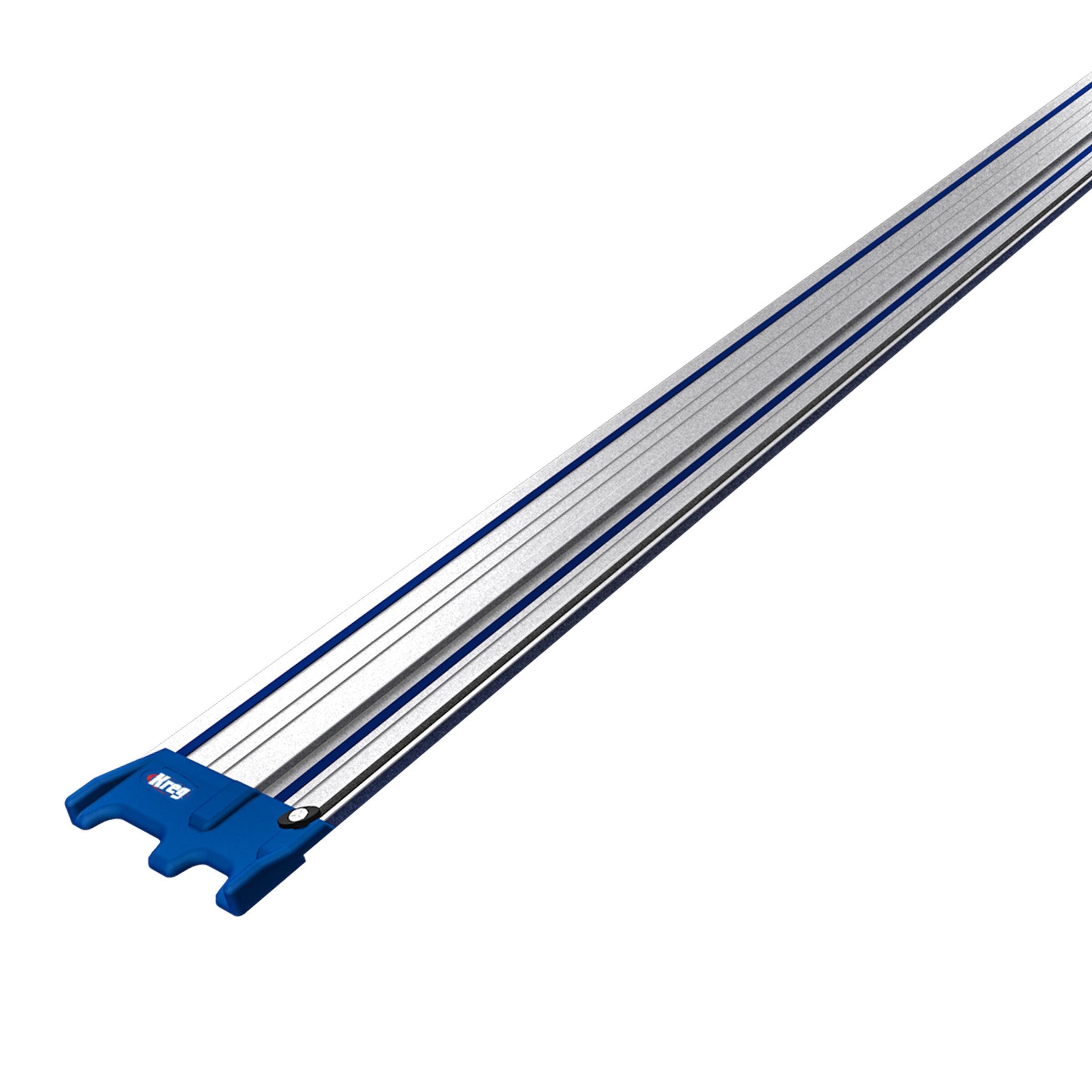
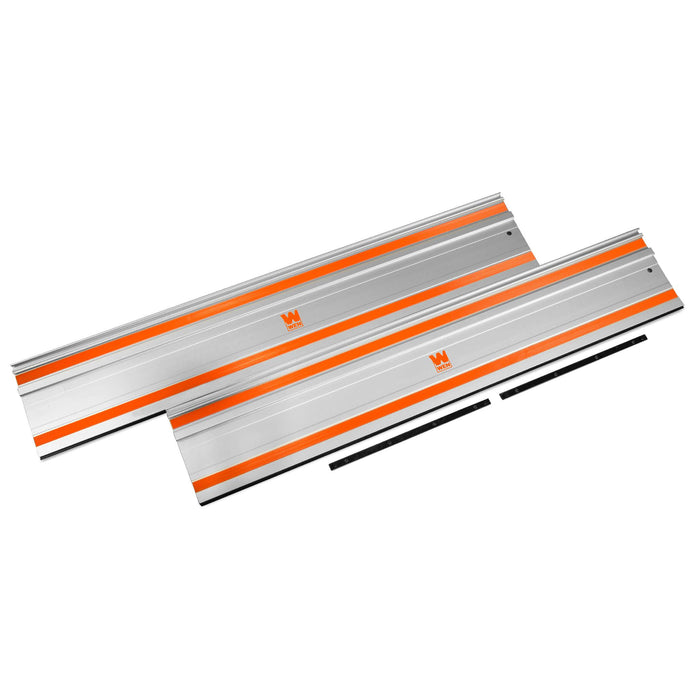
Most guide rails use an aluminum body with a shaped guide surface, low-friction contact area, and a replaceable anti-splinter or cutting strip. Some rails use anti-slip material underneath, while others can be secured with dedicated clamps. The important point is compatibility: the saw, rail profile, adjustment system, and accessories must work together. A rail that physically looks similar to another brand’s rail is not automatically interchangeable.
Source: mobileimages.lowes.com
What Is a Track Saw Rail Guide?
A track saw rail guide, also called a guide rail or track saw track, is a straight rail that guides a compatible plunge saw or track saw during a cut. The saw base engages with the rail so the operator can push the saw along a defined path instead of manually steering the saw beside a pencil line.
The rail itself does not cut the material. Its job is to establish the saw’s travel path and maintain the relationship between the saw and the intended cut line. This is why a guide rail can be useful for long cuts where even a small amount of freehand wandering can produce a noticeable error at the far end of a sheet.
Many rail systems also include a cutting-edge strip that is trimmed to the actual blade path. Once properly established, that edge can make positioning easier because the operator can align the rail’s edge with the intended cut rather than estimating the blade’s offset.
Source: kregtool.com
Rail body
Usually a long aluminum extrusion that provides the straight reference surface and supports the saw during travel.
Guide interface
The groove, lip, channel, or other profile that engages the saw base and keeps the saw aligned with the rail.
Anti-splinter strip
A sacrificial strip positioned at the cutting edge that can support the material fibers close to the blade and indicate the actual cut location.
Anti-slip surface
Rubber or foam-like material underneath the rail that helps reduce movement on the workpiece.
Connectors and clamps
Optional accessories used to join rails for longer cuts or hold a rail securely when its built-in anti-slip surface is not enough.
Track Saw Rail Guide vs. Circular Saw Straightedge
A conventional circular saw can be guided with a straightedge, but the saw usually remains beside the guide rather than mechanically engaging with it. A track saw rail guide provides a dedicated interface between the saw and the rail. That difference can make long cuts easier to control and repeat.
Some universal circular saw guide systems use a sled or adapter instead of a dedicated plunge saw. These systems can be useful, but their setup and compatibility depend on the specific guide. Do not assume that a universal rail system has the same adjustment or cutting reference as a dedicated track saw rail.
Dedicated track saw
The saw base is designed specifically to engage the guide rail.
Circular saw guide system
A sled, adapter, or guide attachment may be required to connect a conventional circular saw to the rail.
How Does a Track Saw Rail Guide Work?
The rail works by constraining the saw’s lateral movement while allowing it to travel forward along the length of the guide. The saw’s base or guide mechanism engages the rail, and adjustment features are used on some systems to remove excessive side-to-side play without making the saw difficult to push.
The rail’s cutting edge is positioned against the intended cut line. When the saw travels along the rail, the blade follows a path determined by that rail rather than by the operator’s hands alone. This is particularly useful for long sheet cuts because the operator can concentrate on maintaining steady forward pressure and keeping the saw properly seated on the track.
The rail does not automatically make every cut perfectly accurate. The workpiece must be supported properly, the rail must be positioned correctly, and the saw must be adjusted according to its manual. A bent rail, damaged guide strip, loose saw-to-rail fit, or poorly aligned rail connection can transfer directly into the cut.
Source: powertools.ridgid.com
Position the rail
Align the rail’s cutting reference with the intended cut location.
Secure the setup
Use the rail’s anti-slip surface or appropriate clamps when movement could affect accuracy.
Engage the saw
Place the saw onto the rail and adjust its guide fit according to the manufacturer’s instructions.
Make the cut
Operate the saw at a controlled feed rate while keeping the saw fully engaged with the rail.
Why the Anti-Splinter Strip Matters
The anti-splinter strip sits close to the blade’s cutting path and helps support the material fibers near the cut. On many systems, the first setup cut trims the strip to match the actual blade position. That gives the operator a physical reference for where the blade will cut.
The strip is a consumable component. If it becomes damaged, lifts away from the rail, or no longer provides the intended edge support, replacing it can restore the rail’s cutting reference and edge-support function.
Clean edge reference
The trimmed edge can make it easier to align the rail with a marked cut line.
Reduced tear-out
The strip can support fibers near the blade and reduce splintering under suitable cutting conditions.
Replaceable part
Worn or damaged strips should be replaced according to the rail manufacturer’s instructions.
How to Use a Track Saw Rail Guide
For a straight cut, start by supporting the workpiece on a stable cutting surface that will not interfere with the blade. Place the panel so the cut can be completed without the offcut closing against the blade or falling in a way that creates a hazardous pinch.
Before powering the saw, confirm that the blade depth, bevel setting, rail position, and saw-to-rail adjustment are correct. The exact adjustment procedure varies by saw, so the manufacturer’s manual should take priority over a generic procedure.
For a first use or a newly installed cutting strip, follow the rail manufacturer’s trimming procedure. This establishes the strip’s edge in relation to that particular saw and blade.
Source: wenproducts.com
1. Prepare the workpiece
Support the panel across its surface so the cut is stable and the blade will not contact the support underneath.
2. Mark the cut
Measure from a reliable reference edge and mark the intended cut location.
3. Position the rail
Align the rail’s cutting edge with the intended cut and confirm the full rail has adequate support.
4. Secure the rail if needed
Use compatible clamps when the material, angle, surface, or cutting conditions could allow the rail to move.
5. Set the saw
Adjust cutting depth and bevel angle according to the material and the saw manufacturer’s instructions.
6. Check the guide fit
The saw should move smoothly without excessive lateral play. Do not overtighten adjustments to the point that the saw binds.
7. Make the cut
Start the saw as specified by the manual, allow the blade to reach operating speed when required, and move the saw steadily along the rail.
8. Complete the cut safely
Keep the saw engaged with the rail until the blade has cleared the workpiece, then follow the manufacturer’s shutdown and blade-stop procedure.
How Deep Should a Track Saw Cut?
Set the cutting depth only as deep as the job requires. For a sheet of known thickness, the goal is to have the blade pass through the material while avoiding unnecessary blade exposure below the workpiece. The exact setting depends on the saw design, blade diameter, material thickness, and manufacturer’s instructions.
For example, a 3/4-inch plywood panel does not require the same depth setting as a 1-1/2-inch solid-wood board. Before cutting, verify that the blade will not strike the support surface or hidden hardware beneath the workpiece.
Thin sheet goods
Use only enough blade depth to complete the cut while protecting the support surface below.
Thicker lumber
Confirm the saw’s rated cutting capacity at the selected bevel angle before starting.
Bevel cuts
Cutting depth generally changes when the blade is tilted, so check the saw’s capacity at the selected angle.
Signs of a Proper Setup
A correctly adjusted rail system should allow the saw to travel smoothly without excessive side-to-side movement. The rail should remain aligned during the cut, and the saw should not require unusual force to move forward.
After the cut, check the result at several points along the edge. A straight cut with consistent alignment suggests that the rail, saw, and workpiece were properly controlled.
Smooth travel
The saw moves along the rail without binding or rocking.
Stable rail
The rail does not shift as the saw passes.
Consistent cut
The finished edge follows the intended line from the beginning to the end of the cut.
Choosing the Right Track Saw Rail Guide
Choose a rail based on the exact saw you own, the longest cut you regularly make, and the accessories you need. Rail length is one of the most visible specifications, but compatibility and the quality of the guide interface are just as important.
A rail that is longer than necessary can be harder to transport and store, while a rail that is too short may require a connection in the middle of an important cut. For common U.S. sheet goods, a rail system that can cover the length of the intended rip or crosscut without awkward repositioning is usually easier to work with.
When comparing rails, check the manufacturer’s compatibility list rather than relying on claims that two systems look similar. Some guide rails work with multiple saw brands, while other systems are intentionally restricted to specific saw families.
Source: cdn11.bigcommerce.com
Compatibility
Verify the exact saw model and rail system before buying. Check whether clamps, connectors, adapters, and replacement strips are also compatible.
Rail length
Choose enough usable cutting length for the jobs you perform most often, with connected rails available when longer cuts are needed.
Guide adjustment
A good fit should control lateral movement while allowing smooth travel.
Anti-slip system
Consider whether the rail’s underside is sufficient for your materials and working conditions or whether you need compatible clamps.
Replacement parts
Check whether cutting strips, glide strips, anti-slip material, and connectors are available separately.
Long aluminum rails can bend if stored poorly, so a suitable storage location or protective bag can help keep the rail straight and undamaged.
When You Need a Longer Rail
If the available rail is shorter than the required cut, compatible connectors can join two or more rails. The joint needs to be aligned carefully so the saw can travel across it without encountering a step, gap, or change in direction.
For a long cut through a full sheet, support the connected rail over its working length and verify the connection before starting. Some systems use two connector bars or similar hardware to maintain alignment, while the exact procedure depends on the rail manufacturer.
Align both rails
Make sure the joined sections form one continuous straight guide.
Tighten connectors evenly
Follow the connector manufacturer’s tightening procedure rather than relying on excessive force.
Check the joint
Run the saw over the connection without powering it to confirm smooth movement before making the actual cut.
Dedicated Track Saw Rail vs. Universal Circular Saw Guide
A dedicated track saw rail is designed around a compatible plunge or track saw. A universal circular saw guide typically adds a sled or adapter so an existing circular saw can be guided. The second approach can reduce the need to buy a dedicated saw, but it may require more setup and may have different cut-location references.
If you already own a compatible track saw, use its specified rail system or a manufacturer-approved alternative. If you own a conventional circular saw, compare the cost and limitations of a universal guide system against a dedicated track saw before deciding which setup better matches your work.
Dedicated system
Usually provides a direct saw-to-rail interface designed around particular saw models.
Universal system
Uses an adapter or sled to guide a conventional circular saw and can have different compatibility limits.
Track Saw Rail Guide Problems and Safety Checks
When a track saw cut wanders, starts hard, splinters unexpectedly, or produces an inconsistent edge, check the setup before changing multiple variables at once. The rail may be moving, the saw may have excessive guide clearance, the blade may be dull, or the workpiece may not be supported correctly.
Safety remains the operator’s responsibility. A guide rail helps control the saw, but it does not prevent every kickback or contact hazard. Use the protective equipment specified by the saw manufacturer, keep hands away from the blade path, secure the workpiece, and disconnect power before making adjustments or changing a blade.
Source: upload.wikimedia.org
Saw drifts away from the line
Check that the saw is properly engaged with the rail, the guide adjustment is correct, the rail is straight, and the rail has not moved.
Rail moves during the cut
Clean the rail’s anti-slip surfaces and workpiece, reposition the rail, and use compatible clamps when additional holding force is needed.
Cut edge is rough or splintered
Check blade sharpness, tooth design, cutting direction, material support, and the condition of the anti-splinter strip.
Saw binds on the rail
Stop the operation and inspect the rail, guide interface, and adjustment settings. Do not force a saw that is binding.
Long cut becomes inaccurate
Inspect the entire rail length and any connector joint. A small alignment error can become more visible over a long cut.
Safety Boundaries for Rail-Guided Cutting
Always follow the operating and safety instructions supplied with the specific saw and rail. Manufacturer manuals can differ in blade requirements, cutting depth, anti-tip procedures, rail adjustment, dust collection, and approved accessories.
Use appropriate eye protection and hearing protection for the cutting environment. Dust collection can reduce airborne dust, but it does not make cutting dust-free. When working with materials that generate hazardous dust, follow the material manufacturer’s and tool manufacturer’s applicable safety instructions and use an appropriate dust-control method.
Never assume that the rail itself makes an unstable workpiece safe. Large sheets should be supported so the cut does not create a dangerous pinch or cause the material to move unexpectedly.
Disconnect power before adjustments
Remove the battery or disconnect the saw from its power source before changing blades or making adjustments that could expose you to the blade.
Keep the blade path clear
Keep hands, cords, clamps, and loose objects away from the cutting path.
Control the offcut
Support the material so the offcut cannot fall, rotate, or close the kerf around the blade.
Inspect before cutting
Do not use a rail with a significant bend, damaged guide surface, loose connector, or compromised anti-slip material.
What to Check When the Cut Is Not Straight
Start with the simplest causes. Confirm that the rail did not move, then check the saw-to-rail fit. Next inspect the blade and workpiece support. If the problem appears only on connected rails, inspect the connector joint and alignment.
If the saw remains correctly engaged with a straight rail but the blade still produces a wandering cut, the issue may involve blade deflection, incorrect blade selection, excessive feed pressure, or a problem with the saw itself. Consult the saw manufacturer if the cause cannot be identified safely.
First check
Confirm the rail stayed on the intended line.
Second check
Confirm the saw is properly adjusted to the rail.
Third check
Inspect the blade and material support.
Fourth check
Inspect connected rail sections and connector hardware.
Frequently Asked Questions
Q
Can any track saw use any guide rail?
No. Compatibility depends on the saw’s guide interface and the rail’s profile. Some manufacturers document compatibility with selected competitor rails, while other systems are designed for a specific saw family. Check the exact saw model and rail specifications before purchasing or mixing components.
Q
Do I need clamps for a track saw rail guide?
Not always. Some rails use anti-slip material designed to hold the rail on the workpiece during normal cutting. Clamps can still be useful when cutting slippery materials, making angled cuts, working near an edge, or when the manufacturer recommends additional securing.
Q
How long should a track saw rail be?
Choose a rail long enough for the cuts you regularly make without awkward repositioning. For large U.S. sheet goods, longer rails or connectable rail systems are useful for full-length cuts. The actual cutting capacity can be shorter than the physical rail length because the saw needs room to enter and leave the cut.
Q
Can I connect two track saw rails together?
Yes, when the rail system is designed for connectors. The connection must be straight and secure so the saw travels smoothly across the joint. Use the manufacturer’s specified connectors and verify the alignment before making the cut.
Q
Why is my track saw not cutting straight even though the rail is straight?
Check rail movement, saw-to-rail adjustment, blade condition, feed pressure, workpiece support, and any connector joint. A straight rail cannot compensate for a loose saw interface, a dull or unsuitable blade, or material movement during the cut.
Q
Can a track saw rail guide be used for bevel cuts?
Many track saw systems support bevel cutting with the saw still guided by the rail. The available angle range and anti-tip requirements vary by model. Check the saw manual and engage any required anti-tip feature before making an angled cut.
✦ Wrapping Up
Conclusion
A track saw rail guide turns a track saw into a controlled cutting system for straight, repeatable work across plywood, MDF, solid wood, doors, and other suitable materials. The rail establishes the cutting path while the saw moves along it, reducing the need to steer the tool freehand over long distances.
The most reliable results come from treating the rail and saw as one system. Verify compatibility, position the rail carefully, support the workpiece, adjust the saw correctly, use an appropriate blade, and inspect the rail and connectors before important cuts. When a cut goes wrong, troubleshoot rail movement, guide adjustment, blade condition, and workpiece support before assuming the rail itself is defective.
💡 Key Takeaway
Before your next cut, confirm saw-to-rail compatibility, mark the cut accurately, position the rail with its cutting edge on the mark, secure it when necessary, set the correct blade depth, and make a controlled pass without forcing the saw.