A proper miter saw setup starts with a stable, level mounting surface, adequate support for the material, a correctly installed blade and guard, accurate fence and angle alignment, and a test cut before you use project stock.
For a U.S. homeowner, remodeler, carpenter, or woodworker setting up a miter saw in a garage, workshop, or jobsite, accuracy begins before the first cut. A saw that sits on an unstable bench or has an unsupported board can move during operation, while a small alignment error can turn several otherwise identical cuts into poorly fitting joints.
The setup process is not identical for every model. A 10-inch sliding compound saw, a compact cordless saw, and a large 12-inch dual-bevel saw can have different mounting holes, adjustment mechanisms, cutting capacities, and support requirements. Use this guide as a general procedure, then use the owner’s manual for your specific saw whenever it gives different instructions.
The goal is simple: secure the saw, give long stock dependable support, confirm that the blade and fence are square, set the miter and bevel scales, and verify the result with scrap material. That sequence provides a repeatable starting point for crosscuts, miters, bevels, and compound cuts.
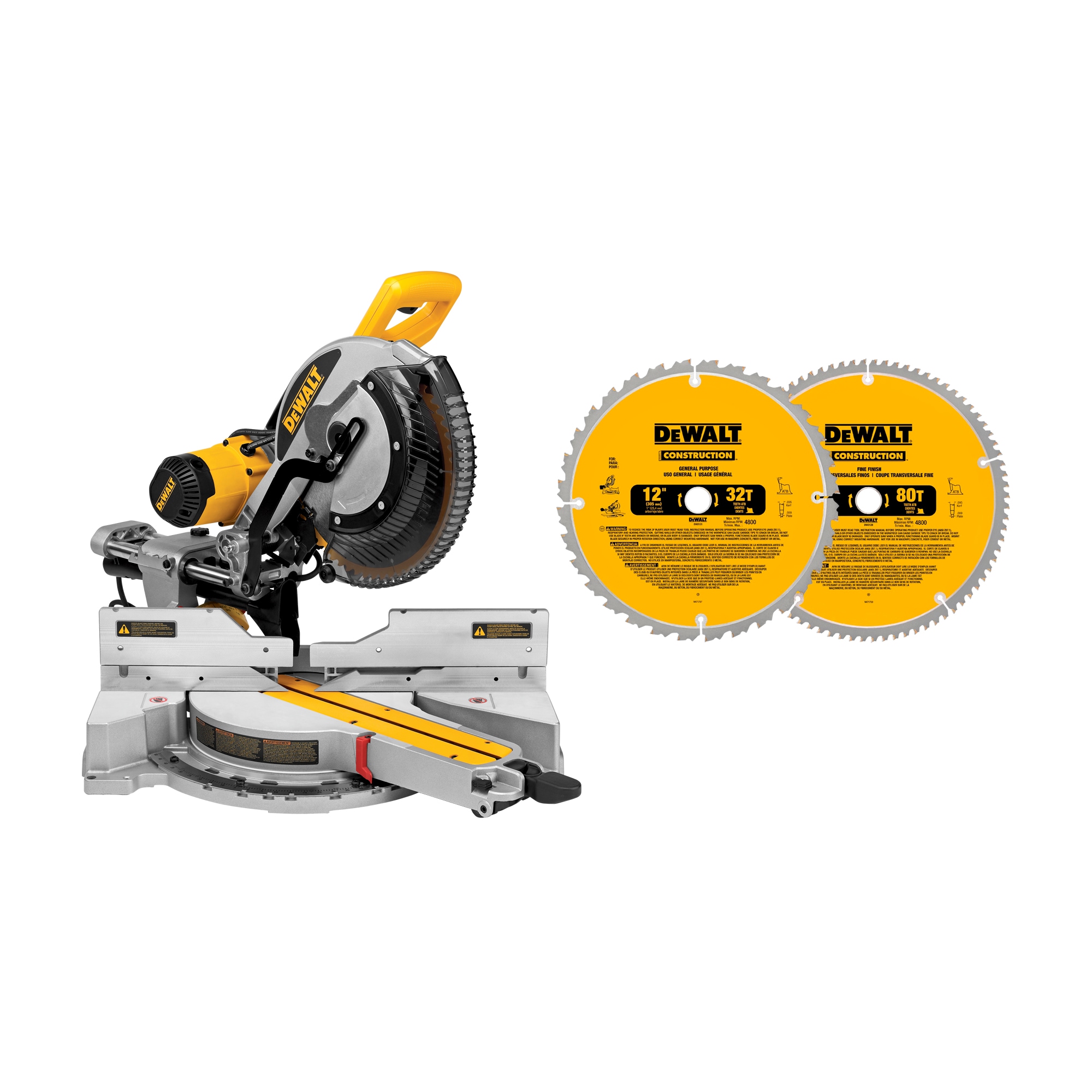
Source: lowes.com
What You Need Before Setting Up a Miter Saw
Before mounting or calibrating the saw, gather the tools and materials needed to make the setup stable and measurable. The exact hardware depends on whether you are using a permanent workbench, a portable miter saw stand, or a temporary jobsite table.
For most setups, you will need the saw’s owner’s manual, the correct blade, mounting hardware or clamps approved for the saw, a combination square or another reliable square, a straightedge or level, scrap lumber for test cuts, and appropriate personal protective equipment. A tape measure and pencil are also useful when establishing extensions and stops.
Disconnect the saw from its power source before performing assembly, blade changes, or adjustments. For cordless models, remove the battery when the manual calls for the battery to be disconnected during setup work. Inspect the blade guard, power cord or battery interface, fence, table, miter lock, bevel lock, slide mechanism, and mounting points before proceeding.
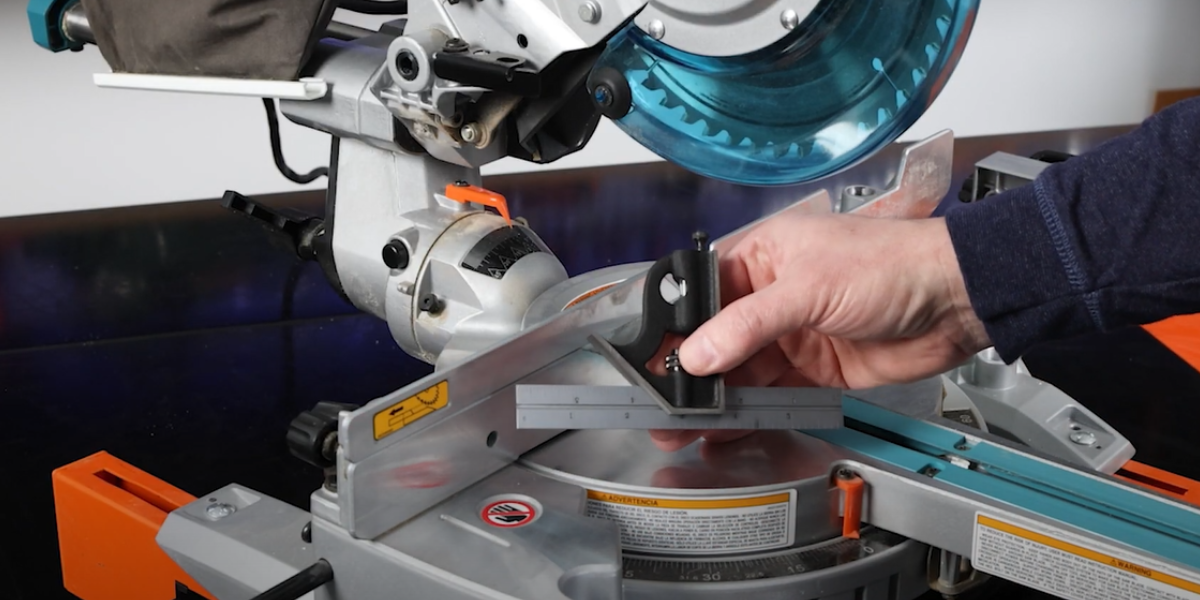
Source: nature-bois-concept.com
Reliable measuring tools
Use a square that is straight and known to be accurate. A poor square can make a correctly aligned saw appear out of alignment.
Stable mounting hardware
Use the mounting holes, clamps, brackets, or stand hardware specified for your saw. The mounting method must prevent the saw from shifting, tipping, or walking during use.
Suitable work supports
Provide support on both sides when cutting long boards. The supports should be stable and approximately flush with the saw table.
Scrap material
Keep several pieces of straight, flat scrap available for checking 90-degree and angled cuts before using finished material.
Choose a Stable Location
Set the saw where the table and fence can remain unobstructed and where the cutting head can travel through its full range. A sliding miter saw also needs sufficient clearance behind or around the rails according to its design.
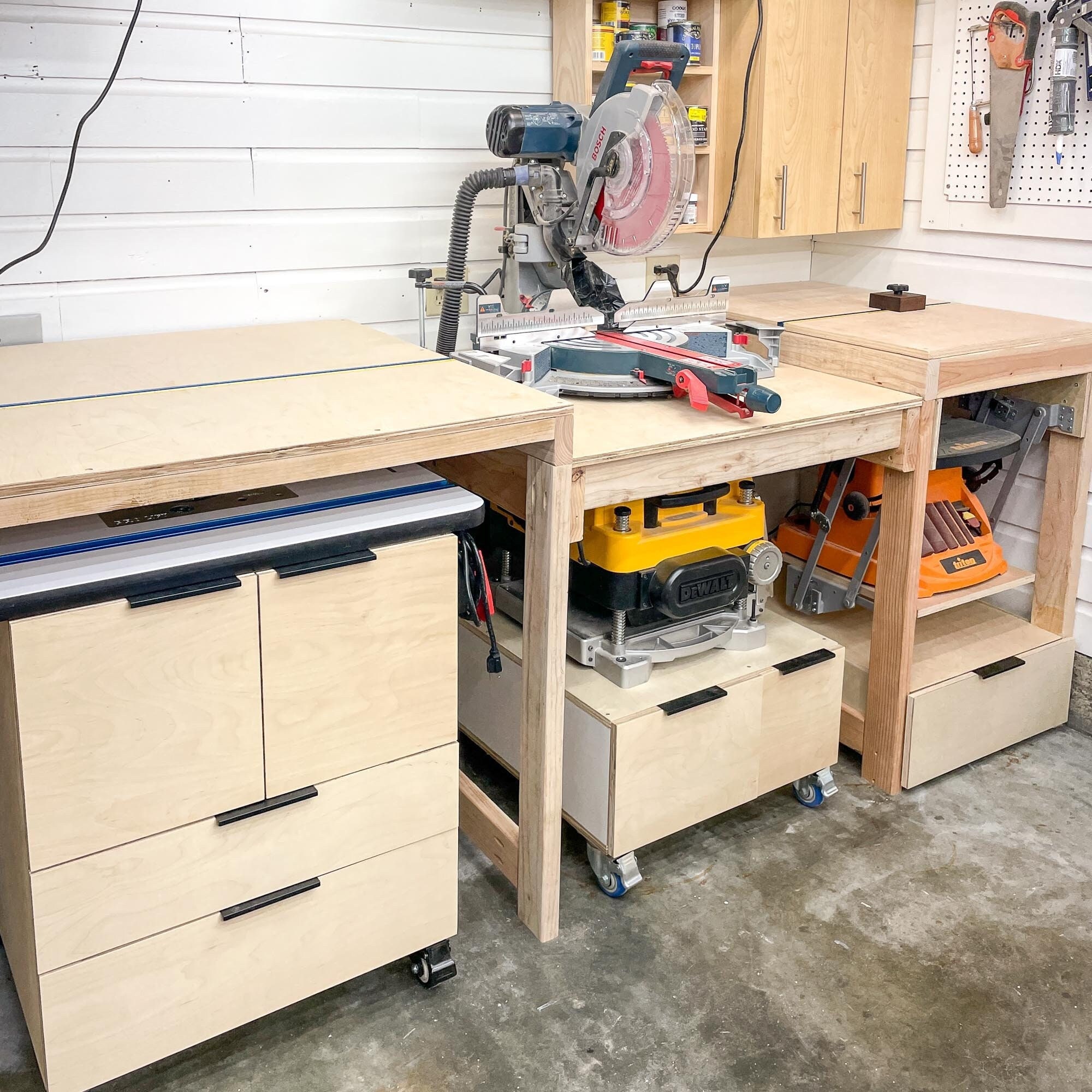
For a permanent workshop setup, a dedicated miter saw station can make long cuts easier because the extensions, fences, and stops remain aligned with the saw. For a portable setup, a purpose-built stand can provide similar support while allowing the saw to be moved around a U.S. jobsite or garage.
Flat surface
The supporting surface should be firm, level, and strong enough to carry the saw and the workpiece.
Adequate clearance
Allow room for the saw head, slide mechanism, workpiece, operator, and cutoff pieces without interference.
Good lighting
Position the saw where the cut line, miter scale, bevel scale, and workpiece are clearly visible.
How to Mount and Support the Miter Saw
Secure the miter saw before making calibration checks or cuts. A saw that moves while you cut can change the relationship between the workpiece, fence, and blade and can create an unstable cutting condition.
For permanent installation, place the saw in its intended position, mark the mounting holes, and fasten it using the hardware and dimensions specified by the manufacturer. For temporary installation, use only suitable clamping areas and make sure the clamps do not interfere with the saw head, guard, slide mechanism, or angle adjustments.
If you use a commercial miter saw stand, follow the stand manufacturer’s mounting instructions as well as the saw manufacturer’s instructions. Lock folding legs, tighten mounting brackets, and place the complete assembly on a solid, level surface before operating the tool.
Source: woodcraft.com
Permanent bench setup
Bolt the saw through its designated mounting holes when the installation is intended to remain in place. Check the finished installation for movement before operating the saw.
Portable stand setup
Fully open and lock the stand, secure the saw to its mounting brackets, and verify that the stand remains stable when a long board is placed on the supports.
Temporary workbench setup
Clamp the saw securely to a suitable work surface when the manufacturer’s instructions permit this method. Confirm that the clamps do not restrict normal saw movement.
Long-stock support
Use extension wings, auxiliary tables, roller supports, or another stable support method to prevent long material from sagging or tipping.
Level the Work Supports With the Saw Table
Long workpieces should remain supported as they approach and leave the blade. If an extension table is too high or too low, the board can tilt against the fence and affect the cut. Place a straightedge or long level across the saw table and the support surface to check their relationship.
Adjust the support height until the workpiece can rest naturally on the saw table and the extensions. The objective is not a specific stand height for every workshop; it is a stable, continuous support plane suited to the saw and material.
Check both sides
Make sure the left and right supports are aligned with the saw table rather than assuming one side represents the other.
Avoid unsupported overhang
Long or heavy boards can create leverage that makes an otherwise stable stand move or tip if the far end is unsupported.
How to Square and Calibrate a Miter Saw
After the saw is secure, calibrate the basic 90-degree relationships before relying on the miter scale or bevel scale for precision work. The exact adjustment screws and stops vary by model, so identify the correct adjustment procedure in your owner’s manual before loosening hardware.
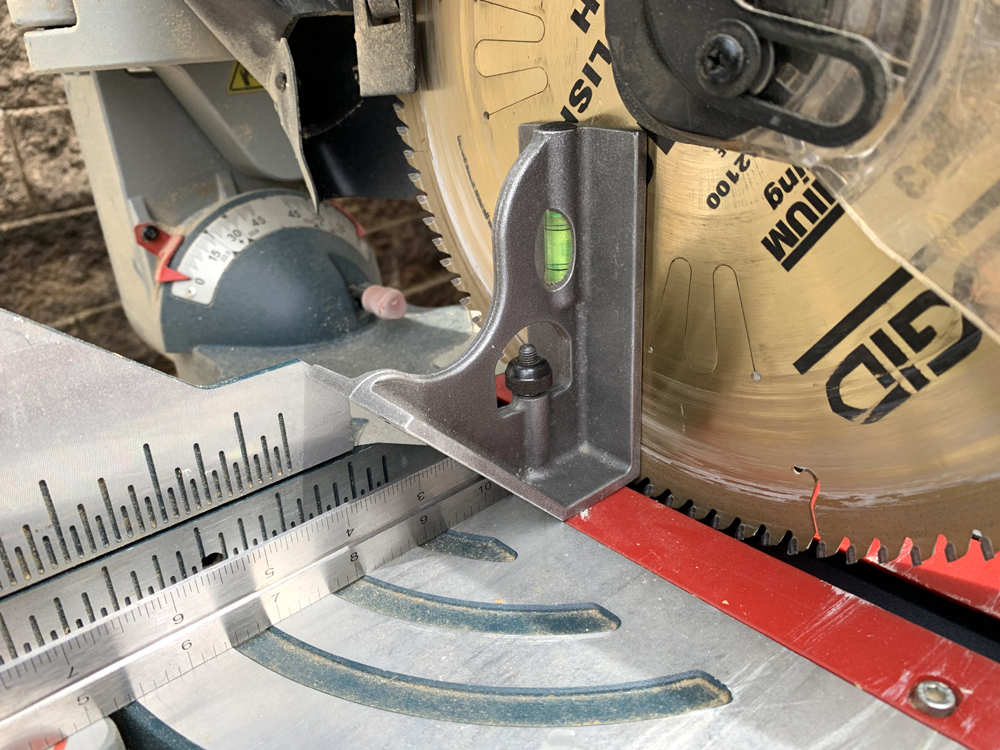
Start with the blade at the normal 0-degree miter and 0-degree bevel positions. With the saw disconnected from power, lower or position the blade as directed by the manufacturer and use a reliable square to check the blade against the fence and table. When checking the blade, place the square against the flat blade body rather than the carbide teeth because the teeth can introduce an inaccurate reference.
Source: fix.com
Check the blade against the table
At the 0-degree bevel setting, verify that the blade is perpendicular to the saw table. If there is a visible gap between the square and blade body, follow the manufacturer’s bevel adjustment procedure.
Check the blade against the fence
At the 0-degree miter setting, verify that the blade is perpendicular to the fence. A gap indicates that the fence or miter mechanism needs adjustment.
Set the pointer
Once the mechanical alignment is correct, adjust the miter and bevel indicators so their zero marks correspond with the actual calibrated position.
Check the 45-degree positions
Verify the manufacturer’s 45-degree bevel and miter settings when those angles are important to your work. Do not assume that a zero-degree calibration automatically proves every other angle.
Use a Test Cut to Confirm Accuracy
A square measurement tells you about the setup, but a test cut shows how the complete system behaves with real material. Cut two pieces of straight scrap at the same angle and bring the cut edges together. For a 90-degree corner test, two accurately cut 45-degree pieces should meet cleanly when assembled as a right-angle joint.
If the joint shows a gap, do not immediately move the pointer. First determine whether the problem comes from the miter angle, bevel angle, fence alignment, material movement, or the way the pieces were positioned. Make one adjustment at a time and repeat the test.
Gap at one side of a miter joint
Recheck the miter angle and confirm that the workpiece was held consistently against the fence.
Uneven bevel
Check the bevel setting and verify that the material remained flat against the table during the cut.
Repeatedly inconsistent cuts
Inspect the mounting, fence, stop, blade condition, workpiece support, and slide mechanism before making further angle adjustments.
Set the Fence, Stops, Blade, and Dust Collection
Once the basic geometry is correct, configure the fence and repeatable stops around the type of work you actually perform. A fence keeps material positioned consistently, while a stop allows multiple pieces to be cut to the same length without repeatedly measuring from scratch.
For trim, cabinetry, framing, and furniture work, a well-aligned auxiliary fence or stop system can make repeated cuts faster and more consistent. However, accessories must not interfere with the blade, guard, sliding head, bevel movement, or the manufacturer’s specified cutting capacity.
Install a blade that is compatible with your saw’s diameter, arbor, speed rating, and intended material. A fine-tooth crosscut blade may be appropriate for clean wood cuts, while construction work may call for a different tooth configuration. Always follow the blade and saw manufacturer’s compatibility requirements.
Source: etsy.com
Fence
Keep the fence clean and aligned. If the fence has adjustable sections, align them according to the saw manufacturer’s procedure.
Stop block
Position a stop where it can contact the workpiece without creating a trapped cutoff or interfering with blade movement.
Blade
Confirm the blade diameter, arbor size, rotation direction, and maximum rated speed before installation. The blade teeth must face in the correct direction for the saw.
Connect the saw’s dust port to the compatible dust bag, extractor, or shop vacuum system when appropriate. Dust collection can reduce airborne debris and cleanup, but it does not eliminate all sawdust.
Set a Repeatable Stop Without Creating a Safety Problem
A stop is useful when several pieces must be identical in length, but the stop must be positioned so the offcut can move freely away from the blade. Avoid arrangements that trap a short cutoff between the blade and a fixed stop when the geometry of the cut could cause the piece to bind.
After positioning the stop, cut one test piece and measure it. If the length is correct, use that piece to confirm the setup before producing the rest of the batch.
Test the stop first
Use scrap material to verify the final length before cutting finished stock.
Check the offcut path
Make sure the cutoff has room to move away from the blade and cannot become trapped by the stop or fence.
Keep Dust Collection Clear
Miter saws can throw dust in several directions because the blade is exposed above the table during cutting. Keep the dust port, hose, and collection area clear of blockages, and position the hose so it does not interfere with the saw’s movement.
For indoor woodworking, combine collection with sensible shop housekeeping and appropriate respiratory and eye protection for the material and operation. The goal is to control dust without allowing the collection hose or accessories to become an obstruction.
Use the correct port
Match the hose or adapter to the saw’s dust outlet and keep the connection secure.
Keep the hose out of the travel path
Route the hose so the sliding rails, bevel movement, and saw head can operate without snagging.
Miter Saw Safety Checks Before the First Cut
A complete setup is not finished until the saw passes a safety check. Keep guards in place and verify that the lower blade guard moves as designed. Confirm that the workpiece is supported and secured appropriately, especially when its size or shape makes hand support unreliable.
Wear appropriate eye protection and hearing protection for the operation. Keep hands outside the manufacturer’s marked no-hand zone and never reach behind or around a spinning blade to remove scraps. Do not start the saw until the blade and cutting path are clear.
For sliding models, use the cutting motion specified by the manufacturer. Some saws require the head to be brought forward before cutting and pushed through the material, while other models have different procedures. Do not invent a cutting technique that conflicts with the owner’s manual.
Source: homeimprovementandrepairs.com
Secure the material
Keep the workpiece firmly against the fence and table. Use the supplied or compatible clamp when the material, cut, or saw manual calls for it.
Keep hands clear
Never place fingers near the blade path or cross one hand over the intended cutting line.
Wait for the blade to stop
After switching the saw off, keep the cutting head controlled and wait for the blade to come to a complete stop before removing material or scraps.
Check for interference
Before powering the saw, manually check that clamps, fences, stops, hoses, and the workpiece do not interfere with the blade guard or saw head.
Disconnect before adjustments
Disconnect the power source before changing blades or making adjustments that require access near moving or cutting components.
Signs Your Setup Is Ready
The saw should remain stable when operated, the table and support surfaces should provide continuous support, and the fence should hold the workpiece consistently. The miter and bevel settings should correspond with their actual measured positions, and a test cut should produce the expected result.
If the saw shifts, the workpiece rocks, the guard does not move correctly, the blade contacts the insert unexpectedly, or the test cuts do not agree with your measured settings, stop and correct the problem before continuing.
Stable saw
The saw and stand remain stationary during normal operation.
Stable workpiece
The material stays flat on the table and firmly against the fence throughout the cut.
Accurate test cut
Scrap pieces meet the intended angle without unexplained gaps or twisting.
Clear blade path
The blade, guard, clamp, stop, hose, and workpiece can move through the complete operation without interference.
What to Do When the Setup Is Not Accurate
If a test cut is wrong, return to the setup sequence rather than trying to compensate with the measurement marks. First check whether the saw moved. Then inspect the fence, blade condition, miter setting, bevel setting, and workpiece support. Make only one adjustment at a time so you know which change affected the result.
If the saw cannot be brought into alignment using the adjustments described in its manual, or if a guard, mounting component, switch, electrical part, or structural component is damaged, stop using the saw and have it serviced by an appropriately qualified professional.
Saw moves during cutting
Improve the mounting or stand stability before attempting further calibration.
Fence is out of square
Use the manufacturer’s fence adjustment procedure rather than forcing the fence into position.
Angles change between cuts
Check the miter and bevel locks, detents, blade condition, workpiece support, and operator positioning.
Guard does not operate correctly
Do not continue cutting. Follow the manufacturer’s service instructions before returning the saw to use.
Frequently Asked Questions
Q
How high should a miter saw stand be?
There is no single universal stand height for every user or saw. Set the saw at a comfortable working height while making sure the table is stable and the support wings are aligned with the saw table. For a permanent station, the surrounding work surface should also be adjusted to the same support height.
Q
Does a new miter saw need to be calibrated?
A new saw may be adjusted at the factory, but transportation, assembly, or handling can affect alignment. It is sensible to inspect the setup and make a test cut before relying on the saw for precision work. Always use the adjustment procedure specified in the owner’s manual.
Q
How do I know if my miter saw fence is square?
Disconnect the saw from its power source, set the miter to the appropriate zero position, and use a reliable square to compare the fence with the blade body. A visible gap indicates that the relationship needs investigation and possible adjustment according to the saw manual.
Q
Should a miter saw be bolted down?
A permanent installation is commonly secured through the saw’s designated mounting holes, while portable setups may use a compatible stand or approved clamping method. The important requirement is that the complete saw and support system cannot move or tip during operation. Follow the mounting instructions for your particular model.
Q
Why are my miter saw cuts not accurate even when the angle is set correctly?
The angle setting is only one part of the system. Check saw stability, fence alignment, bevel alignment, blade condition, workpiece support, stop position, and whether the material stayed firmly against the fence. A test cut can help isolate which part of the setup is producing the error.
✦ Wrapping Up
Conclusion
A dependable miter saw setup is built around stability, alignment, support, and verification. Mount the saw securely, provide level support for long material, inspect the blade and guard, square the fence and blade, set the miter and bevel positions, and then confirm the setup with scrap before cutting finished stock.
The best setup also matches the way you work. A portable stand may make sense for a U.S. jobsite or small garage, while a dedicated station can provide permanent extensions, fences, stops, and dust collection in a workshop. Regardless of the arrangement, the saw should remain stable and the workpiece should remain controlled throughout the cut.
💡 Key Takeaway
Before your next project cut, disconnect the saw, verify its mounting and supports, check the blade-to-fence and blade-to-table alignment, inspect the guard, and make one test cut in scrap. If the test passes, proceed to your project material; if it fails, correct the setup before continuing.