A miter saw depth stop limits how far the blade travels downward. In U.S. woodworking shops and jobsites, it is mainly useful for controlled non-through cuts such as grooves, shallow dados, kerfs, and some joinery operations. The exact adjustment procedure varies by saw, so use your model’s manual for the specific control and clearance requirements.
For American woodworkers working with common stock such as 1x4s, 2x4s, plywood, trim, and hardwood boards, a depth stop can turn a standard miter saw into a useful tool for making repeated shallow cuts. Instead of allowing the blade to reach its normal maximum depth, the mechanism stops the saw head at a predetermined point.
The basic idea is simple, but the adjustment deserves care. Manufacturer instructions from Bosch, DEWALT, Ryobi, and other saw makers describe depth stops as mechanisms that limit blade travel or provide a controlled depth for grooves and other non-through cuts. Some saws use a threaded depth-stop screw and lock nut, while others use a depth-stop plate, lever, or adjustable knob. Because these systems are not identical, never assume that a procedure from one model applies to another.
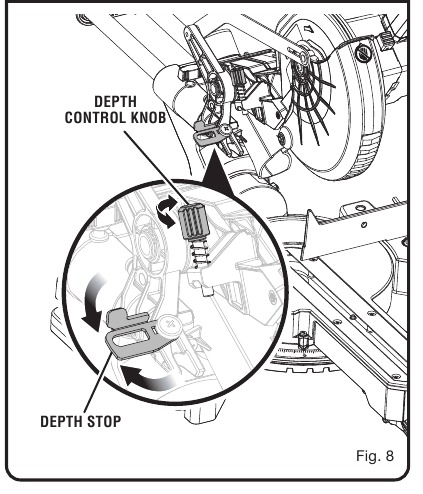
Source: manualslib.com
What Is a Miter Saw Depth Stop?
A miter saw depth stop is a mechanical adjustment that limits the downward movement of the saw head or blade. When the stop is engaged, the blade reaches the selected position and cannot continue downward beyond that point. This creates a repeatable maximum cutting depth.
The depth stop is useful when you do not want the blade to cut completely through the material. This is why it is commonly associated with grooves, dados, shallow channels, relief cuts, and some joinery work. WOOD Magazine has also described adjustable depth stops as a way to limit blade plunge when cutting dadoes or tenons.
Do not confuse a depth stop with a length stop. A depth stop controls how deep the blade cuts into the material. A length stop controls where the end of the workpiece sits so multiple pieces can be cut to the same length.
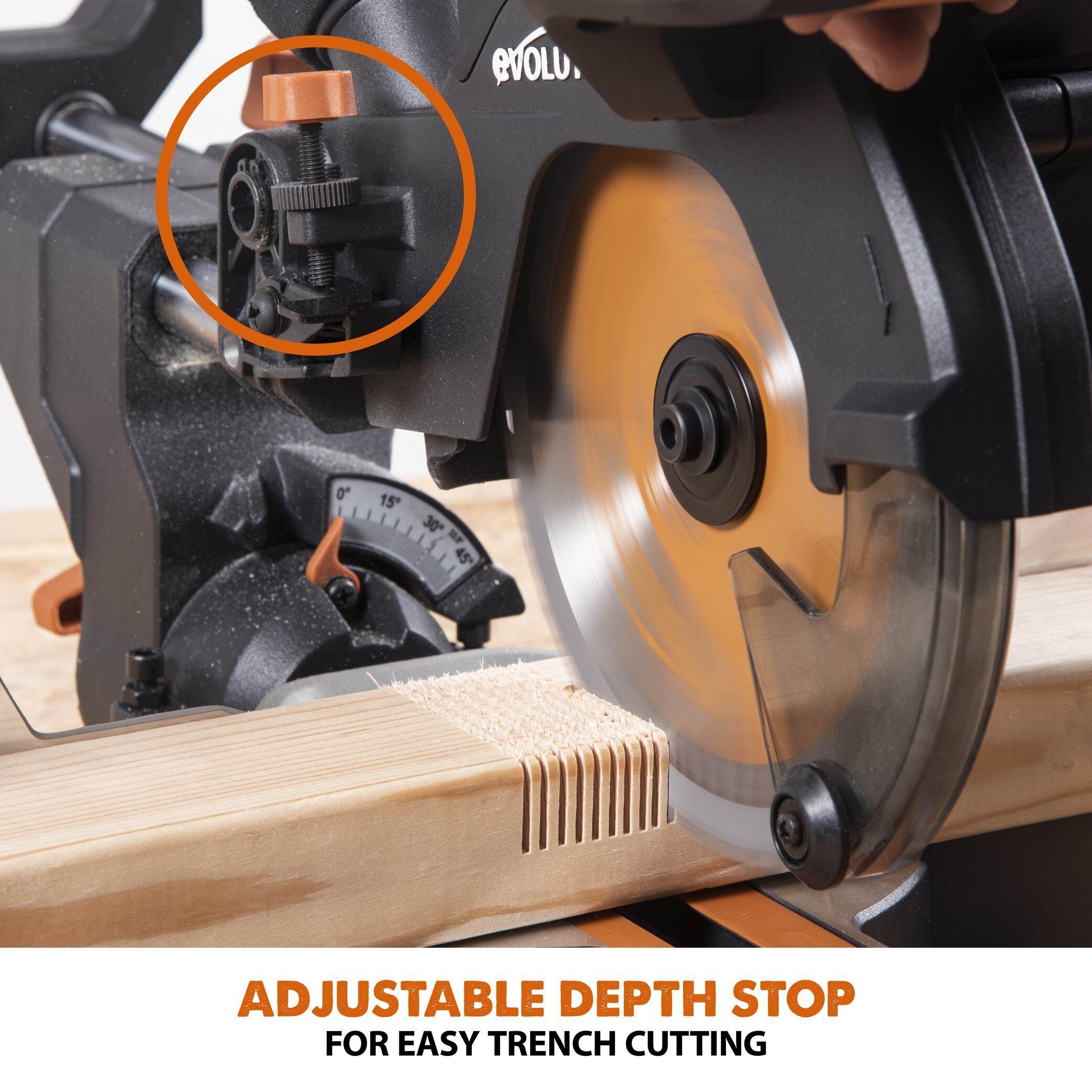
Source: images.squarespace-cdn.com
Depth stop
Limits the downward travel of the blade and therefore controls cutting depth.
Length stop
Positions the workpiece at a repeatable distance from the blade for consistent cut lengths.
Depth adjustment screw
On many saws, a threaded screw changes the point where the saw head stops.
Depth-stop plate or lever
Some designs use a plate, tab, lever, or similar surface for the adjustment screw to contact.
Why Does a Miter Saw Need a Depth Stop?
A normal crosscut is usually intended to pass completely through the workpiece. A groove or dado is different: the blade removes material without separating the board. The depth stop provides a physical limit so the blade can repeatedly stop at approximately the same depth.
This can be useful when producing several identical joints. Instead of estimating the blade height for every cut, the stop can remain at a selected setting while multiple pieces are processed.
Grooves
A controlled-depth cut can form a channel along or across a board.
Shallow kerfs
Repeated shallow cuts can remove material in a controlled area.
Joinery
Selected lap and notch operations can benefit from a repeatable blade depth.
How to Adjust a Miter Saw Depth Stop
The safest adjustment method is to follow the exact procedure in the owner’s manual for your saw. Across different designs, the general process is similar: disconnect the saw from power, engage the depth-stop mechanism, adjust the stop screw or control, verify clearance, and test the resulting cut on scrap.
For example, DEWALT instructions for supported miter saws describe rotating the depth stop forward, setting the depth-adjustment screw to the desired cut depth, and securing the adjustment with the wing nut. Bosch manuals use different arrangements on different models, including depth-stop plates and depth-stop bolts. These differences are why the model-specific instructions matter.
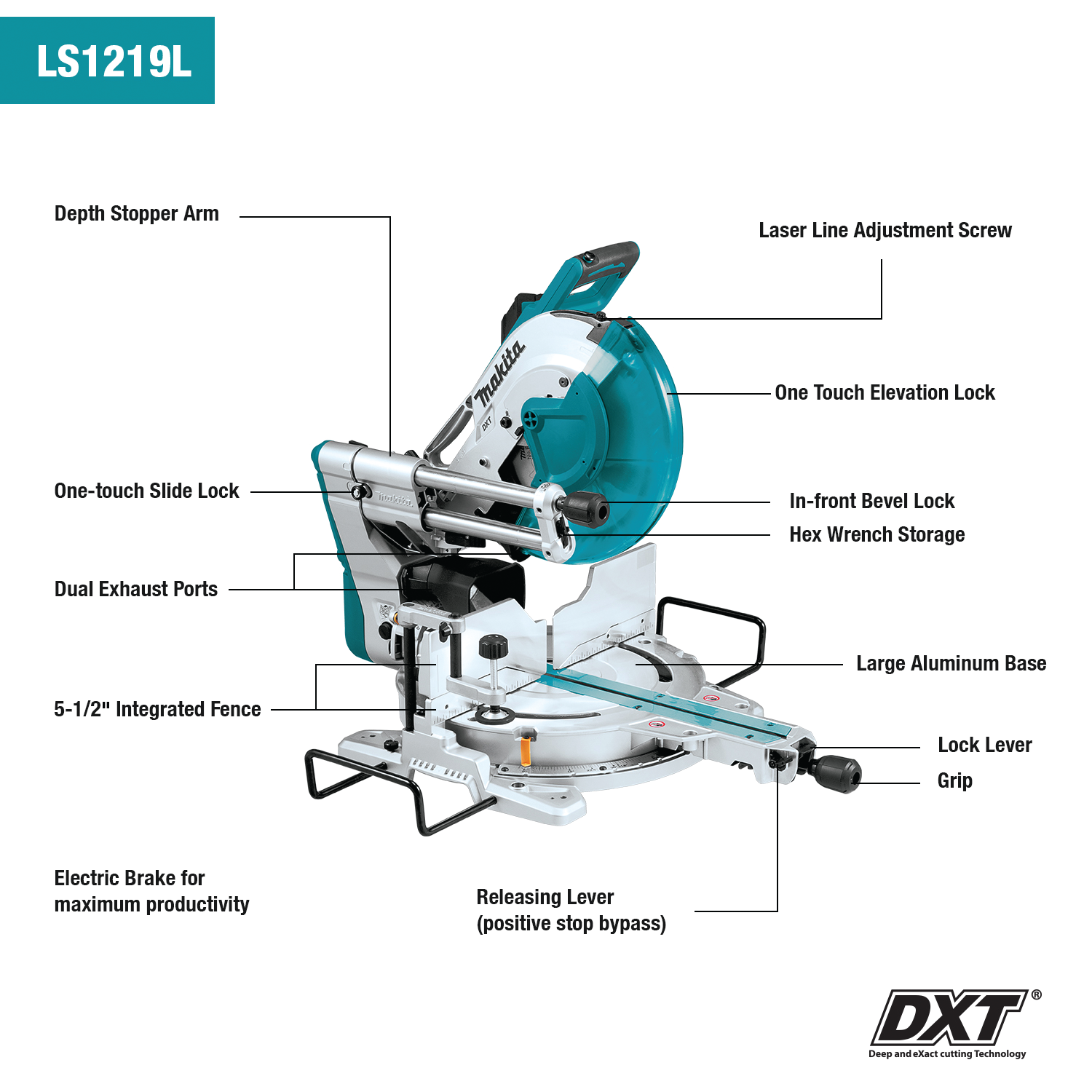
Source: img.lucentcms.com
1. Disconnect the saw
Unplug a corded saw or remove the battery from a cordless saw before reaching near the blade or adjustment mechanism.
2. Identify the depth-stop control
Locate the depth-stop screw, bolt, plate, lever, knob, or release mechanism specified for your model.
3. Set the saw to the required cutting position
Use the miter and bevel settings required for the job, and make sure the workpiece orientation is correct.
4. Set the approximate depth
Adjust the depth stop so the blade reaches the intended depth without contacting the saw table, insert, fence, clamp, or other machine components.
5. Lock the adjustment
Tighten the applicable lock nut, wing nut, knob, or other retaining mechanism without disturbing the setting.
6. Check the setting with the saw disconnected
Move the saw head through its intended travel by hand and confirm that the blade has clearance from the machine and reaches the intended stopping position.
7. Test on scrap
Make a test cut using material with the same thickness and orientation as the final workpiece, then measure the actual result.
How Deep Should a Miter Saw Groove Be?
There is no single correct groove depth for every project. The required depth depends on the joint design and the thickness of the workpiece. For a hypothetical example, if a board is 3/4 inch thick and a project calls for a 1/4-inch-deep groove, the remaining material below the groove would be 1/2 inch. That calculation describes the intended geometry; it does not replace a test cut or the manufacturer’s operating limits.
For a joint where the remaining bottom thickness is structurally important, measure the actual groove depth rather than relying only on the position of the adjustment screw. Blade diameter, kerf, workpiece thickness, saw geometry, and the way the workpiece sits on the table can affect the result.
Measure from the workpiece surface
The relevant dimension is the distance from the top surface of the workpiece to the bottom of the cut.
Use matching scrap
Test with material of the same thickness and orientation whenever possible.
Measure the finished cut
A depth gauge, caliper, rule, or suitable measuring tool can confirm the actual result.
Using the Depth Stop for Grooves, Dados, and Shallow Cuts
A miter saw depth stop is particularly useful for controlled non-through cuts. The blade can be lowered into the workpiece to a selected depth and then moved through the material according to the saw’s approved cutting method.
For a wider groove, one blade pass may not remove the entire area. A common woodworking approach is to make controlled passes across the marked area and remove the remaining waste with additional passes or a chisel, depending on the joint and the saw’s instructions. Bosch documentation, for example, describes using a depth stop for grooves and discusses making multiple passes or using a chisel for the material between cuts on applicable models.
A miter saw is not automatically equivalent to a table saw equipped for dado work. Bosch specifically notes on some models that a table saw with an appropriate dado setup is recommended for certain groove and non-through-cut applications. Follow the instructions for the particular saw rather than assuming that every groove operation is appropriate.
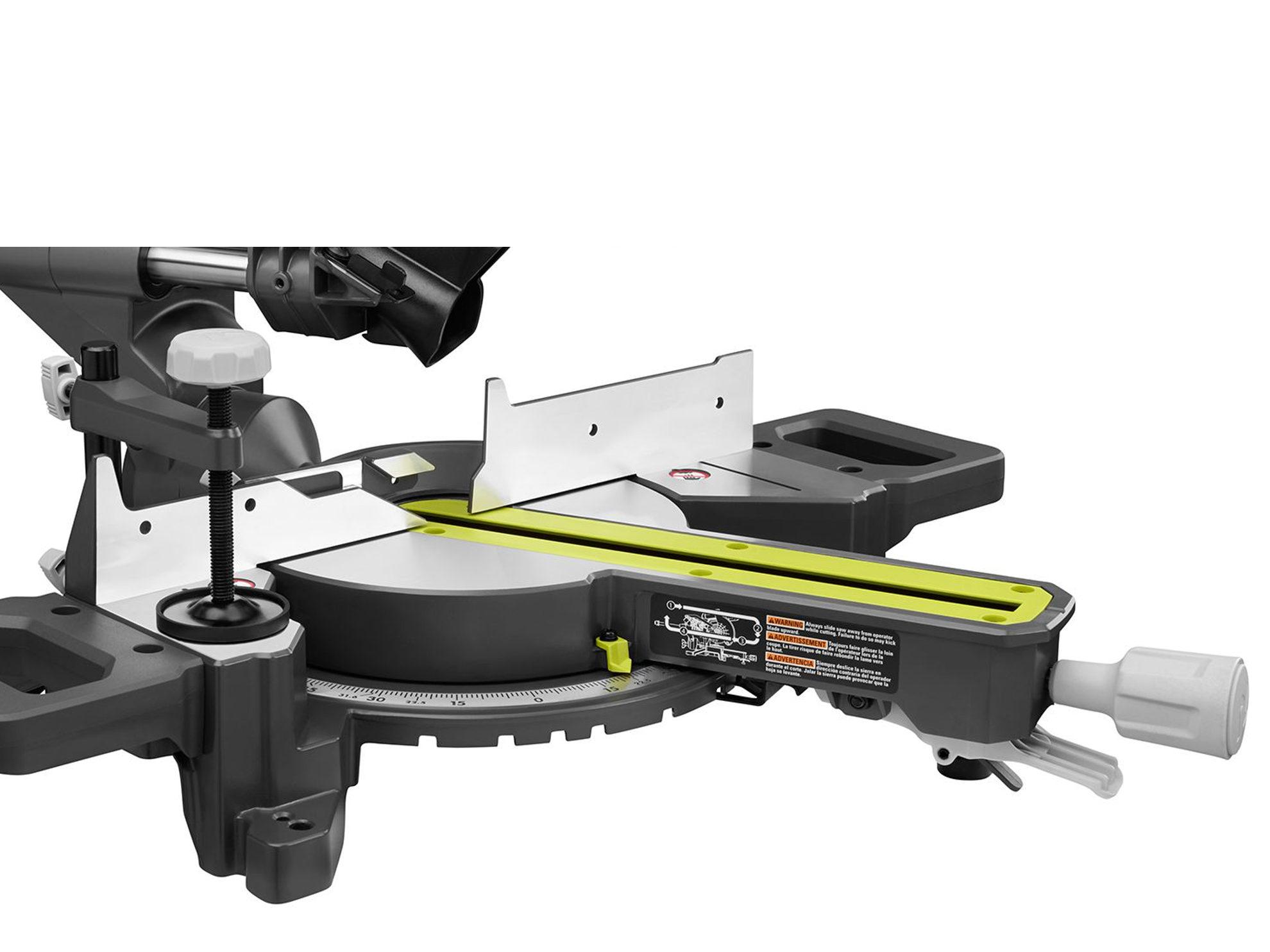
Source: m.media-amazon.com
Mark the groove boundaries
Mark the beginning and end of the area to be removed before setting up the saw.
Set the desired depth
Adjust the depth stop using the manufacturer’s procedure and verify the setting on scrap.
Keep the workpiece secure
The board must remain firmly against the fence and table and should be clamped when appropriate.
Make controlled passes
For a wider groove, remove material in a controlled sequence rather than forcing the blade sideways.
Check the joint
Test the mating piece before cutting the production parts if the groove is part of a critical joint.
Example: Cutting a Shallow Cross Groove
Suppose a U.S. woodworking project calls for a 1/4-inch-deep cross groove in a 3/4-inch-thick board. Mark the groove location, disconnect the saw, set the depth stop to approximately the required position, and verify the blade clears the saw’s table and insert. Then make a test cut in a matching scrap board.
If the test groove measures too deep, raise the blade slightly by adjusting the depth-stop mechanism according to the saw’s instructions. If it is too shallow, make the corresponding adjustment. Re-test until the actual cut matches the project requirement.
Do not judge depth by appearance alone
Lighting, blade kerf, and the workpiece surface can make a shallow cut look deeper or shallower than it is.
Do not force a wide cut
A depth stop controls vertical travel; it does not turn the blade into a side-cutting tool.
Depth Stop vs. Maximum Cutting Depth
A depth stop can be used in two different practical contexts, depending on the saw design. Some machines have a normal full-cut setting that allows the blade to descend far enough for the advertised cutting capacity. Other settings engage the depth-stop mechanism to restrict the blade for non-through cuts.
Manufacturer manuals also warn that blade diameter changes can affect depth and clearance. Sharpening reduces blade diameter, and installing a different blade can change the relationship between the blade and the saw table. A depth-stop setting that was appropriate for one blade may therefore need to be checked after a blade change.
Do not assume that a numerical depth setting transfers between saws. A quarter-inch adjustment on one mechanism does not necessarily produce a quarter-inch change at the workpiece because the mechanical geometry differs between models.
Source: eagle-tools.com
Full-depth cutting
The blade is allowed to descend enough to complete an approved through-cut without contacting the machine structure.
Restricted-depth cutting
The depth stop prevents the blade from reaching its normal maximum travel.
Blade changes
A new or resharpened blade should trigger a clearance and depth check before normal operation.
Model differences
The same adjustment movement can produce different blade-depth changes on different saws.
Why Blade Diameter Matters
The blade’s diameter determines how far the cutting teeth extend relative to the saw’s table and other components. When a blade has been sharpened repeatedly, its diameter may become smaller. Some manufacturer manuals specifically identify reduced blade diameter as a reason to inspect or adjust the depth stop.
Whenever you install a different blade, do not immediately assume that the previous clearance remains correct. With the saw disconnected from power, lower the head slowly and inspect the relationship between the blade, throat plate, table, and other components.
Inspect before starting
Check for physical interference with the blade stationary.
Use the correct blade
The blade diameter, arbor configuration, and other specifications must match the saw and manufacturer’s requirements.
Miter Saw Depth Stop Safety Checks
The depth stop does not make an otherwise unsafe cut safe. The workpiece still has to be properly supported, secured, and positioned, and the blade must be allowed to operate within the saw’s intended cutting envelope.
Before making a depth-limited cut, disconnect the saw while setting the mechanism. Then perform a dry movement check with the blade stationary. Bosch safety instructions for miter saws emphasize securing the workpiece against the fence and table, checking for interference after changes to the setup, supporting long or wide material, and waiting for the blade to stop before removing cutoffs.
Source: rackcdn.com
Disconnect power for adjustments
Unplug a corded tool or remove the battery from a cordless saw before adjusting the depth stop or working near the blade.
Check blade clearance
Confirm that the blade cannot contact the table, throat plate, fence, clamp, or other components during the intended movement.
Secure the workpiece
Keep the material firmly against the fence and table and use the supplied or appropriate clamp when needed.
Support long stock
Use suitable extensions or supports so long material cannot tip, shift, or interfere with the cut.
Keep hands away from the blade
Do not place your hands near the cutting path, and never reach behind the fence toward a moving blade.
Wait for the blade to stop
Keep control of the saw head and allow the blade to come to a complete stop before handling the cutoff.
Cut one workpiece at a time
Do not stack loose workpieces unless the saw manufacturer specifically provides an approved method for the operation.
When You Should Stop and Check the Manual
Stop the operation if the blade contacts the table or throat plate, the depth-stop mechanism will not lock securely, the saw head behaves unexpectedly, the workpiece cannot be clamped or supported, or you cannot determine how the manufacturer’s depth mechanism is intended to operate.
If a depth-stop screw, lock nut, plate, or related component is damaged, loose, bent, or missing, do not improvise a repair that could alter the saw’s safe operating geometry. Use the manufacturer’s parts and service information or have the saw inspected by a qualified service provider.
Unexpected blade contact
Stop immediately and identify the interference before powering the saw again.
Depth setting will not hold
Do not continue cutting if the adjustment can move during operation.
Unclear model procedure
Use the owner’s manual for the exact model rather than applying a generic adjustment method.
Troubleshooting Miter Saw Depth Stop Problems
When a depth-limited cut is wrong, start with the simplest mechanical causes before changing the setting repeatedly. Confirm the workpiece thickness, blade condition, stop position, and actual measured depth. Then inspect the saw for clearance or movement problems.
A depth stop that produces inconsistent results may not be the only problem. A loose workpiece, changing material thickness, blade wear, saw-head movement, or a lock nut that is not holding the adjustment can all affect the finished cut.
The groove is too deep
Disconnect power, slightly reduce blade travel using the model’s adjustment procedure, and make another test cut.
The groove is too shallow
Confirm the workpiece is seated correctly, then increase blade travel in small increments and test again.
The depth changes between pieces
Check that the material has consistent thickness and that each piece is seated firmly against the fence and table.
The stop moves during cutting
Inspect the lock nut, wing nut, screw, plate, or lever and follow the manufacturer’s procedure for securing it.
The blade hits the table
Stop using the saw and disconnect power. Check the depth setting, blade size, throat plate, and machine clearance before restarting.
A new blade changes the result
Recheck blade clearance and depth-stop adjustment because blade diameter and geometry can affect the cutting position.
A Simple Test-Cut Method
Use a scrap board that matches the production material as closely as possible. Mark a short test line, secure the board, and make one controlled cut with the depth stop engaged. Measure the resulting groove and compare it with the required dimension.
If the measurement is wrong, change the depth setting in a small amount rather than making a large adjustment. Repeat the test until the physical result matches the project requirement. Once the setting is correct, avoid changing the depth-stop mechanism until the depth-limited operation is finished.
Same material
Matching species, thickness, and orientation makes the test more representative.
Small adjustments
Small changes reduce the risk of overshooting the required depth.
Measure the result
Use the actual groove depth as the final reference instead of relying on the screw position.
Common Miter Saw Depth Stop Mistakes
Most depth-stop problems come from treating the mechanism as a universal setting instead of a model-specific adjustment. Another common mistake is skipping the stationary clearance check after changing the blade, miter angle, bevel angle, fence position, or depth setting.
A depth stop should also not be used as a substitute for proper workholding. If the board can move while the blade is making a shallow cut, the resulting groove can vary or the workpiece can shift unexpectedly.
Using another saw’s adjustment instructions
Depth-stop mechanisms vary substantially between models, so use the instructions for the exact saw.
Adjusting with the saw connected
Disconnect power before making adjustments near the blade or mechanism.
Skipping the test cut
A visual estimate is not enough when the groove depth matters.
Forgetting about blade changes
A different or resharpened blade can alter the relationship between the teeth and table.
Using the depth stop as a length stop
Depth control and repetitive length control are separate functions.
Forcing the blade sideways
A miter saw blade is designed to cut according to its intended travel; do not force it laterally to widen a groove.
What a Good Depth-Stop Setup Looks Like
A successful setup has a secure workpiece, a locked depth adjustment, adequate blade clearance, a measured test cut, and a saw configuration that matches the manufacturer’s instructions. The blade should stop at the intended depth without contacting the machine structure.
For production work, record the tested setting or keep a labeled setup sample if the operation will be repeated later. This can reduce setup time, but the machine should still be checked whenever the blade, workpiece thickness, or saw configuration changes.
Repeatable
The same setup produces substantially consistent depth when the material and cutting conditions remain consistent.
Secure
The adjustment does not move during normal operation.
Clear
The blade has sufficient clearance from the saw structure throughout the intended travel.
Frequently Asked Questions
Q
What does a depth stop do on a miter saw?
A depth stop limits the downward travel of the blade. This allows the operator to make a controlled non-through cut rather than allowing the blade to reach its normal maximum cutting depth.
Q
Can I use a miter saw depth stop to cut dados?
Some miter saws provide a depth-stop feature specifically for grooves or dado-type cuts. However, the suitability depends on the model and the manufacturer’s instructions. Bosch documentation for some models recommends a table saw with an appropriate dado setup for certain groove applications, so do not assume every miter saw is intended for every dado operation.
Q
How do I set the depth stop for a 1/4-inch groove?
Start with the saw disconnected from power and use the adjustment method specified for your model. Set the blade to approximately the required position, lock the mechanism, and make a test cut in matching scrap. Measure the groove and make small adjustments until the actual depth is 1/4 inch.
Q
Why is my miter saw depth stop not working?
Possible causes include an incorrectly positioned depth-stop plate or lever, a loose lock nut or wing nut, an incorrect adjustment, debris around the mechanism, or a damaged component. Disconnect the saw and inspect the mechanism using the model’s service instructions. If the mechanism cannot hold a secure setting, do not continue using it for depth-limited cuts.
Q
Do I need to reset the depth stop when I change the blade?
You should at least recheck the blade clearance and cutting depth after installing a different blade. Blade diameter and geometry affect the relationship between the blade and the saw table. Manufacturer manuals commonly instruct users to check clearance after blade changes, especially when blade diameter has changed.
✦ Wrapping Up
Conclusion
A miter saw depth stop is a simple but useful mechanism for controlling blade travel. Its main advantage is repeatable depth control when making grooves, shallow dados, kerfs, and other non-through cuts that do not require the blade to pass completely through the workpiece.
The safest approach is to treat the depth stop as a model-specific adjustment. Disconnect the saw before setting it, confirm blade clearance with the machine stationary, secure the workpiece, make a test cut, and measure the actual result. Recheck the setting whenever you change the blade, material thickness, fence position, miter angle, or bevel angle.
If the depth stop cannot lock securely or the blade contacts the saw structure, stop the operation and consult the manufacturer’s manual or qualified service information before continuing.
💡 Key Takeaway
For your next depth-limited cut, start with a matching scrap board: disconnect the saw, set the depth stop according to the exact model manual, check clearance by hand, make one test cut, measure the groove, and adjust in small increments until the required depth is achieved.